

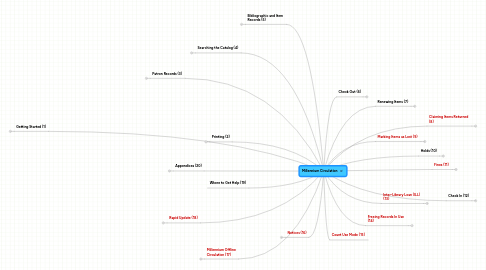
1. Getting Started (1)
1.1. Logging In
1.2. Black Screen - Java Console
1.3. Setting Initials and Passwords
1.4. Clearing Initials and Password
1.5. Logging Off or Exiting MilCirc
1.6. MilCirc Main Window
1.7. Millennium Menus
1.7.1. File Menu
1.7.2. Edit Menu
1.7.3. View Menu
1.7.4. Go Menu
1.7.5. Tools Menu
1.7.6. Admin Menu
1.7.7. Help Menu
1.8. Toolbar Icons
1.9. Using Java® Components
1.9.1. Dialogs
1.9.2. Buttons
1.9.2.1. Choosing Buttons with the Mouse
1.9.2.2. Choosing Buttons with the Keyboard
1.9.3. Radio Buttons
1.9.3.1. Choosing Radio Buttons with the Mouse
1.9.3.2. Selecting Radio buttons with the Keyboard
1.9.4. Check Boxes
1.9.4.1. Choosing Check Boxes with the Mouse
1.9.4.2. Selecting Check Boxes with the Keyboard
1.9.5. Text Boxes
1.9.5.1. Selecting Text Boxes with the Mouse
1.9.5.2. Selecting Text Boxes with the Keyboard
1.9.6. Drop-down Lists
1.9.6.1. Selecting Drop-down Lists and List Items with the Mouse
1.9.6.2. Selecting Drop-down Lists and List Items with the Keyboard
1.9.7. Tables
1.9.7.1. Selecting Table Rows
1.9.7.1.1. Selecting Table Rows with the Mouse
1.9.7.1.2. Selecting Table Rows with the Keyboard
1.9.7.2. Sorting Table Data
1.9.7.3. Viewing Truncated Data
1.9.7.4. Copying Table Cells
1.9.7.5. Resizing Columns
1.9.8. Tabs
1.9.8.1. Selecting Tabs With the Mouse
1.9.8.2. Selecting Tabs With the Keyboard
2. Printing (2)
2.1. Overview
2.2. Types of Printers
2.3. Setting a Default Printer
2.4. Printing Records
2.5. Printing Contents from the Record Tabs
2.6. Printing from a Browse Display
2.7. Printing to a Patron’s Email
3. Patron Records (3)
3.1. Retrieving a Patron Record
3.1.1. Scanning a Patron Barcode
3.1.2. Searching for a Patron Record
3.1.2.1. Searching By Menu
3.1.2.2. Searching by Index Tag
3.1.2.3. Search Does Not Result in a Direct Hit
3.1.3. Using the Recent Patrons and Recent Check-Ins Submenus
3.1.3.1. Recent Patrons Submenu
3.1.3.2. Recent Check-Ins Submenu
3.1.4. Possible Messages Received when Retrieving a Patron Record
3.2. Viewing a Patron Record
3.3. Definitions of System-Generated Fields in a Patron Record
3.4. Definitions of Fixed-Length Fields in the Patron Record
3.5. Definitions of Variable-Length Fields in the Patron Record
3.6. Editing a Patron Record
3.6.1. Editing Toolbar
3.6.2. Modifying a Fixed-Length Field
3.6.2.1. Method A:
3.6.2.2. Method B:
3.6.3. Modifying Dates Using the Keyboard
3.6.4. Modifying Dates Using the Select Date Dialog
3.6.5. Modifying a Variable-Length Field
3.6.6. Inserting a Variable-Length Field Using the Insert Icon
3.6.7. Inserting a Variable-Length Field Using the Keyboard
3.6.8. Deleting a Field
3.6.9. Saving Changes to a Patron Record after Editing is Complete
3.6.9.1. Method A:
3.6.9.2. Method B:
3.6.10. Adding Messages to Patron Records
3.6.11. Multiple Messages in a Patron Record
3.6.12. Deleting a Message
3.6.13. The PIN Field in a Patron Record
3.6.13.1. If a patron forgets their PIN
3.6.13.2. Steps to Delete a Patron’s PIN
3.6.14. The INTERNET and NET POLICY Fields in a Patron Record
3.6.14.1. How to Edit a Patron Record when they sign an Internet AUP
3.6.14.2. What do I do when someone violates the Internet AUP?
3.7. Emailing from the Patron Record
3.7.1. Brief Patron Record Display
3.7.2. Full Patron Record Display
3.8. Creating a Patron Record
3.9. GIS Property Search
3.10. How to Handle the Duplicate Record(s) Found Window
3.11. Updating a Patron Record with a New Library Card
3.11.1. Option 1
3.11.2. Option 2
3.12. Copying Patron Records
3.13. Merging Duplicate Patron Records
3.14. Guest Card Creation for Use with CybraryN
3.15. Deleting a Patron Record
3.16. Patron Information Tabs
3.16.1. Tab Descriptions
3.16.2. Red Font
3.16.3. How Patron Tabs Work
3.17. Patron Images
3.17.1. Taking a Patron’s Picture
3.17.2. Removing a Patron’s Picture
4. Searching the Catalog (4)
4.1. Indexes
4.1.1. Heading Indexes
4.1.2. Word Indexes
4.1.3. Number Indexes
4.2. Browse Searching
4.2.1. Searching By Title
4.2.2. Searching by Author
4.2.3. Searching by Subject
4.2.4. Searching by Call Number
4.2.5. Searching by ISBN / ISSN
4.2.6. Other Searches
4.3. Keyword Searching
4.4. Toolbars in Search/Holds Mode
4.5. Conducting your Search
4.6. Browse Displays
4.6.1. Expanding Entries in a Browse Display
4.6.2. Retrieving a Record from a Browse Display
4.6.3. A “No-Hit” Browse Display
4.6.4. Performing Another Search/Returning to Browse
4.7. Limiting the Search
4.7.1. Editing Your Limit Criteria
4.7.2. Discarding Limit Criteria
4.7.2.1. Clear All Criteria
4.7.2.2. Delete Individual Criteria
4.7.2.3. Disregard Criteria
4.8. Range Searching
4.8.1. Searching a Range of Record Numbers
4.8.2. Searching for Records Within an Existing Review File
4.8.3. Searching a Subset of an Index of Records
4.8.4. Advanced Searching by Keyword
5. Bibliographic and Item Records (5)
5.1. Display of Bibliographic Records
5.1.1. Brief Bibliographic Record
5.1.2. Bibliographic Information Tabs
5.1.2.1. Summary Tab
5.1.2.2. Record Tab
5.1.2.3. Item-Level Holds Tab
5.1.2.4. Bookings Tab
5.1.2.5. Bib-Level Holds Tab
5.2. Display of Full Bibliographic Record
5.3. Definitions of System-Generated Fields in a Bibliographic Record
5.4. Definitions of Fixed-Length Fields in the Bibliographic Record
5.5. Definitions of Variable-Length Fields in the Bibliographic Record
5.6. Display of Item Records
5.7. Definitions of System-Generated Fields in an Item Record
5.8. Definitions of Fixed-Length Fields in an Item Record
5.9. Definitions of Variable-Length Fields in an Item Record
5.10. Status Bar in an Item Record
5.11. Editing an Item Record
5.11.1. When Item Records May Need to be Changed
6. Notices (16)
6.1. Courtesy Notices
6.2. Overdue Notices
6.3. Replacement Bills
6.4. Dealing with Returned Notices
6.5. Dealing with Bounced Email Notices
6.6. Overdue Notices
7. Millennium Offline Circulation (17)
7.1. Check Millennium Offline Circulation Preferences
7.2. Checking Out Items in Millennium Offline Circulation
7.3. Renewing Items in Millennium Offline Circulation
7.4. Closing Millennium Offline Circulation
7.5. Uploading Files from Millennium Offline Circulation
8. Rapid Update (18)
8.1. Using the Rapid Update Program
8.2. Exiting the Rapid Update Program
8.3. Important Points about the Rapid Update Program
9. Where to Get Help (19)
10. Appendices (20)
10.1. MilCirc Keyboard Shortcuts
10.2. MilCirc Function Keys
10.3. Library Numeric Codes
10.4. Gender Codes
10.5. PCODE2 Codes
10.6. Manual Patron Block Codes
10.7. Municipality Codes
10.8. School District Codes
10.9. Location Codes
10.10. ICODE1 Encoding in Item Record
10.11. Loan Rules
10.12. IMESSAGE Codes
10.13. MARC Field 852 Fields
11. Check Out (6)
11.1. Checking Out Items
11.2. Loan Periods
11.3. Changing the Due Date
11.4. Checking Out Items to Homebound Patrons
11.5. Checking Out ILL Items
11.6. Adding Messages at Checkout
11.7. Possible Messages Received When Checking Out Items
11.7.1. Patron Blocks, Messages and Warnings
11.7.1.1. Borrower’s registration has expired
11.7.1.2. Borrower has exceeded highest level overdue
11.7.1.3. Borrower owes too much money
11.7.2. The Item Has Messages
11.7.3. The Item is Non-Circulating
11.7.4. Item is for Library Use Only
11.7.5. Another Patron is at the Top of the Hold Queue for the Item
11.7.5.1. Item on holdshelf for another patron
11.7.6. Item Already Checked Out
11.7.7. Item Has Been Claimed Returned
11.7.8. Item has Invalid Location: None
11.7.9. The Patron Has Too Many Items Checked Out
11.7.10. Checking Out a Billed Item
11.7.11. Record In Use by the System
11.8. Checked-Out Items Tab
11.8.1. Working with the Checked-Out Items Table
11.8.1.1. Adjusting Column Widths
11.8.1.2. Moving a Column
11.8.1.3. Sorting Columns
11.8.1.4. Table Tooltips
11.8.2. Overdues and Charges
11.8.3. Copy Function
11.8.4. Viewing Item Records
11.8.5. Print Table
11.8.6. Additional Areas of the Checked-Out Items Tab
12. Renewing Items (7)
12.1. Renewing Items from a Patron’s Record
12.1.1. Renew Items by Scanning Them from the Patron Record
12.1.2. Renew Items Using the Renew Button
12.1.3. Renew Items Using the Change Due Date Button
12.2. Renewing Items in Renew Mode
12.3. Renewing Overdue Items
12.4. Possible Messages Received when Renewing Items
13. Claiming Items Returned (8)
13.1. Patron Record Note and CL RTRND field:
13.2. Item Record Note and STATUS field:
14. Marking Items as Lost (9)
14.1. Before Marking an Item Lost (optional)
14.2. Changing the Billed Amount
15. Holds (10)
15.1. Types of Holds
15.2. The Loan Rules
15.3. Placing a Title-Level Hold from the Patron Record
15.4. Placing an Item-Level Hold from the Patron Record
15.5. Possible Reasons Why Holds Can’t be Placed
15.6. Holds Tab
15.6.1. Display Holds Ready For Pickup Only
15.7. View Cancelled Holds for a Patron
16. Fines (11)
16.1. Collecting Money for Fines and Bills
16.2. Waiving Fines
16.3. Adjusting Fine Amounts
16.4. Adding a Manual Charge
16.5. Editing the Manual Charge Note
16.6. Viewing a Patron’s History of Fines Paid
16.7. Reinstating Fines
16.8. Viewing the Notes in a Patron’s Record
16.9. Viewing All Fines Paid
16.9.1. Table of Paid Fines
17. Check In (12)
17.1. Checking In Items – Patron Present
17.2. Collecting Money and Waiving Fines at Check In
17.3. Checking In Items – No Patron
17.4. Checking In Items that have Special Conditions
17.4.1. Checking In an Item that has Messages
17.4.2. Checking In an Item that Belongs at Another Location
17.5. Checking In an Item that Satisfies a Hold
17.5.1. Checking in an item, owned by any library, that has a hold for a patron that wants to pick up the item at your library
17.5.2. Checking in an item, owned by your library, that has a hold for a patron that wants to pick up the item at another library
17.5.3. Checking in an item, not owned by your library, that has a hold for a patron that wants to pick up the item at another library
17.6. Checking In a MISSING Item
17.7. Checking In an IN TRANSIT Item
17.8. Checking In a CLMS RETD Item
17.9. Checking In a Billed Item
17.9.1. Check In of Long Overdue Billed Item; Patron has not Paid the Bill
17.9.2. Check In of a Lost Billed Item; Patron has not Paid the Bill
17.9.3. Check In of Long Overdue Billed Item; Patron has Paid the Bill
17.9.4. Check In of Lost Billed Item; Patron has Paid the Bill