Unlock the full potential of your projects.
Try MeisterTask for free.
Vous n'avez pas de compte ?
Inscription gratuite
Parcourir
Cartes en vedette
Catégories
Gestion de projet
Objectifs d'affaires
Ressources humaines
Brainstorming et analyse
Marketing et contenu
Éducation et remarques
Loisirs
Vie courante
Technologie
Design
Résumés
Autre
Langues
English
Deutsch
Français
Español
Português
Nederlands
Dansk
Русский
日本語
Italiano
简体中文
한국어
Autre
Montrer carte totale
Copier éditer carte
Copier
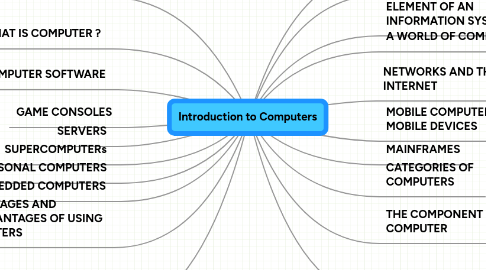
Introduction to Computers
Éducation et remarques
MK
mirai kojima
Suivre
Lancez-Vous.
C'est gratuit
S'inscrire avec Google
ou
s'inscrire
avec votre adresse e-mail
Cartes mentales similaires
Plan de carte mentale
Introduction to Computers
par
mirai kojima
1. WHAT IS COMPUTER ?
1.1. Data and Information
1.2. Information Processing Cycle
2. ADVANTAGES AND DISADVANTAGES OF USING COMPUTERS
3. COMPUTER SOFTWARE
3.1. System Software
3.2. Application Software
3.3. Installing and Running Programs
4. PERSONAL COMPUTERS
4.1. Desktop Computers
5. GAME CONSOLES
6. SERVERS
7. SUPERCOMPUTERs
8. EMBEDDED COMPUTERS
9. EXAMPLES OF COMPUTER USAGE
9.1. Home User
9.2. Small Office/Home User
9.3. Power User
9.4. Large User
9.5. Putting It All Together
10. COMPUTER APPLICATIONS IN SOCIETY
10.1. Education
10.2. Finance
10.3. Government
10.4. Health Care
10.5. Science
10.6. Publishing
10.7. Travel
10.8. Manufacturing
11. A WORLD OF COMPUTERS
12. THE COMPONENT OF A COMPUTER
12.1. Input Devices
12.2. Output Devices
12.3. System Units
12.4. Storage Devices
12.5. Communications Devices
13. NETWORKS AND THE INTERNET
13.1. The Internet
14. CATEGORIES OF COMPUTERS
15. MOBILE COMPUTERS AND MOBILE DEVICES
15.1. Notebook Computers
15.2. Mobile Devices
16. MAINFRAMES
17. ELEMENT OF AN INFORMATION SYSTEM
18. CHAPTER SUMMARY
19. HIGH-TECH TALK
19.1. Analog versus Digital Making the Conversion
20. TECHNOLOGY TRAILBLAZERS
20.1. Bill Gates
20.2. Anne Mulcachy
Lancez-vous. C'est gratuit!
Connectez-vous avec Google
ou
S'inscrire