


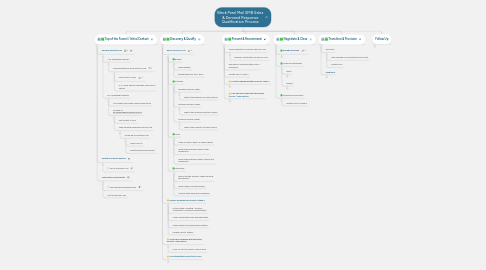
1. Top of the Funnel / Initial Contact
1.1. Inbound Website Lead
1.1.1. 1-25 Knowledge Workers
1.1.1.1. Demand Response Email Sent by LOB
1.1.1.1.1. Put Contact in CRM
1.1.1.1.2. IF IT LOB & Partner Identified Then Xfer to Partner
1.1.2. 50+ Knowledge Workers
1.1.2.1. Mid Market Direct Team Works Opportunity
1.1.2.2. Forward to Bill.Wheeler@blackpearlmail.com
1.1.2.2.1. Put Contact in CRM
1.1.2.2.2. Send Demand Response Email by LOB
1.2. Customer Support Referral
1.2.1. Set up Discovery Call
1.3. Lead Nurture Opportunity
1.3.1. Send Demand Response Email
1.3.2. Set up Discovery Call
2. Discovery & Qualify
2.1. BANT Discovery Call
2.1.1. Budget
2.1.1.1. Fixed Budget?
2.1.1.2. Budget Based on ROI / ROMI
2.1.2. Authority
2.1.2.1. Business Decision Maker
2.1.2.1.1. What is the Business Success Criteria?
2.1.2.2. Technical Decision Maker
2.1.2.2.1. What is the Technical success criteria?
2.1.2.3. Financial Decision Maker
2.1.2.3.1. What is the Financial Success Criteria
2.1.3. Need
2.1.3.1. Is this a "Nice to have" or Need to have?
2.1.3.2. What is the business impact if they implement?
2.1.3.3. What is the business impact if the do not implement?
2.1.4. Timeframe
2.1.4.1. Why is this the timeline? What is driving the timeline?
2.1.4.2. What if they miss the timeline?
2.1.4.3. How are they working it backwards?
2.2. If BANT Qualified then move to Stage 3
2.2.1. Set up Stage 3 meeting - Solution Presentation & Product Demonstration
2.2.2. Send Confirmation email with next steps
2.2.3. Send outlook invite with Teams Meeting
2.2.4. Update CRM to Stage 3
2.3. If not BANT Qualified but interested move to Lead Nurture
2.3.1. Click " in CRM to send to Lead Nurture
2.4. If no interest then close/lost in CRM
2.4.1. Close / Lost Opportunity with Reason in CRM
3. Present & Recommend
3.1. Value Proposition & Product Demo by LOB
3.1.1. Business Justification for BDM by LOB
3.2. Evaluation & Implementation Plan if Necessary
3.3. Update CRM to Sate 4
3.4. If Mutual Agreement then move to Stage 4
3.4.1. Set up Stage 4 meeting - Customer pricing agreement & close
3.4.2. Send Confirmation email with next steps
3.4.3. Send outlook invite with Teams Meeting
3.4.4. Update CRM Pipeline
3.5. If no agreement but interested move to Trial / Lead Nurture
3.5.1. Click " in CRM to send to Lead Nurture
3.5.2. Update CRM if Trial - Move to Stage 2
4. Negotiate & Close
4.1. Pricing Discussion
4.1.1. Purchasing Process
4.2. Customer Agreement
4.2.1. Direct
4.2.1.1. Google
4.2.1.2. Non Standard Pricing
4.2.1.3. Multi Tenant
4.2.2. Reseller
4.2.2.1. O365
4.2.2.2. Standard Pricing
4.2.2.3. Single Tenant
4.3. Provisioning Discussion
4.3.1. Update CRM to Stage 5
5. Transition & Provision
5.1. Tech Data
5.1.1. Walk Through TD Purchase/Set up Process
5.1.2. Update CRM
5.2. Conditions
5.2.1. O365
5.2.2. Standardized Pricing
5.2.3. Single Tenant