


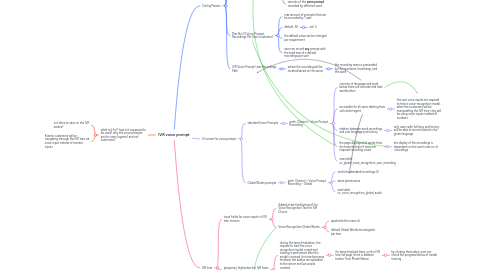
1. what is it for? how is it supposed to be used? why the voice prompts are for users (agents) and not customers?
1.1. is it done to save on the IVR audios?
1.2. Ksenia: customers will be navigating through the IVR tree via voice input instead of number inputs
2. Config Params
2.1. path: Admin > MHz Admin > Config > Services
2.1.1. !! the change is not yet on linoes
2.2. Enable IVR Voice Recognition
2.2.1. enables the whole functionality
2.3. Min Required Recording Count For Each Voice Prompt
2.3.1. required minimum amount of recordings that need to exist for each voice prompt
2.3.1.1. min amount of recordings > the min size of an IVR tree?
2.3.2. default: 50
2.3.2.1. is it hard-coded or is it a UI param?
2.3.3. the default value can be changed per requirement
2.3.3.1. do users (in markets) have permission to do so? will they adjust this config or ops?
2.3.4. variants of the **same prompt** recorded by differnet users
2.4. Max No Of Voice Prompt Recordings Per User (customer)
2.4.1. max amount of prompts that can be recorded by 1 user
2.4.2. default: 50
2.4.2.1. set: 5
2.4.3. the default value can be changed per requirement
2.4.4. user can record **any** prompt with the total max of x default recordings per user
2.5. IVR Voice Prompt User Recordings Path
2.5.1. where the recording will be located/saved on the server
2.5.1.1. the recording name is preceeded by the username, timestamp, and the word
3. UI screen for voice prompt
3.1. standard Voice Prompts
3.1.1. path: Channel > Voice Prompt Recording
3.1.1.1. consists of language and word, below there are recorder and next word button
3.1.1.2. accessible for all users starting from call center agent
3.1.1.2.1. the user voice inputs are required to train a voice-recognition model. when the customers will be manipulating the IVR tree, they will be using voice inputs instead of numbers
3.1.1.3. relation between word recordings and user language proficiency
3.1.1.3.1. only users with full lang. proficiency will be able to record a word in the given language
3.1.1.4. the page displayed all words from the trees that don't have min required recording count
3.1.1.4.1. the display of the recordings is dependent on the user's max no of recordings
3.1.1.5. new table: ivr_global_voice_recognition_user_recording
3.2. Global Words prompts
3.2.1. path: Channel > Voice Prompt Recording > Global
3.2.1.1. similar to standard recordings UI
3.2.1.2. same permissions
3.2.1.3. new table: ivr_voice_recognition_global_audio
4. IVR tree
4.1. input fields for voice inputs in IVR tree choices
4.1.1. Added a text field(optional) for Voice Recognition Text for IVR Choice
4.1.2. Voice Recognition Global Words
4.1.2.1. applied at the menu lvl
4.1.2.2. default Global Words are assigned per tree
4.2. temporary finalization for IVR trees that contain the voice inputs
4.2.1. during the temp finalization, the request to train the voice recognition model is sent and training is performed. after the model is trained, the tree becomes finalized, the audios are uploaded to the server and lua scripts created
4.2.1.1. for temp finalized trees, on the IVR tree list page, there is added a button Train Model Status
4.2.1.1.1. by clicking the button, user can check the progress/status of modal training
4.2.2. on clicking 'Finalize' the user is shown a message that the request has been initiated to process the voice prompts.
4.2.2.1. during the temp finalization the user won't be able to make the changes to the tree
4.2.2.2. the tree looks the same as finalized to the user
4.3. additional config page
4.3.1. IVR Voice Recognition Global Words
4.3.1.1. access: TSM, Super User, MHz Admin
4.3.1.2. CSV import available
4.3.1.2.1. fields: Name, Finalized, Include in IVR trees by default
4.3.2. API
4.3.2.1. ivr_voice_recognition_global_word