


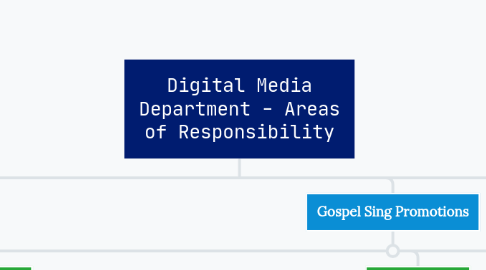
1. Website Administration and Development
1.1. Routine Content Updates
1.1.1. Needs List
1.1.2. Gospel Sings
1.1.3. Car Sales
1.1.4. Travel Schedule
1.1.5. Homepage Refreshes
1.1.6. Thrift Stores
1.2. Landing Page and Form Creation
1.2.1. Fundraisers
1.2.2. Donation Forms
1.2.3. Admissions Application
1.2.4. Employment Application
1.3. Maintenance and Security Updates
1.3.1. WordPress (CMS, Content Management System)
1.3.2. Divi (Theme and Page Building Software)
1.3.3. Plugins (Form building software, caching software, etc)
1.4. User Experience Updates
1.4.1. Navigational menu
1.4.2. Page layouts (updated designs, graphics, pics, copy, etc)
1.4.3. Load speed optimizations
2. Social Media Management (Facebook)
2.1. Community Engagement
2.1.1. "Liking" and answering public comments
2.1.2. Answering private messages
2.2. Ad Management
2.2.1. Testing ad copy and monitoring engagement
2.2.2. Audience sampling (to make sure the ads are targeting our intended audience)
2.3. Promotional Cotent
2.3.1. Main Home
2.3.1.1. Needs List
2.3.1.2. Fundraising Campaigns
2.3.1.3. Gospel Sings
2.3.1.4. Good news sharing
2.3.2. *Car Sales *
2.3.2.1. Car sales posts and ads
2.3.2.2. Vehicle donation flyers and ads
2.3.3. *Thrift Stores *
2.3.3.1. Holiday hours updates
2.3.3.2. Sales (Holiday, Saturday 50% off, etc)
2.3.3.3. Unique item posts
2.3.3.4. Furniture and appliance donation flyers and ads
2.3.3.5. "Growth" focused content
3. Fundraising Campaigns
3.1. Content Creation
3.1.1. Graphic Design
3.1.2. Copywriting
3.1.3. Photo/Video
3.2. Website Materials
3.2.1. Website Landing Page
3.2.2. Donation Form
3.2.3. Homepage blocks and menu items
3.3. Marketing
3.3.1. Social Media Marketing
3.3.2. Email Marketing
3.3.3. Printed Newsletter
4. Gospel Sing Promotions
4.1. Before Event
4.1.1. Flyer Creation
4.1.1.1. Copywriting
4.1.1.2. Graphic Design
4.1.2. Website Materials
4.1.2.1. Website Landing Page
4.1.2.2. Ticket Order Form
4.1.2.3. Homepage Updates
4.1.3. Marketing
4.1.3.1. Social Media Marketing
4.1.3.2. Email Marketing
4.1.3.3. Printed Newsletter
4.1.3.4. Printed Flyers
4.2. During Event
4.2.1. Photo Capture and Video Recording
4.2.2. Live Social Media Updates
4.2.2.1. Video Livestreaming
4.2.2.2. Photo/Text Updates
4.3. After Event
4.3.1. Photo and Video Editing
4.3.2. Post-Event Highlights Posting
4.3.2.1. Website
4.3.2.2. Facebook
4.3.2.3. Email
5. Color Key
5.1. Alot of activity
5.2. Some activity
5.3. No Activity
6. Email Marketing Management
6.1. Email Creation (including copywriting + graphic design)
6.1.1. Gospel Sings Promos and Updates
6.1.2. Needs List/Needs Met Updates
6.1.3. Digital version of printed newsletter
6.1.4. Good news sharing
6.1.5. Customer Journeys
6.2. Customer Relationship Management (CRM)
6.2.1. Audience building
6.2.2. Tagging and grouping based on sign-up intention
6.2.3. Identifying VIP customers (i.e. regular donors, big donors, Gospel Sing attendees, etc)
7. NOTES:
8. Need Content Management Software to Post on All Platforms at Once.
9. Printed Material Creation
9.1. Printed Newsletter
9.1.1. Layout
9.1.2. Copywriting
9.1.3. Graphic Design
9.1.4. Photo Editing
9.1.5. Printing Preparation
9.2. In-House and Promo Materials
9.2.1. School/Dorm/Ministry Manuals
9.2.2. Event Flyers
9.2.3. Thank you letters for donors
9.2.4. Brochures
10. Internet Directories - Listing Management
10.1. Google Business Profiles
10.1.1. *Review Management *
10.1.1.1. Soliciting postive reviews
10.1.1.2. Responding to reviews
10.1.2. *Routine Posting *
10.1.2.1. Gospel Sing & Event images
10.1.2.2. Sales flyers
10.1.2.3. Furniture & Appliance Donation Flyers
10.1.2.4. Car donation flyer
10.1.3. *General Info Updates *
10.1.3.1. About Us
10.1.3.2. Contact & Location Info
10.1.3.3. Hours of Operation
10.1.3.4. Facility Images
10.2. Other Listings (Yelp, Yellow Pages, etc)
10.2.1. *General Info Updates *
10.2.1.1. About Us
10.2.1.2. Contact & Location Info
10.2.1.3. Hours of Operation
10.2.2. *Routine Posting *
10.2.2.1. Holiday Hour Updates
11. Email Administration
11.1. Tech Support & Maintenance
11.1.1. Assisting TCS in email hosting transfer
11.1.2. Troubleshooting email issues
11.1.3. Resetting passwords
11.1.4. Flagging spam