

1. Home
1.1. Home page will give a brief description of what Thrive is about
1.1.1. Photo: The home page will have one close up photo of a shelter dog and will include a quote.
2. About
2.1. This page will include a brief description about how Thrive got started and their goal in rescuing dogs.
2.1.1. App: This app will be a brief overview of what the website consists of and will provide pictures with the dogs available for adoption/fostering
2.1.1.1. Piktochart explaining the difference between adopting and buying a dog. The benefits, challenges, and some statistics.
3. Adopt a dog
3.1. This page will show the dogs that are available for adoption. It will have pictures and a short description of each dog.
3.1.1. Graphic Design/QR code
3.1.1.1. Pictures and descriptions with dogs available for adoption
3.1.1.1.1. Powtoon: video explaining the five steps to adopting a dog.
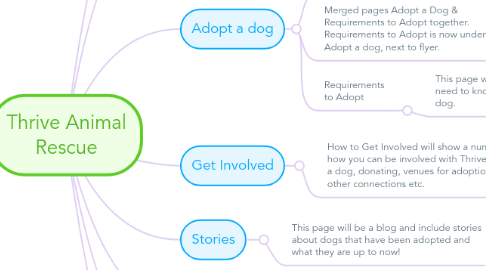
3.2. Merged pages Adopt a Dog & Requirements to Adopt together. Requirements to Adopt is now under Adopt a dog, next to flyer.
3.3. Requirements to Adopt
3.3.1. This page will tell you what you need to know before adopting a dog.
3.3.1.1. Thrive logo at top of page
4. Get Involved
4.1. How to Get Involved will show a number of different ways on how you can be involved with Thrive. Wheather thats fostering a dog, donating, venues for adoption events, photography, other connections etc.
4.1.1. There will be a Foster Application right under the Fostering description. Its just a click of a button and will open a google doc with a survey.