


WordPress Integration with Pinterest
создатель Glenn Nicholas
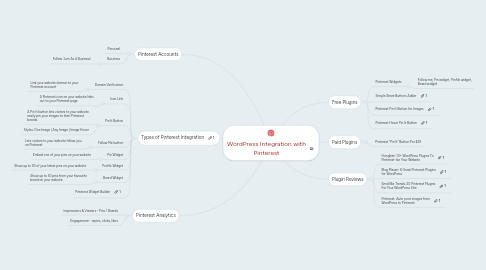
1. Types of Pinterest Integration
1.1. Domain Verification
1.1.1. Link your website domain to your Pinterest account
1.2. Icon Link
1.2.1. A Pinterest icon on your website links out to your Pinterest page
1.3. Pin It Button
1.3.1. A Pin It button lets visitors to your website easily pin your images to their Pinterest boards.
1.3.2. Styles: One Image | Any Image | Image Hover
1.4. Follow Me button
1.4.1. Lets visitors to your website follow you on Pinterest
1.5. Pin Widget
1.5.1. Embed one of your pins on your website
1.6. Profile Widget
1.6.1. Show up to 30 of your latest pins on your website
1.7. Board Widget
1.7.1. Show up to 30 pins from your favourite board on your website.
1.8. Pinterest Widget Builder
2. Pinterest Accounts
2.1. Personal
2.2. Business
2.2.1. Follow 'Join As A Business'
3. Pinterest Analytics
3.1. Impressions & Viewers - Pins / Boards
3.2. Engagement - repins, clicks, likes
4. Free Plugins
4.1. Pinterest Widgets
4.1.1. Follow me, Pin widget, Profile widget, Board widget