

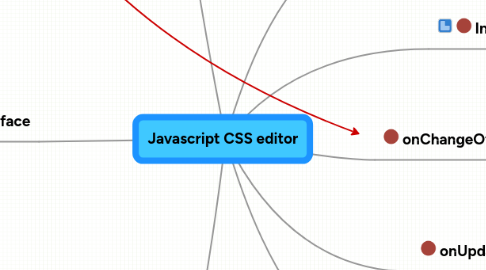
1. Icon legend
1.1. Object
1.2. Value
1.3. Function
2. Interface
2.1. Current target
2.2. Background
2.2.1. Background colour
2.2.2. Background image
2.2.3. Background repeat
2.2.4. Background attachment
2.2.5. Background position
2.3. Border
2.3.1. Switch - All / Per side
2.3.1.1. Border width
2.3.1.2. Border style
2.3.1.3. Border colour
2.4. Dimensions
2.4.1. Height
2.4.2. Min Height
2.4.3. Max Height
2.4.4. Width
2.4.5. Min Width
2.4.6. Max Width
2.5. Font
2.5.1. Font Family
2.5.1.1. Serif
2.5.1.2. Sans-serif
2.5.1.3. Monospace
2.5.2. Font Size
2.5.3. Bold (Font Weight)
2.5.4. Italic (Font Style)
2.6. Margin
2.6.1. Switch - All / Per side
2.6.1.1. Value
2.7. Padding
2.7.1. Switch - All / Per side
2.7.1.1. Value
2.8. Position
2.8.1. Type
2.8.2. Float
2.8.3. Top / Left / Right / Bottom
2.9. Properties
2.9.1. Cursor
2.9.2. Overflow
2.9.3. Display
2.9.4. Visibility
2.10. Text
2.10.1. Alignment
2.10.2. Capitalization
2.10.3. Color
2.10.4. Letter spacing
2.10.5. Line height
2.11. Save button
3. Custom CSS
3.1. Current CSS
3.2. Custom CSS
3.3. Save/Update button
4. Stored data
4.1. Default data
4.1.1. Selector
4.1.1.1. Property: Value
4.2. Changed data
4.2.1. Selector
4.2.1.1. Property: Value
4.3. CurrentSelector
4.4. CustomCSS
4.5. StyleName
5. onChangeOfTarget
5.1. Save current changes
5.2. Change CurrentSelctor
5.3. Change to current values
6. Init
6.1. Default data
6.2. Take default stylesheet
6.3. Popularize Default Data
6.4. Create interface
7. onUpdate
7.1. Check data
7.2. Change data
7.3. Update style
8. savePopup
8.1. Create the popup
8.1.1. If modifying current theme
8.1.1.1. Chance to change name & description
8.1.1.2. Publish it? [Y/N]
8.1.2. When saving a new one
8.1.2.1. Name
8.1.2.2. Description
8.1.2.3. Publish it? [Y/N]