


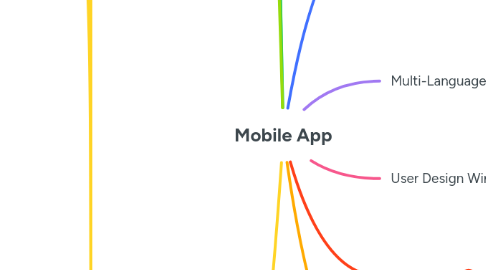
1. WorkFlow
1.1. Main Theme
1.1.1. Core Goal
2. Scenarios
2.1. Number of Users
2.1.1. Interaction
3. Mortgage Brokerage APP
3.1. WorkFlow
3.1.1. Main Theme --Listings--
3.1.1.1. Core Goal: Get your whatsapp Laeads into a System where you can ctegorize them, Upload your listings one by one or via Excel, and Share the relevant units with the relevant client as per the Need.
3.2. Scenarios
3.2.1. Number of Users: only 1 which is the mortgage brokerage office, and the app owner on web dashboard
3.2.1.1. Interaction: Agent buys a subscription, gets into the account, set his profile, then, connect his whatsapp using an API, then upload his 1st units.
3.3. Native or Hybrid
3.3.1. Hybrid
3.3.1.1. Flutter
3.4. Multi-Language or Single
3.4.1. English
3.4.2. Arabic
3.5. User Design Wireframe
3.5.1. Ui
3.5.2. UX
3.6. Backend
3.6.1. Dashboard
3.6.1.1. Web
3.6.1.2. App
3.7. Features
3.7.1. Realestate Listings module with ADD button, and Filter with search bar
3.7.2. Lead Manager module ( simple ) Name, Number, code, unit shared
3.7.3. buy package and profile
3.8. Usability/Accessibility/Hierarchy
3.8.1. User types/Roles
3.8.2. Dashboard access
3.8.3. User View
3.9. Payment gateway Integration
4. ابي خدمة
4.1. اللغة : عربية
4.2. coding language : flutter
4.3. Ui ( main theme ) : present
4.4. UX: Same as whatsapp with a service chatbot
4.4.1. Usability/Accessibility and hierarchy
4.4.1.1. 1 type of users : a person who wants to fulfill his govermental services online and wants it to be as easy as possible on terms of usability so we choose the whatsapp interface to act as a users interface but with different colour theme and pallete
4.4.2. Accessibility
4.4.2.1. mobile application for users and a Daschboard for the company
4.4.3. no hierarchy
4.5. Work flow
4.5.1. 1- Name : 2 2- Number:
4.5.1.1. OTP
4.5.1.1.1. User shall enter any service tab and say something then chatbot will reply with a pre-set sequence, will be added from dashboard to each service, and he will continue till he/she reaches the payment which will be an image sent for his ( bank account ) and he will upload the receipt for the team to review and then the evaluation to the support team.
4.6. scenarios
4.6.1. User searches for a service
4.6.2. User enters into a chat, and if he wrote 3 times things different than the needed things. he will be transfered to one of the support team.
4.6.3. user continue replying to the service questions and it is recorded in the backend tables as enteries ( specificed with characters or options or etc )
4.6.4. User finishes the journey in the service chat by having the payment pic, and the chatbot gives him a time until the review, and after that, the agent chose approved or disapproved on the dashboard, to get his chat person evaluation message
4.6.5. User can make a Voice call with the agent, he is assigned to, and he can also ask for a direct chat.
4.6.6. User can see his profile of used services and that is saved on his client profile on dashboard to be searched and etc.
4.7. insights
4.7.1. the company can get reporting on dashboard of which clients used which services and categorize most usable sevices and most active clients with charts and numbers.
4.7.2. تقارير لأكثر وقت فيه ضغط و أقل وقت و تقارير باداء كل خدمة على صعيد عدد المستخدمين و المدخول المالي و تقارير بنوع العميل و عمره و تأثير ذلك في كل خدمة - تقارير مالية يومية خاصة بمدخول كل خدمة و مضاعفاتها في الشهر و السنة.
4.8. Backend
4.8.1. Tables include client info services, and with a chatbot replies that can detect words of option, and numbers to be detected and sub categories.
4.9. Features
4.9.1. mobile app
4.9.1.1. Search on service
4.9.1.2. Direct interaction with service chatbot
4.9.1.3. Calling the Customer service
4.9.1.4. Rating and reviews
4.9.1.5. Checking past user services ( number is the identifier to the account not the mobile device )
4.9.1.6. الحالات statusus reels that are added from dashboard to appear to all users
4.9.1.7. attachemnts: 1- add voice 2- add image 3- add doc. 4- add location 5- add camera shot
4.9.1.8. الحالات statusus reels that are added from dashboard to appear to all users
4.9.2. Dashboard
4.9.2.1. Block user
4.9.2.2. Check user profile ( services finished - services not finished yet )
4.9.2.3. حالات العميل لكل خدمة ( في انتظار الدفع - جاري التنفيذ ( مكتمل الخدمة و جاري التنفيذ له ) - تحت الانشاء ( مرحلة ما قبل الدفع ) - تم التنفيذ ( تم التنهاء من خدمته )
4.9.2.4. Agent can edit client profile adding name, gender and age and area also he has the capability to call the client or send an announcement notification to his device
4.9.2.5. Send public notifications
5. Native or Hybrid
5.1. Flutter
5.1.1. Python gango Flutter
5.2. Native Android
5.2.1. Java
5.2.2. Kotlin
5.3. Native IOS
5.3.1. Swift
5.3.2. Objective C
6. Multi-Language or Single
6.1. English
6.2. Arabic
7. User Design Wireframe
7.1. Ui
7.2. UX
8. Backend
8.1. Dashboard
8.1.1. Web
8.1.2. App