IFC SCHEMA
作者:Jose Aguiar
1. NON-ROOTED ELEMENTS
1.1. IfcMaterial
1.1.1. A material may be named, and then have further non-rooted classes assigned to it, such has simple RGB colours, textures, and material properties for environmental simulations.
1.2. IfcCartesianPoint
1.2.1. As you might expect, IFC can store 2 or 3 dimensional Cartesian coordinates. This is one of the building blocks of many other non-rooted classes, such as the ability to locate an object in space, or build up geometric representations.
1.3. IfcFacetedBrep
1.3.1. A huge variety of geometric forms may be described in IFC. One commonly known format is a faceted BREP, or series of polygons that describe the surface of an object.
1.4. IfcPerson
1.4.1. Information about people and organisations can be recorded, which is especially useful as some countries have legislation that requires this to be stored.
1.5. IfcPropertySingleValue
1.5.1. This commonly used class can define a single property in terms of a property name and its associated value. In addition, there are other classes that allow more complex properties in tabular or calculated form to be stored.
1.6. IfcObjective
1.6.1. This little-known class can store design intentions, strategies, and objectives to be then associated with objects or portions of the BIM model.
1.7. IfcRegularTimeSeries
1.7.1. When scheduling, events may occur at predictable time intervals, which may be stored.
2. IfcDoorType
3. IfcProject
3.1. this is the most common "container" of IFC data, used to store information specific to a particular project
4. IfcWallType
5. IfcWindowType
6. IfcPropertyDefinition
6.1. These subclasses describe properties of objects and things. They themselves are not an object but instead a property or quantity like fire rating, energy usage, or volume
7. IfcContext
7.1. This special category holds the starting point of IFC data, by describing either a project or library. There are only two subclasses which can contain the rest of the IFC data: IfcProject and IfcProjectLibrary.
8. IfcObject
9. IfcProjectLibrary
9.1. this can store BIM data that is project agnostic, to be reused between multiple projects
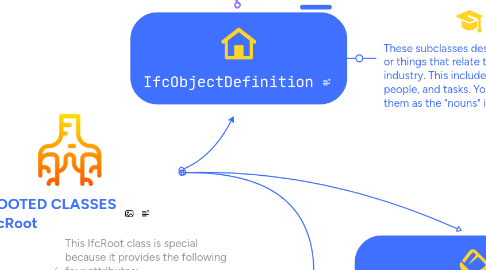
10. IfcObjectDefinition
10.1. These subclasses describe objects or things that relate to the AEC industry. This includes walls, people, and tasks. You may think of them as the "nouns" in IFC.
11. IfcPropertyTemplateDefinition
11.1. If you don't want to actually to store the value of a property but instead want to describe a template of what properties exist, which are required, and what data is valid for the purposes of exchange requirements or company standards, then this template subclass allows you to do so.
12. IfcExternalSpatialStructureElement
13. IfcStructuralActivit + IfcStructuralItem
13.1. These are useful for structural analysis. They hold data to describe an analytical model, including members, nodes, connections, loads, and forces, as well as the results from the calculations. Example subclasses include IfcStructuralCurveMember, IfcStructuralPointConnection, and IfcStructuralPointReaction.
14. IfcTypeObject
15. IfcRelationship
15.1. These subclasses describe relationships between objects themselves, between properties, or between objects and properties. The relationships can be objects that contain other objects, connect to objects, have system inputs or outputs, or are assigned a property or quantity.
16. IfcPreDefinedPropertySet
16.1. For some reason, some properties to do with door and window linings are given a special status in the IFC schema and have their own category. This will likely disappear in the future and merge into IfcPropertySet.
17. IfcSpatialStructureElement
18. IfcPropertySetDefinition
19. IfcSpatialZone
20. IfcRelDefines
20.1. This relationship is used when a particular object can be defined by a common set of definitions, such as properties, manufacturer / construction types, or a template of definitions. This relationship is very commonly used, specifically to define properties (both buildingSMART standard properties, and custom user properties) to objects, and define construction types. Example subclasses include IfcRelDefinesByProperties, IfcRelDefinesByType, and IfcRelDefinesByTemplate.
21. IfcElementType
21.1. These describe construction types. A construction type may be assigned to an IfcElement, just like a particular IfcWall might have a particular construction type of 2 layers of plasterboard on a metal frame. Example subclasses of IfcElementType include IfcWallType, IfcDoorType, and IfcWindowType.
22. IfcSpatialElement
22.1. These describe spatial concepts, such as sites, buildings, bridges, storeys, and spaces. These IfcSpatialElement classes can contain IfcElement elements inside them, such as a slab being inside a building storey. Example subclasses of IfcSpatialElement include IfcSite, IfcBuilding, and IfcSpace.
23. Hundreds of available concepts
24. IfcElement
24.1. These hold physical built elements that we come across every day, like slabs, columns, beams, furniture, pipes, cables, ducts, and so on. Example subclasses of IfcElement include IfcColumn, IfcBeam, and IfcFurniture. They may have geometry associated with them.
25. IfcRelDecomposes
25.1. This relationship is used when a particular object (physical or virtual) is built up of smaller object parts. Smaller parts may be simple aggregated into a larger whole, or projecting from a object, or embed itself within another object. Example subclasses include IfcRelAggregates, IfcRelProjectsElement, and IfcRelVoidsElement.
26. Material Association
27. #123=IFCRELASSOCIATESMATERIAL(...,,(#20,#27),#10)
28. Attribute
29. IfcRelConnects
29.1. This relationship is used when a particular object is joined physically or virtually to another object. This is usually used in analytical models, such as structural analysis where members and nodes connect to each other, MEP systems analysis where ports join together, or environmental analysis, where spaces have boundaries and are covered by particular material layers. Example subclasses include IfcRelConnectsStructuralMember, IfcRelConnectsPorts, and IfcRelSpaceBoundary.
30. Attribute
31. IfcRelAssigns
32. IFC properties
32.1. IFC properties are IFC entities that can be attached to classes. Unlike fixed attributes, properties have attributes and are grouped into Property Sets (Psets) linked to many elements; e.g., FireRating in Pset_WallCommon applied to multiple IfcWalls. Names of standard properties/Psets are defined in the IFC spec, but users can create custom properties and Psets. Quantities are a special property type for measurable values (length, area, volume, cost), grouped as Quantity Sets (Qto). Not every Pset/Qto applies to every class; the spec prescribes valid mappings, though custom Psets may be assigned.
33. IfcProduct
34. IfcMaterial
35. ROOTED CLASSES IfcRoot
36. IfcSlab
37. IFC attributes
37.1. All IFC classes have attributes—named fields with values. A common example is the inherited Name (e.g., an IfcDoor named “D01”). Attributes can be mandatory or optional, and hold simple text or complex data, such as OwnerHistory (responsible person, software, organization, contacts). Attributes are inseparable from their classes: when an entity exists, its attributes exist (filled or empty). The attribute set for each class is fixed by the IFC specification; end-users can’t add or remove them. Consequently, classes expose a small, stable set of globally useful attributes that changes little across IFC versions.
38. IfcPropertySet
38.1. These classes help store properties of other classes, such as IfcElement. For instance, it may store a fire rating associated with an IfcWall. Some properties names and values are standardised within IFC, but end-users can also create their own properties. See IFC attributes and properties for more information.
39. IfcRelAssociates
39.1. IfcRelAssociatesMaterial
40. IFC attributes and properties
41. IfcRelAssigns
41.1. This relationship is used when a particular object supplies a resource or fulfils a task for another object. It is commonly used for resource management and construction sequencing, determining processes, resources, and actions performed by people. Example subclasses include IfcRelAssignsToResource, IfcRelAssignsToProcess, and IfcRelAssignsToProduct.
42. IfcFurnishingElement
43. IfcBuildingElement
44. IfcBuildingElementType
45. IfcBuildingStorey
46. IfcBuilding
47. IfcSpace
48. IfcSite
49. IfcFacilityPart
50. Starting Point
51. IfcQuantitySet
51.1. This is similar to IfcPropertySet but focuses on calculated quantities (lengths, areas, volumes, weights, etc). Some quantity names and values are standardised within IFC, but end-users can also create their own quantities. See IFC attributes and properties for more information.
52. Visual Key: IFC Class Hierarchy & Syntax Indicators
53. IfcFacility
54. IfcColumn
55. Hierarchy Level
56. IfcBeam
57. IfcRelAssociates
57.1. This relationship is used when a particular object has a source of information associated with it, such as an external document, classification system like Uniclass, project library, or material definition. This is commonly used for facility management. Example subclasses include IfcRelAssociatesDocument, IfcRelAssociatesClassification, and IfcRelAssociatesMaterial.
58. IfcControl
59. IfcRoot
60. IfcRoot
60.1. This IfcRoot class is special because it provides the following four attributes: - GlobalId (required) - A unique identifier of the object, generated by a computer. This is usually created automatically by the BIM authoring tool. - OwnerHistory - This special attribute can store names, dates, organisations, software vendor, and contact details of people who are responsible for this object. This is usually created automatically by the BIM authoring tool. - Name - This can contain a short text that names the object. - Description - A sentence or so to describe the object.
61. Level 1
62. o
63. o
64. IfcRelDecomposes
64.1. IfcRelAggregates
65. IfcRelDecomposes
65.1. IfcRelAggregates
66. IfcBuildingStorey
67. IfcBuildingStorey
68. IfcBuilding
69. IfcSite
70. Level 3
71. Level 4
72. Level 5
73. Level 3
74. Level 3
75. Level 4
76. These are useful for scheduling information, describing responsibility, tasks, resources, and timelines for construction sequencing or project planning. Example subclasses include IfcTask, IfcConstructionMaterialResource, and IfcWorkSchedule.
77. Level 5
78. Level 6
79. Level 6
80. Level 7
81. Level 7
82. IfcWall
83. IfcFurniture
84. IfcProcess
84.1. IfcTask
85. IfcClass
86. IfcResource
87. IfcRelAssigns
87.1. IfcRelAssignsToProduct
88. Coloured background + Gold Icon - Abstract Class
89. IfcClass
90. White background + Level colour Icon - Concrete Class (Instantiable
91. IfcActor
92. https://wiki.osarch.org/index.php?title=IFC_attributes_and_properties
92.1. Wiki.OSArch: IFC attributes and properties
93. Level 2
94. ScheduleDuration
95. IfcProcess
96. DurationType
97. External Link
98. IfcLagTime
99. Enumeration
100. Concrete Pour
101. o
102. Formwork
103. o
104. Attributes
105. Attribute
106. Attributes
107. attribute
108. IfcTask
109. attribute (type)
110. Direct attributes
111. IfcRelFillsElement
111.1. 5. Openings → links opening → filling (IfcWindow, IfcDoor)
112. IfcRelAssociatesMaterial
112.1. 6. Materials → connects wall to material layer set or material profile set
113. IfcRelAssociatesClassification
113.1. 7. Classification → links wall to bSDD, Uniclass, OmniClass, etc.
114. IfcRelAssociatesDocument
114.1. 8. Documents → drawings, specs, PDFs
115. IfcRelAssignsToGroup
115.1. 9. Groups → zones, systems, logical groupings
116. IfcRelAssignsToProcess
116.1. 10. Tasks / sequencing → construction scheduling (4D)
117. IfcRelAssignsToControl
117.1. 11. Costs → cost items (5D)
118. IfcRelVoidsElement
118.1. 5. Openings → links wall → opening element (IfcOpeningElement)
119. IfcRelContainedInSpatialStructure
119.1. 1. Spatial context → tells you where the wall lives (building storey, building, site)
120. 1
121. 7
122. 6
123. 5
124. 4
125. 3
126. .
127. IfcRelAggregates
127.1. 4. Geometry decomposition → walls composed of layers, sub‑elements, etc.
128. IfcRelDefinesByProperties
128.1. 3. Properties → attaches Psets
129. IfcRelDefinesByType
129.1. 2. Type assignment → links the wall to an IfcWallType
130. IfcTask
131. IfcRelConnects
131.1. IfcRelSequence
132. Attribute
133. Attribute
134. Attribute
135. Attribute
136. Spatial decomposition
137. #123=IFCRELAGGREGATES(...,#10,(#20,#27))
138. IfcProcess
138.1. IfcTask
139. CONSTRUCTION
139.1. IfcTaskTypeEnum
140. FINISH_START
140.1. IfcSequenceEnum
141. IfcControl
142. ELAPSEDTIME
142.1. IfcTaskDurationEnum
143. IfcWorkControl
143.1. IfcWorkSchedule
144. IfcRelAssignsToControl
145. 2


