


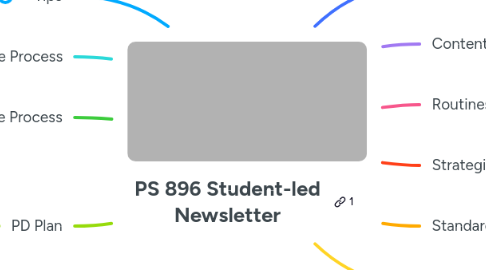
1. Tips
1.1. Think like an editor
1.2. Edit in camera as much as possible
1.2.1. Shoot in sequence
1.2.2. Start stop in short clips (5sec)
1.2.3. Rehearse before kids speak
2. Upper Grade Process
2.1. phones will be better quality and easier
2.2. let the kids talk to each other on video
2.2.1. Give them essential questions in their hands
2.2.2. Imagine you're an influencer trying to teach people about volcanoes, and how they can teach themselves about them.
2.3. Get a gimbal per grade
2.4. PBL Video Goals
2.4.1. Most complex
2.4.2. Writing
2.4.3. Research
2.5. Options
2.5.1. Give the table caption the role of director
2.5.2. Show how you are successful
2.5.3. Explain how you are learning the objective.../essential idea
2.5.4. whoever finishes first gets to do the video
2.5.5. Take 5 photos of evidence that supports your statement.
3. Lower Grade Process
3.1. Film longer clips of action
3.2. Take still photos or short videos (5-10 sec max) of authentic work
3.3. Get close shots of students speaking to what they learned
3.4. Add teacher narration
3.5. Optional: add music
3.6. Optional: student narration
4. PD Plan
4.1. Practice in April & May
4.2. June Workshop
4.3. Fall review
5. Digital Storytelling as PBL
5.1. Constructivist Media Decoding (CMD)
5.1.1. Show them shots - Wide, Mid, Closeup. Ask them (who, what, where, why then…): “What can you tell about the setting?”/“Where are they?” “How can you tell?” “Point to something in this image that shows that.” “What are they doing?” “Who is together?” “What are they doing?” “How do you think they are feeling?” “Point to a detail that makes you think that.”
5.1.2. Ads
5.1.2.1. What do you think the maker of this wanted you to feel?
5.1.2.2. Point to details out describe the details that made you think that.
5.1.2.3. Name the shots (mid, wide, close up)
5.1.3. Book cover
5.1.3.1. Who is this book for? What details makes you think that?
5.1.3.2. What do you think this book is about?
5.1.3.3. Name the shots (mid, wide, close up)
5.1.3.4. Point to details out describe the details that made you think that.
5.1.4. Option: Annotate over printouts
5.1.5. Critical Analysis of Media Artifacts
5.2. Mindful Media Making (Documentary, News, PSA)
5.2.1. Think of a topic you want to share about
5.2.2. Who is your audience? Why Will they want to watch it? Why is it important for them to watch it?
5.2.3. Do you want to persuade, inform or entertain them?
5.2.4. How should we do it?
5.2.4.1. General style: realistic, a skit or demonstration, step by step… etc.
5.3. Media Activity on Paper: Storyboarding
5.3.1. Planning a visual story: Design 3 visuals to tell a story
5.3.2. Group on smart board, group on paper/dry erase tablets etc.
5.3.3. Individuals on paper
5.3.4. Plan 3 visual shots
5.3.4.1. **Wide:** where are we, who is there, how many are there?
5.3.4.2. **Mid:** what are they doing? Who are they doing it with? How are they doing it?
5.3.4.3. **Close:** how are they doing that? How are they feeling?
5.3.5. Write in narration or captions
5.3.5.1. What can you say to explain what you want your audience to understand from the visual?
5.3.5.2. What details do you want your audience to notice?
5.3.5.3. What details your audience need to see in our picture to know this?
5.4. Produce a Digital Story from your Storyboards
5.4.1. “Frame” your photos/video based on the storyboards and record video or take photos
5.4.2. Option: take photos of student drawings for this.
5.4.3. Put the videos/photos in order in an editor
5.4.4. Decide what happens to your captions or narration: “titles” (text on screen), voice over narration, a narrator on screen.
5.4.5. Option add music
5.4.5.1. Ask how music affects the story
5.4.5.2. How can music help set the mood to inform, persuade or entertain?
5.5. Examples
5.5.1. New node
6. Core purpose of the Newsletters
6.1. Unit
6.2. Trips/events
6.3. Pictures/Evidence
6.4. What's coming up or continuing
6.5. Tutorials/ How to
7. Content Objectives
7.1. record the process
7.2. goal/objectives
7.3. action and artifacts
7.4. student reflection/perspective
8. Routines
8.1. Key moments/Details
8.2. Shoot with phones or iPad
8.3. 10 sec or less each shot
8.4. Model 896 templates on TikTok or IG Templates
8.5. Editing Options
8.5.1. iMovie
8.5.1.1. Can be on all Laptops/Ipads/iPhones
8.5.1.2. Can set up templates
8.5.2. Capcut
8.5.2.1. works on android/iPhones/iPads
8.5.2.2. works on laptops
8.5.2.3. kids love it
8.5.2.4. would take some time to install
8.6. 1 topic per month (examples)
8.6.1. How to: Math: show process (2 strategies + reflection)
8.6.2. Culminating activity
8.6.3. Field trip
8.6.4. Full description of 1 thing
8.6.5. everyone do (example) lunar ny
8.6.6. event or trip
8.6.7. pbl/ show a process
8.6.8. show off features of the school (make a checklist)
8.6.9. bulletin boards
8.7. Monthly Crew (grades 2-5)TBD
8.7.1. Camera
8.7.2. Hosts
8.7.3. Director (make sure it all gets done)
8.7.4. Writer (decide on the style and approach)
9. Strategies
9.1. Less is more!
9.2. Tues/Wed gets most interaction
9.3. Coordinated blurbs + Teacher Choice???
9.3.1. is everyone in sync enough to share the blurbs
9.4. MINIMAL EDITING/Collaborate on the monthly
10. Standard content
10.1. Intro: Class ___ news!
10.1.1. Student on camera
10.1.2. Title over image or video
10.1.3. Narration over photos/videos
10.1.4. Name the month, name the theme
10.2. Name the subject/goals
10.2.1. Title over images/video
10.2.2. Or student on camera
10.3. Substance, action and artifacts
10.3.1. Photos of action
10.3.2. Videos of action
10.3.2.1. Student explaining what they’re doing
10.3.2.2. B-roll: Fly on the wall details of work
10.3.2.2.1. Close/mid/wide
10.3.3. Optional narration (voice over)
10.3.4. Optional student on camera explaining
10.3.4.1. Or narrator over images/video
10.4. Class reflection interview questions
10.4.1. why are you…?
10.4.2. what did you learn?
10.4.3. Use photos of the real Process if you have them
10.5. Closing
10.5.1. Student says what’s coming up
10.5.2. Student on cam says goodbye see you next t month, etc.
10.5.3. Title on screen.
11. Styles
11.1. All photos with titles and music
11.2. All photos with narration
11.3. Fly on the wall clips with real sound
11.3.1. Kid perspective videos 10 second shots
11.4. Student hosts tour of an activity
11.4.1. Optional music
11.4.2. Intro the activity “this is…”
11.4.3. Show details with video or photos
11.4.4. Share 1-3 learning goal/ purpose/ reflection