


1. Databases
1.1. RDS
1.1.1. **Definition**
1.1.1.1. Amazon RDS is a **fully managed relational database** service that makes it easy to **set up, operate, and scale databases in the cloud.** It automates time-consuming administrative tasks such as hardware provisioning, database setup, patching, and backups, enabling users to focus on their applications. **User cannot SSH to RDS instance because it's fully managed by AWS**
1.1.2. Engine
1.1.2.1. PostgreSQL, MySQL, SQL Server, MariaDB, IBM DB2, AWS Aurora
1.1.3. RDS Storage Auto Scalling
1.1.3.1. RDS will **auto-detect** and **increase your storage** if the storage is going to running out of free database User can set the **Maximum Storage Threshold**
1.1.4. RDS Read Replicas
1.1.4.1. Read Replicas is similar to master-slave databases where we can store mutiple SQL database and they will be **asynced** automatically. Therefore, we can perform read from other databases instead of only main database. **(Read Replicas aims to scale your read action)**
1.1.4.2. Can configure up **15 read replicas** on the same AZ
1.1.4.3. **Read Replica will generate new connection string for read databases**
1.1.5. RDS Multi-AZs
1.1.5.1. RDS automatically **replicates data **to a **standby instance** in another availability zone. In the **event of an outage,** RDS will **automatically failover to the standby instance,** ensuring minimal downtime.
1.1.5.2. To change from single AZ to **multiple AZ.** Just modify the setting → **No downtime** is required for this change.
1.1.5.3. **Multi AZs doesn't generate new connection string**
1.1.6. Backup & Restore
1.1.6.1. - **Automatically backup:** Every day, and 5 minute earliers → can restore from daily backup or at any moment in until the last 5 minutes. Can be disabled and can store the backup until 35 days **- Manually backup snapshot:** Take snapshot manually
1.1.6.2. Restore from backup or snapshot
1.1.7. RDS Security
1.1.7.1. - **At-rest encryption:** Can configure at launch time using KMS keys - **In-flight encryption:** TLS-ready by default, use the AWS TLS root certificates client-side - **IAM Authentication:** IAM Roles to connect to your database (instead of username/password) - **Security Group:** Control Network access to your RDS/Aurora DB - No SSH Available except RDS Custom for Oracle & SQL Server - Audit logs can be enabled and sent to CloudWatch
1.2. Aurora
1.2.1. A **relational database management system** which provide **better performance compared to PostgreSQL and MySQL** on the AWS RDS. Aurora can compatible to MySQL or PostgreSQL. Aurora works with 2 major concepts: **- Write endpoint:** Only write to the main database **- Read Endpoint:** Read from multiple database (the Load balancing is executing at the connection level, not statement level).
1.2.2. All **16 instance** including main database will **share the same storage** to optimize the sync time.
1.2.3. Auto-Scalling
1.2.3.1. Auto add more reader nodes to the REader endpoints
1.2.4. Custom Endpoint
1.2.4.1. Custom endpoint to only connect to specific instance of readers (with higher or lower hardware resources) just for reading in some purposes
1.2.5. Aurora Serverless
1.2.5.1. Automate **database instantiation** and **auto scalling** based on **actual usage.** **Best if you have no capacity planning**
1.2.6. Global Aurora
1.2.6.1. Up to **5 regions and 15 replicas per regions** to reduce the latency. When the main database is **failed** it can automatically **bring up the replica** to the main database **under 1 minuts.**
1.2.7. Machine Learning
1.2.7.1. Connect directly to AWS Machine Learning services.
1.2.8. Backup
1.2.8.1. - Automated backup: Can store up to 35 days and cannot be disabled. - Manual snapshot:
1.2.9. Restore
1.2.9.1. - From backup or snapshot - From S3 - Aurora database cloning: Faster than snapshot & restore.
1.3. Elastic Cache
1.3.1. ElastiCache is a fully managed, in-memory caching service provided by AWS. It supports two popular open-source caching engines: Redis and Memcached,
1.3.2. Redis
1.3.2.1. Better for high availability with multi AZ configured available, ensure data integrity.
1.3.3. Memcache
1.3.3.1. Can lost data, lost connection, not high availability
1.4. Oracle
1.4.1. The user cannot SSH directly to the RDS instance since it's all managed by AWS. However, Oracle do need to be able to access to do some setup. => Use **RDS Custom for Oracle** to run Oracle on RDS
1.5. DynamoDB
1.5.1. Definition
1.5.1.1. AWS fully managed serverless for NoSQL database, millisecond latency
1.5.1.2. Capacity Mode
1.5.1.2.1. Provisioned with Auto Scalling
1.5.1.2.2. On-demand capacity
1.5.2. High Available, Multi AZ by default, Read/Write are decoupled
1.5.3. Security
1.5.3.1. Through IAM
1.5.4. Event Processing
1.5.4.1. DynamoDB streams to integrate with LAmbda, Kinesis Data stream
1.5.5. Backup
1.5.5.1. Automated backup
1.5.5.1.1. Up to 35 days
1.5.5.2. On-demand backup
1.5.5.3. Export to S3
1.6. S3
1.7. DocumentDB
1.7.1. Aurora version for MongoDB. Auto scale storage up to 10GB Auto scal workloads with millions rps
1.8. Neptune
1.8.1. Fully-managed for graph database Highly available across 3 AZs, up to 15 read replicas
1.8.2. Build and run a pplications working with highly connected database
1.8.3. Can store up to **billions of realtions**
1.9. KeySpaces
1.9.1. Apache casandra is an open-source. NoSQL. distributed database
1.9.2. Serverless, Scalable, highly available, fully managed byAWs
1.9.3. Automatically scale tables up/down based on the traffic
1.9.4. Capacity
1.9.4.1. On-demand
1.9.4.2. Provisioned mode
1.9.5. Backup
1.9.5.1. Point-in-time recovery up to 35 days
1.10. QLDB
1.10.1. Definition
1.10.1.1. QLDB: **Quantum Ledger Database** To record the financial transactions
1.10.1.2. **No entry can be removed or modified**
1.10.2. Fully managed, serverless, high available, replication across 3 AZs
1.11. Timestream
1.11.1. Definition
1.11.1.1. Fully managed, fast, scalable, serverless time series databases
1.11.2. Automatically scales up./down to align capacity and traffic
1.11.3. Can store trillions of events/days
2. Data Streaming
2.1. Simple Queue services SQS
2.1.1. Security:
2.1.1.1. - Encryption - In-flight encryption HTTPS - At-rest encryption KMS keys
2.1.1.2. - Access Control (IAM policies)
2.1.1.3. - SQS Access Policies
2.1.2. **Defintion**
2.1.2.1. SQS (simple queue service) is a queue service that multiple **producer** send messages to the **SQS Queue,** then **Consumer will poll messages** fro the Queue. (**Similar to RabbitMQ**)
2.1.3. Message Types
2.1.3.1. Standard Queue
2.1.3.1.1. Guarantees at-least-once delivery but can deliver messages out of order.
2.1.3.1.2. - **Unlimited throughout, ulimited number of messages** - Default retention of messages: 4 days → 14 days - Low latency (< 10ms on publish and receive) - Limitation of 256KB per message sent. - Can have duplicate messages (at least on delivery)) - Can order messages
2.1.3.2. FIFO Queue
2.1.3.2.1. Ensures exactly-once processing and maintains the order of message delivery.
2.1.3.2.2. Limited throughput: **300msg/s** or **3000msg/s** with batch
2.1.4. Convert Standard to FIFO and vice versaion
2.1.4.1. - Delete existing standard queue and recreate it as FIFO - Make sure the name are same - Make the the limit throughput not over 3000ms/s
2.1.5. Process
2.1.5.1. Consumers
2.1.5.1.1. Send message to SQS Queue via API
2.1.5.2. Producers
2.1.5.2.1. 1. Poll message from Queue **(poll not pull)** 2. Process message 3. Delete message on Queue
2.1.6. Message Visibility Timeout
2.1.6.1. After the **consumer poll a message** from Queue, the other **consumer cannot get** the message **before predefined time** to **prevent** processing **twice.**
2.1.7. Long polling
2.1.7.1. SQS supports **long polling,** reducing the **number of empty responses** by allowing consumers to **wait for a message to become available** (up to **20** seconds)
2.1.8. Monitoring
2.1.8.1. Amazon **CloudWatch** provides detailed metrics, such as the number of messages sent, received, or deleted, visibility timeout, and more, enabling **real-time monitoring of SQS** queues.
2.1.9. Auto Scalling
2.1.9.1. Add **CloudMetric** to ensure the **Queue lenght** **should not greater** than a **specific number.** If it’s over that number, the **CloudAlarm will trigger auto scalling.**
2.1.10. Best Practices
2.1.10.1. Before writing transactions to the database, if the application has a layer before and we need to confirm there is no transaction are lost. We can has one more decoupling EC2 groups with auto scalling to dequeue from SQS and write to database → Producers (EC2 ) → SQS → Consumers (EC2) → Database (RDS)
2.2. Simple Notification Service SNS
2.2.1. **Definition**
2.2.1.1. SNS is a fully managed messaging service that allows developers to send notifications and messages to a large number of recipients, **(similar to MQTT)**
2.2.2. Message Types
2.2.2.1. Standard Topics
2.2.2.1.1. Support multiple protocols such as HTTP/HTTPS, email, SMS, and mobile push notifications. They allow for high throughput and at-least-once delivery.
2.2.2.2. Fifo
2.2.2.2.1. Ensure exactly-once delivery and maintain the order of messages. Ideal for applications where order is crucial.
2.2.3. Process
2.2.3.1. Configure topics
2.2.3.2. Publisher
2.2.3.2.1. Send message to the specific topic
2.2.3.3. Subscribers
2.2.3.3.1. 1. Receive message of the subscribed topic 2. Process message
2.2.4. AWS Subscribers
2.2.4.1. SQS, Kinesis, Lambda, Email, Email-JSON, HTTP, HTTPS, SMS
2.2.5. Security
2.2.5.1. In-flight HTTPS
2.2.5.2. Server-side encryption: KMS
2.2.5.3. SNS Access Policies
2.2.6. Auto Scalling
2.2.6.1. Similar to SQS: Setup CloudWatch & CloudWatch Alarm to trigger auto scale based on multiple criterias
2.2.7. Best Practices
2.2.7.1. Fanout Architecture
2.2.7.1.1. SNS receive the message then send it to multiple SQS as receipients
2.3. Kinesis
2.3.1. Kinesis Data Stream
2.3.1.1. Definition
2.3.1.1.1. Kinesis Data Streams is a fully managed, scalable service designed for real-time data streaming.
2.3.1.1.2. **Producers** - **Consumers** approach (similar to SQS but different) KDS **divided data** into **multiple shards** (container, data stream, etc). Each **message** must **contains** a **key** which will be **hashed** to place **message** to the **Queue** **Each shards is a queue itself**. Therefore, the FIFO will be happening on each Shard (not global FIFO)
2.3.1.2. Capacity Mode
2.3.1.2.1. Provisioned
2.3.1.2.2. On-demand
2.3.1.3. Process
2.3.1.3.1. Producers
2.3.1.3.2. Consumers
2.3.1.4. Scaling
2.3.1.4.1. Provisioned mode must configure scale manually by adjusting the number of Shards
2.3.1.5. Security
2.3.1.5.1. In-flight HTTPS
2.3.1.5.2. At-rest using KMS
2.3.1.5.3. VPC Endpoint
2.3.1.6. Data Retention
2.3.1.6.1. From 24 hours to 7 days
2.3.1.7. Monitoring
2.3.1.7.1. CloudWatch, CloudTrail
2.3.1.8. Best Practices
2.3.1.8.1. Recommend using Kinesis Data Stream over SQS & SNS since it’s single application if multiple applications has different purposes
2.3.2. Kinesis Firehose
2.3.2.1. Definition
2.3.2.1.1. It is a fully managed service designed for loading streaming data into data lakes, data stores, and analytics services. **This is a data transformation tools**
2.3.2.1.2. This is a **near real-time** process because the data will be **saved in batch** on the **Firehose storage** and will be **write on batch** to the **data lake** The **Buffer Interval** control the delay
2.3.2.2. Data Source
2.3.2.2.1. Application, client, SDK send a message up to 1 MB
2.3.2.3. Data Transformation
2.3.2.3.1. optional process such as Lambda function
2.3.2.4. Data Delivery (Lake)
2.3.2.4.1. S3, Amazon Redshift, Amazon OpenSearch, Splunk, New Relic, MongoDB, DataLog, HTTP Endpoin
2.3.3. Kinesis Data Analytic
2.3.3.1. SQL
2.3.3.1.1. - Read form Firehose or Data Stream - Apply SQL statements for real-time transformation - Send back to Data Streams or Data Firehose.
2.3.3.2. Apache Flink
2.3.3.2.1. Java, Scala, SQL to process and analyze streaming data
2.4. Amazon MQ
2.4.1. **Amazon MQ** is a managed message broker service provided by AWS that makes it easy to set up and operate message brokers in the cloud. It supports popular messaging protocols like **Apache ActiveMQ** and **RabbitMQ,**
2.5. Glue
2.5.1. Definition
2.5.1.1. AWS Glue is a fully managed extract, transform, and load **(ETL)** service provided by (AWS) Fully serverless service
2.5.2. Data Source
2.5.2.1. S3, RDS, etc
2.5.3. Data Transformation
2.5.3.1. Lambda Function
2.5.4. Data Destination
2.5.4.1. AWS Redshift (DataWarehouse)
2.6. Amazon Managed Streaming for Kafka (MSK)
2.6.1. Definition
2.6.1.1. Amazon Managed Streaming for Apache Kafka (MSK) is a fully managed service that simplifies the setup, scaling, and management of Apache Kafka
2.6.2. Process
2.6.2.1. Cluster Creation:
2.6.2.2. Producer Configuraiton
2.6.2.3. Data Storage
2.6.2.4. Consumer Configuration
2.6.2.5. Monitoring
2.7. Elastic MapReduce EMR
2.7.1. Definition
2.7.1.1. Amazon EMR (Elastic **MapReduce)** is a cloud-based big data platform provided by AWS that simplifies the processing and analysis of large data sets using popular open-source tools such as Apache **Hadoop,** Apache **Spark,** Apache **HBase,** Apache **Flink,** and Presto
2.7.2. Process
2.7.2.1. Cluster Creation
2.7.2.2. Data Input
2.7.2.2.1. S3, HDFS, others
2.7.2.3. Job Execution
2.7.2.3.1. MapReduce, Spark to the EMR to transform data
2.7.2.4. Data Output
2.7.2.4.1. S3, RDS, Firehose, DataStream, etc
2.7.2.5. Cluster Termination
2.7.3. Purchasing Options
2.7.3.1. On Demand
2.7.3.2. Reserved (1-3 years)
2.7.3.3. Spot Instances (recommended)
2.7.4. Node Types
2.7.4.1. Master Node
2.7.4.1.1. Manage cluster, coordinate, manage health **(Should use Reserved Node)**
2.7.4.2. Core Node
2.7.4.2.1. Run Tasks & Store Data **(Should use Spot Instances)**
2.7.4.3. Task Node
2.7.4.3.1. Run tasks usually SPO
2.7.5. Security
2.7.5.1. IAM Role
2.7.5.2. Resource-based policy
2.8. EventBridge
2.8.1. Definition
2.8.1.1. Amazon EventBridge is a **serverless** event bus service provided by AWS that makes it easy to connect **applications** using events
2.8.1.2. **EventBridge** allows developers to build **event-driven architectures** by routing **real-time events** from **various sources to targets** such as AWS Lambda, Amazon SNS, Amazon SQS, and other AWS services
2.8.2. Process
2.8.2.1. Event Generation
2.8.2.1.1. Generate from various of source such as: EC2, Codebuild, S3 Event, Trusted Advisor, CloudTrail
2.8.2.2. Event Submission
2.8.2.3. Event Filtering and Routing
2.8.2.3.1. Filter and Route to destination
2.8.2.4. Event Processing
2.8.2.4.1. Process event at the destination after delivered
2.8.2.5. Monitoring & Loggin
2.8.2.5.1. CloudWatch to monitor
2.8.3. Security
2.8.3.1. **Resource-based policy:** Lambda, SNS, S3, API Gateway -> Generate policy to let these services can be connected together
2.8.3.2. **IAM Role:** EventBridge integrates with IAM to provide fine-grained access control
2.9. Simple Email Service SES
2.9.1. - Fully managed service to send emails securely, globally and at scale - Allow to inbound/outbound emails - Reputation dashboard, performance insights, anti-spam feedback - Support DomainKeys Identified Mail (DKIM) and Sender Policy Framework (SPF) - Flexible IP deployment
2.10. Amazon Pinpoint
2.10.1. - Scalable 2-way (outbound/ inbound) marketing communication service - Support email, SMS, push, voice, and in-app messaging - Ability to segment and personalize messages with the right content to customer - Posibility to receive replied - Scales to billions of emssages per day - Integration with SNS, SES and a versus
3. Analytics
3.1. Athena
3.1.1. **Definition**
3.1.1.1. **Serverless** tool to analyze Amazon S3 using SQL languages to query the files
3.1.1.2. Support CSV, JSON, ORC, AVRo, and Parquet
3.1.1.3. Often use together with Amazon Quicksight
3.1.2. Federated Query
3.1.2.1. - Allows you to run SQL queries across data stored in realtional, non-relational, object, custom data source (AWS or on-premises) - Uses Data Source Connectors that run on AWS Lambda to run Federated Queries
3.1.3. Performance Best Practices
3.1.3.1. Use columnar data for cost-savings (less can) - Apache Parquet or ORC - Huge performance improvement - Use Glue to convert data to Parquet or ORC Compress data for smallr retrieval (zip) Partition dataset in S3 for easy querying on virtual columns Use larget file (Eg > 128MB) to reduce overhead
3.2. Amazon OpenSearch Services
3.2.1. Definition
3.2.1.1. Similar to Elastic Search (successor) search by any field with partially matches
3.2.1.2. Users can **ingest data** from **various sources** using tools like **Amazon Kinesis Data Firehose,** **Logstash,** and Beats. This makes it easy to centralize log and event data for analysis.
3.2.2. Capacity Mode
3.2.2.1. Managed Cluster
3.2.2.1.1. User manage config and deployment of cluster
3.2.2.2. Serverless Cluster
3.2.2.2.1. AWS manage these configuration and deployment
3.2.3. Security
3.2.3.1. IAM
3.2.3.2. In-flight HTTPS
3.2.3.3. At-rest KMS
3.3. QuickSight
3.3.1. Definition
3.3.1.1. Serverless machine learning-powered business intelligence service to create interactive dashboards
3.3.1.2. Integrated with RDS, Aurora, Athena, Redshift, S3
3.3.1.3. In-memory computation using SPICE engine if data is imported to Quicksight
3.3.2. Dashboard
3.3.2.1. Define Users (standard version) and Groups (enterprise)
3.3.2.2. **Dashboard** - Readonly snapshot of an analysis that you can share - preserves the configuraiton of the anslysis
4. Data
4.1. RedShift
4.1.1. Definition
4.1.1.1. Redshift is a fully managed, petabyte-scale data warehousing service in the cloud
4.1.1.2. Redshift has **Multi-AZ** mode for some clusters
4.1.2. Process
4.1.2.1. Cluster Creation
4.1.2.2. Data Loading
4.1.2.3. Schema Definition
4.1.2.4. Query Execution
4.1.2.5. Results Retrieval
4.1.2.6. Monitoring and Optimization
4.1.3. Cluster
4.1.3.1. Leader Node
4.1.3.1.1. for query planing, result aggreation
4.1.3.2. Compute Node
4.1.3.2.1. for performing the queries and send result to leader
4.1.3.3. Provision Node
4.1.4. Backup
4.1.4.1. Snapshot
4.1.4.1.1. Snapshot are point-intime backups of a cluster stored in S3
4.1.4.1.2. Snapshot are incremental (only what has changed in save)
4.1.4.2. Automated
4.1.4.2.1. every 8 hours or 5GB or schedule
4.1.4.3. Manual
4.1.4.3.1. Snapshot is retained until you deleted
4.1.5. Spectum
4.1.5.1. Redshift Spectrum **allows users** to **query data directly in Amazon S3 without having to load it into Redshift**, extending analytics capabilities to vast amounts of unstructured data.
4.2. Lake Formation
4.2.1. **Fully managed services** - Data Lake = central place to have all your data for analytic purpose - Fully managed service that makes it easy to setup a data lake in day - Discover, cleanse, transfor, and ingest data into your data lake - Combine structure and unstructure data in data lake - Fine-grained access control for your application (row and column-level) - It’s a layer in top of AWS Glue
4.3. Disaster Recovery
4.3.1. RTO: Recovery Point Objective
4.3.1.1. The time before disaster that having backup
4.3.2. RTO: Recovery Time Objective
4.3.2.1. The time after disaster that the system can be launched again
4.3.3. Backup - restore
4.3.3.1. High RPO
4.3.4. Pilot Light
4.3.4.1. A small version of production always running on another zone Data Replication in real-time to reduce the RPO. Re-enable the system by configuring Route 53 failover
4.3.5. Warm Standby
4.3.5.1. Fullsystem (main and backup) are up and running, using ELB & Route53 failover to control the redirect traffic
4.3.6. Multi-side
4.3.6.1. Always have 2 productions are up and running (horizontal scalling)
4.4. Migrations
4.4.1. Application Migration Services
4.4.1.1. Plan migration projects by gathering information about on-premises data centers -Server utilization data and dependency mapping are important for migration -Agentless Discovert (AWS Agentless Discovery control) -Agent-based Discovert (AWS Application Discovery Agent) -Resulting data can be viewed within AWS Migration Hub
4.4.1.2. Use this tool to **initate** the **small version (staging) on the AWS,** then **increase** the **resource** of **staging** to make it **become production when cut-off**
4.4.2. Database Migration Service
4.4.2.1. Use this service to migrate data from source SQL to destination SQL/Redshift
4.4.2.2. - If the database is the same engine: Just use AWS migration service to migrate from source database to destination - Otherwise: Need to use AWS Schema Conversion Tools to convert the data of engine.
4.4.3. RDS & Aurora Migration
4.4.3.1. RDS MySQL to Aurora MySQL
4.4.3.1.1. Option 1: Backup snapshot and restore on Aurora
4.4.3.1.2. Option2: Create Aurora Read Replicas from RDS MySQL and promote to Production later
4.4.3.2. External MySQL to Aurora
4.4.3.2.1. Option1: Personal backup & restore
4.4.3.2.2. Option2: Create Aurora backup & restore
4.5. AWS Backup
4.5.1. This is a central place to review and manage all backup strategies of AWS Support cross-region backups
4.6. VMWare Cloud on AWS
4.6.1. Some customers use VMware cloud to manage their on-premises Data Center They want to extend the Data Center capacity to AWS but keep using VMware Cloud software → use VMware Cloud on AWS
5. Monitoring
5.1. Cloud Watch
5.1.1. Definition
5.1.1.1. **CloudWatch** is a **monitoring** and **observability** service provided by AWS that enables **users to collect, analyze, and act on operational data** from AWS **resources and applications** in **real-time**
5.1.2. Metrics Monitoring
5.1.2.1. CloudWatch collects and tracks metrics for AWS resources (like EC2, RDS, and Lambda) and custom metrics from applications, providing visibility into performance and resource utilization.
5.1.2.2. - Up to 30 dimensions per metrics - Metric has timestamp - Can create CloudWatch dashboard against metrict - Can create custom metrics
5.1.3. Metric Stream
5.1.3.1. Continually stream CloudWatch metrics to a destination of you choice, with near-realtime delivery and low latency **Dest:** Kinesis Firehose, Datadog, Dynatract, NewRelic, Splink, etc
5.1.4. Alarm
5.1.4.1. Users can **set alarms** based on **specific metrics,** enabling **automated notifications** (via Amazon SNS) or **actions (like auto-scaling) **when **thresholds are breached.**
5.1.4.2. **Composite Alarms** are monitoring the states of multiple other alarms with OR /AND conditions. Helpful to reduce “alarm noise” by creating complex composite alarms
5.1.5. Logs
5.1.5.1. Log Groups
5.1.5.1.1. Arbitrary name, usually representing an application
5.1.5.2. Log Stream
5.1.5.2.1. Instances within application, log files, containers
5.1.5.2.2. Can send logs to: - Amazon S3 - Kinesis Data Stream - Kinesis Data firehose - AWS Lambda - OpenSearch
5.1.5.2.3. Logs are encrypted by default and can set up KMS-based encryption
5.1.5.3. Log Insigts
5.1.5.3.1. Search and analyze logs data in CloudWatch Logs
5.1.5.4. Log Subscription
5.1.5.4.1. Subscription Filter supports to filter the data before sending them to other resources such as Kinesis Data Stream, Kinesis Firehose, or Lambda function.
5.1.5.4.2. Subscription will also be able to support send data from one AWS account to another account by sending from Subscription to another Subscription.
5.1.5.5. Log Live Tail
5.1.5.5.1. Similar to tail -f in linux, auto show the new log to the screen to see in real time.
5.1.5.6. CloudWatch Logs of EC2
5.1.5.6.1. - Need to run CloudWatch agent to send logs to CloudWatch - Need to assume a role to EC2 instance
5.1.5.7. Agent
5.1.5.7.1. CloudWatch Log Agent
5.1.5.7.2. CloudWatch Unified Agent
5.1.6. Insights
5.1.6.1. Container Insights
5.1.6.1.1. Collect, aggreeate, **summarize metrics and logs from containers** - Available for containers on - EKS - EC2 - ECS - Fargate
5.1.6.2. Lambda Insights
5.1.6.2.1. **Monitoring** and **troubleshooting** solutions for **serverless** **applications**
5.1.6.3. Contributor Insights
5.1.6.3.1. Analyze logs and create time series that display contributor data, find **Top-N** **contributors** through **CloudWatch Logs**
5.1.6.4. Application Insights
5.1.6.4.1. Provide **automated dashboard** that show **potential problems** with **monitored applications,** to help isolate ongoing issues
5.2. Cloud Trail
5.2.1. Definition
5.2.1.1. AWS CloudTrail is a **fully managed** service that enables governance, compliance, and operational and risk **auditing of your AWS account.** It provides a **record of actions** taken by a user, role, or AWS service in the AWS Management Console, AWS SDKs, command line tools, and other AWS services
5.2.1.2. This **log data** can help organizations meet compliance requirements and improve security and operational troubleshooting.
5.2.2. Event Type
5.2.2.1. Management Event
5.2.2.1.1. - Operation that are performed on resources in your AWS Account - Trails are configured to log management events - Can separate Read Events from Write Events
5.2.2.2. Data Event
5.2.2.2.1. - Data Events **are not logged** - Amazon S3 object-level activity can separate Read and Write events
5.2.2.3. Insight Events
5.2.2.3.1. Enable CloudTrail insight to detect unusual activity in your account, the continuously analyzes write events to detect unusual patterns
5.2.3. EventBridge Integration
5.2.3.1. Integrate CloudTrail with EventBridge to send notification to manager when weird things are happening
6. Artificial Intelligence AI
6.1. Rekognition
6.1.1. Object detection (faces, objects, things)
6.2. Trascribe
6.2.1. Convert from **Audio to Text**
6.3. Polly
6.3.1. Convert **Text to Audio**
6.4. Lex
6.4.1. Build a conversational Chatbot (Chat with visitors of website)
6.5. Connect
6.5.1. Cloud contact center Often used together with Lex for fully intergrated and managed
6.6. Comprehend
6.6.1. NLP to extract important information from paragraphs
6.7. Sagemaker
6.7.1. Fully managed services for supporting developers/ data scientists to build ML models faster
6.8. Forecast
6.8.1. Fully managed services that uses ML to deliver highly accurate forecast data
6.9. Kendra
6.9.1. Extract answers from documents (text, pdf, html, powerpoint, MS words, FAQs) etc
6.10. Personalize
6.10.1. Fully managed ML-services to support build apps with team-time personalized recommendataions. **E.g**: build mobile app with best practices
6.11. Textract
6.11.1. Extract text, handwriting, and data from scanned documents using AL and ML Read and process any types of documents
6.12. Translate
6.12.1. Translate from one languages to another language
7. Others
7.1. AWS Config
7.1.1. Overview
7.1.1.1. Helps with: Auditing and recording compliance of your AWS resources record configurations change over time Question that can be solved - Is there unrestricted SSH to my security groups User can receive alerts (SNS notification) for any changes
7.1.2. Config Rules
7.1.2.1. - AWs managed config rules - Make custom config rules (must be defined in AWS Lambda) - Rules can be evaluated / triggered - AWS Config rules doesn’t prevent actions from happening
7.1.3. Redemtions
7.1.3.1. Automate remediation of non-component resource
7.2. CloudFormation
7.2.1. CF is a declarative way of outlining your AWS Infrastructure, for any resources. Then CloudFormation will create based on your defined requirements in order
7.2.2. Infrastructure as code:
7.2.3. Don’t re-invent the wheel
7.2.4. Support (almost) all AWS resources
7.2.5. Can have visualization
7.3. SSM
7.3.1. Session Manager
7.3.1.1. Allows you to start secure shell on your EC2 and on-premises servers No SSH, no keys is needed **Connect directly via SSM Session Manager from local computer to AWS Service**
7.3.2. Run Command
7.3.2.1. Execte a document or just run a command
7.3.3. Patch Manager
7.3.3.1. Automates the process of patching managed instances
7.3.4. Maintenance Window
7.3.4.1. Define a schedule for when to perform actions on your instances
7.3.5. Automation
7.3.5.1. Simplifies common maintenance and deployment tasks on EC2 instances and other AWS resources
7.4. Cost Explorer
7.4.1. Definition
7.4.1.1. - Visualize, understand, and manage your AWS costs and usage over time - Create custom reports that analyze cost and usage data - Analyze your data at a high level: total costs and usage across all accounts
7.5. Cost Anomaly Detection
7.5.1. Continuously monitor your cost and usage using ML to detect unsual spends Monitor AWS services, member accounts, cost allocation tags, or cost categories
7.6. Batch
7.6.1. Fully managed batch processing at any scale Efficienly run 100,000s of computing batch jobs on AWSa “batch” job is a job with a start and end Batch will dynamically launch EC2instances or Spot instances AWS Batch provision on the right amount of compute / memory Batch jobs are defined as Docker images and run on EC2 Helpful for cos optimization
7.6.2. - **Lambda:** Time limit, limited runtime, limited temporary disk space, serverless - **Batch:** No time limit, any runtime as long as it’s packaged as A docker
7.7. App Flow
7.7.1. Fully managed integration sevices that enable you to securely transfer data between software-as-a-service **SaaS** application and AWS E.g: Salesforce, Azure, etc
7.8. AWS Amplify
7.8.1. A set of tools and services taht helps you to develop and deploy scalable full stack web and mobile applications
8. Infrastructure Distribution
8.1. Region
8.2. Availability Zones
8.2.1. Independent from eachother in the same regions, prevent disaster
8.3. Data Center
8.4. Edge Locations & Point of Presense
8.5. Best Practices
8.5.1. - How to choose Regions? - **Compliancy**: Sometimes government wants the data to be hosted locally. - **Proximity**: Reduce the latency - **Available Services:** New services & new features aren’t available in every region. - **Pricing**: Pricing varies region to regions.
9. Security
9.1. Terms
9.1.1. Encryption in flight
9.1.1.1. - Data is encrypted before sending and decrypted after receiving - TLS certificates help with encryption (HTTPS) - Ensure no man-in-the-middle attach can happen
9.1.2. Server-side encryption (at rest)
9.1.2.1. - Data is encrypted after being received by the server - Data is decrypted before being sent from the server - It is stored in an encrypted form (key) - The encryption/decryption keys must be managed somewhere, and server must have access to it.
9.1.3. Client-side Encryption
9.1.3.1. - Data is encrypted by the client and never decrypted by the server - Data will be decrypting by a receiving client - The server should not be able to decrypt the data - Envelop Encryption (term to learn)
9.2. AWS Key Management Service KMS
9.2.1. Fully-managed services to manage key - Amazon managed Key - Customer Managed Key - Customer Provided KEy
9.2.2. Keys Algorithm
9.2.2.1. Symmetric
9.2.2.1.1. AES-256: single key to encrypt and decrypt the data - Not downloadable
9.2.2.2. Asymmetric
9.2.2.2.1. RSA, ECC - Public & private key to encrypt & decrypt the data. - Public key is downloadable.
9.2.3. Key Policy
9.2.3.1. Specify who or which can use the Key
9.2.4. KMS Multi-region Keys
9.2.4.1. Create key in the specific region and sync them to other regions automatically by AWS for encrypt, decrypt data, etc. - Each keys after sync will be managed independently (policy, rotation, etc)
9.3. SSM
9.3.1. SSM Parameter Store
9.3.1.1. - Secure storage for configuration and secrets - Security through IAM - Notification with Amazon EventBridge - Integration with CloudFormation
9.3.1.2. **If the parameter is encrypted, the user must need to have an access to the KMS to ensure that they can decrypt the data**
9.3.1.3. **Need to issue role & policy to the lambda function to access parameter & KMS**
9.4. Secret Manager
9.4.1. Add secret variables to services (RDS username, password, EC2 environments, etc) - Capability to force rotation of secrets every X days - Auto generation of secrets on rotation (use Lambda) - Integration with Amazon RDS - Secrets are encrypted by KMS → Multi-region - Replicate secrets across multiple AWS Regions - Secrets manager keeps read-replicas in sync - Ability to promote a read-replicate secret to standalone secret
9.5. AWS Certificate Manager ACM
9.5.1. Easily provision, manage, and deploy TLS certificates Provide in-flight encryption for websites (HTTPS) Free of charge for public TLS certificates Automatic TLS certificate renewal Integration with (ELB, CloudFront, APIs) Cannot use ACM with EC2 (can’t be extracted)
9.6. Web Application Firewall
9.6.1. Protects your web application from common web exploits (Layer 7 - OISP) - Deploy on - Application Load Balancer - API Gateway - CloudFront - AppSync GraphQL API - Cognito User Pool - Defile Web ACL (Web Access Control Rules) - IP Sets: up to 10,000 ips - HTTPS header,HTTP body, URLI String, SQL injection, etc - Size constrains, geo-match (block countries) - Rate-based rules (tocount occurences of event) for DDoS protection
9.7. AWS Shield
9.7.1. Protect from DDoS attach **AWS Shield standard:** - Provide protection from attacks such as SYN/UDP floods **AWS Shield Advance**: - Optional DDoS mitigation server ($3000/month/organization) - 24/7 access to AWS DDoS responseteam - Protect against higer fees during usage spikes due to DDoS
9.7.2. **Enable consolidated billing to move all cost of shield into one organization.**
9.8. AWS Firewall Manager
9.8.1. Manage rules in all accounts of all AWS Organization Security Policy: - WAF rules - AWS Shield Advance - Security Groups, ALP, ENI - AWS Network Filewall (VPC) - Policies are creatd at the region level
9.9. GuardDuty
9.9.1. Use machine learning algorithms, anomaly detection, 3party data to discovert to protect AWS account Inputs: - CloudTrail event logs - VPC FLow Logs - DNS Logs Optional Features - S3, EBS, Lambda, RDS, EKS Audit Log Can setup EvenBridge rules to notified in case of findings Can protect against cryptocurrency attachs
9.10. Amazon Inspector
9.10.1. Inspect to detect package vulnerabilities, network reacability, risk score is associated with all vulnerabilities for prioritization
9.11. Amazon Macie
9.11.1. Fully managed data security and data privacy service that use **ML and pattern maching **to **discover** and **protect** **sensitive** data in AWS Machie help **identify** you to **sensitive data,** such as personally identifiable information
10. Virtual Network Cloud (VNC/VPC)
10.1. Classless Inter-Domain Routing **CIRD**
10.1.1. This is a combination of IPv4/range or IPv6/range **Max CIDR:** 16 bits change **E.g:** - 10.0.0.0/24 ( range is 2^(32-24) = 2^8 = 256 IPs) -> The last IP is 10.0.0.255
10.2. AWS Private IP
10.2.1. IPv4 address that can only be used in the internal network of organization Can only assign certain values: - 10.0.0.0 -> for big network - 172.16.0.0 -> AWS default VPC - 192.168.0.0 -> Home network
10.3. AWS Public IP
10.3.1. Internet Assigned Number Authority established certain blocks of IPv4 addresses for use of private (LAN) and public (internet acc ess)
10.4. Elasitc IP
10.4.1. The static IPv4 that can be assigned to a service. Up to 5 Elastic IP on a single account
10.5. VPC
10.5.1. Virtual Private Cloud to manage the network within regions - Can setup up to 5 VPCs/region - Because the VPC is private, only private IPv4 address is allowed - Do not adjust the Default VPC that created when creating AWS account
10.6. Subnet
10.6.1. Subnet is a subset of VPC network (subset of IPv4 ranges). Subnet must be associated to the AZs AWS reserved 5 ip address of subnet (1,2,3,4 and last) for management. **E.g:** VPC: 10.0.0.0/24 -> subnet A: 10.0.0.0/28, subnet B: 10.0.0.0/24, cannot create subnet C 10.0.0/18 because it's over IP ranges of VPC
10.7. Internet Gateway (IGW)
10.7.1. Internet Gateway is a service that let internal network connect to the global internet network - It's serverless and scale horizontally. - One VPC can only be attached to one IGW and vice versa => The IGW is just a service that like a hook to the internet network. But if you actually wants to send data to the Global network, must define Routing Tables to redirect requests/responses
10.8. Routing Tables
10.8.1. The routing table is a combination of rules to let user define traffic in/out the AWs network. **Structure** - Destination: Define the CIDR block for which the traffic is destined. - Target: Specify where to send the traffic matching destination
10.9. Bastion Hosts
10.9.1. A secure instance that acts as an intermediary for accessing instances in private subnets. It is used to securely access instances without exposing them directly to the public internet. → Instead of ssh directly to the important and sensitive EC2 instances in the private subnet. SSH to the public instance (Bastion Host) on public subnet instead
10.10. NAT Instances
10.10.1. NAT instances is an **EC2 instance** configured to enable outbound internet traffic for instances in a private subnet while preventing incoming internet traffic from reaching those private instances
10.11. NAT Gateway
10.11.1. NAT Gateway is a fully **managed services** that allow sprivate subnet to connect to the internet or other AWS services while blocking inbound traffic from the internet. It simplifies the setup and management of outbound internet traffic for private instances, offering high availability and scalability compared to NAT Instances. NAT Gateway is resilient within an AZ
10.12. Network Access Control List **NACL**
10.12.1. NACL is a **stateless,** subnet-level security layer that acts as a virtual firewall, controlling inbound and outbound traffic for **subnets** in a Virtual Private Cloud (VPC). NAT attached to subnet level **Stateless** -> If the request pass the INBOUND rule of NACL, that doesn't mean the response will pass OUTBOUND of NACL
10.13. Security Groups
10.13.1. Security Group is a virtual firewall that controls inbound and outbound traffic to and from EC2 instances or other AWS resources (such as databases, load balancers, etc.). Unlike NACLs, which operate at the subnet level, security groups operate at the instance level and are **stateful.** **Stateful** -> When the request pass INBOUND rules, it will be bypass at the OUTBOUND rules
10.14. VPC Peering
10.14.1. In AWS, each VPC is isolation. VPC peering enables functions to let service from this VPC connect to service of other VPCs To enable VPC Peering, 1. Create VPC Peering on each VPC combination (no chain) 2. Create Routing Tables rule for both VPC to allow others to access
10.15. VPC Endpoints
10.15.1. Every services in AWS is publicy exposed. Therefore, if the internal AWS services (EC2) connect to other services (SNS, SQS, RDS) by their public URL. It’s costly because it will need to go through the NACL, Route Table, Internet Gateway, then go back to EC2 instance.
10.15.2. Interface Endpoints: (powered by PrivateLink): $/hour + $/GB
10.15.3. Gateway Endpoints (S3, DynamoDB) >>> Provisions a gateway and must be used as a target in a route table (does not use security groups) Free
10.16. VPC Flow Logs
10.16.1. Capture information about IP traffic going to your interfaces - VPC Flow Logs - Subnet Flow Logs - Elastic Network Interface (ENI) Flow Logs Can use FlowLogs to detect which network security layers is blocking the request in/ou
10.17. AWS Site-to-site VPN
10.17.1. Uses the public internet to establish a secure encrypted VPN connection between your on-premises network and AWS. **Security** Encrypts data over the public internet using IPsec protocols. **Cost** Generally cheaper because it uses the internet, but comes with variability in performance. **Use-case:** Best for short-term, low-to-medium bandwidth needs, or when quick temporary connectivity is required **Setup**: Quick in hours
10.18. AWS Direct Connect
10.18.1. Provides a dedicated, private connection between your on-premises network and AWS without traversing the public internet. **Security**: Doesn’t use encryption by default, but since it's a private connection, it's inherently more secure from internet-based threats. Encryption can be added using additional services if needed. **Cost** More expensive due to the dedicated nature of the connection, but costs can be offset by reduced data transfer fees compared to using VPN over the internet. **Use-case:** Suitable for long-term, high-performance, and large-scale data transfer needs **Setup**: Takes longer to provision (weeks to months) due to the need for a physical connection setup with AWS.
10.19. Transit Gateway
10.19.1. Transit Gateway is a service that enables you to **interconnect multiple Virtual Private Clouds (VPCs)and on-premises networks through a central hub.** Need to use with Routing Tables
10.20. VPC Traffic Mirroring
10.20.1. VPC Traffic Mirroring in AWS is a feature that allows you to **capture** and **inspect** network **traffic** from Amazon Elastic Network Interfaces (ENIs) attached to EC2 instances within your Virtual Private Cloud (VPC). It is used for **monitoring,** **troubleshooting,** **security analysis,** and compliance purposes by **copying network traffic and sending it to a monitoring or analysis tool.**
10.21. Egress-only Internet Gateway
10.21.1. Allows instances in your VPC outbound connections over IPv6 while preventing the internet to initate an IPv6 connection to your instances
11. Compute
11.1. EC2
11.1.1. Instance Type
11.1.1.1. AWS provides a lot of instance type, each instance type will propose a specific hardware requirements for user to select **Structure instance type's name:** m5.2xlarge - m → instance class - 5 → generation - 2xlarge → size within the instance class
11.1.1.2. **Instance Type purpose**:::: - **General Purpose:** balance between: - Compute - Network - Memory - **Compute Optimized** → high performance CPU - HPC, Game Server, etc. - **Memory Optimized** → fast performance for workloads that process large data sets in memory - High performance for sql,no-sql databases, in-memory computing for BI, real-time unstruct data. - **Storage Optimized**: → Frequent read/write on local storange. - Redis database.
11.1.2. Purchasing Options
11.1.2.1. - **On-Demand:** Pay for what you use. Billing per seconds. - **Reserved Instances**: Up to **72% discount** compared to on-demand. ( 12 months or 36 months) - **Saving Plan**: Up to **72%** discount compared to on-demand - **Spot instances**: Up to 90%, you define the min and max price, if someone purchase the instance higher than your max price then you will loose your permission to the instance. ++ Need to cancel the Spot Request before Spot Instances, otherwise AWS will relaunch Spot instances ++ **Spot Fleet:** - Strategy to gather spot instances based on multiple criteria: Lowest price (for e.g) - This is a combination of Spot Instances & On-demand instances - **Dedicated Hosts:** Rent physical hardware that’s only belong to your organization. - **Dedicated Instance**: Provide hardware isolation without the management overhead of dedicated hosts, ideal for applications needing isolation without extensive control. - **Capacity Reservation:** Pay for what you use or not use, AWS ensure that you will have the correct workload that you paid.
11.1.3. Placement Group
11.1.3.1. An AWS Placement Group is a feature that influences how instances are placed on the underlying hardware in Amazon EC2 to optimize network performance, latency, or fault tolerance. E.g → In the same region, move EC2 across 3 AZ to reduce the impact if one server is down.
11.1.3.2. **Cluster Placement Group**
11.1.3.2.1. - Instances are placed closely together in a single Availability Zone on the same underlying hardware. + Greate network (10GBs bandwidth between instances)
11.1.3.3. **Spread Placement Group**
11.1.3.3.1. - Instances are placed on distinct racks, with each instance in the group being placed on separate hardware across multiple Availability Zones if needed. + Prevent all failures but cannot grant more 7 instances per AZ.
11.1.3.4. **Partition Placement Group**
11.1.3.4.1. - Instances are divided into partitions, and each partition is isolated from the others. Each partition is placed on separate racks with its own set of hardware to isolate failures. + Up to 7 partitions per AZ, up to 100 EC2 instances.
11.1.4. Hibernate
11.1.4.1. Hibernate allows you to pause your Amazon ECore2 instances and save their current state to disk When you hibernate an instance, the **contents** of its **memory** (RAM) are written to the root Amazon Elastic Block Store **(EBS)** volume, allowing you to **resume** the **instance** later without losing any data and better performance
11.1.5. Amazon Machine Image AMI
11.1.5.1. It's similar to Docker image, save the configuration and data to the package then can reuse later without installing these reqiurements again
11.1.6. Instance Store
11.1.6.1. Instance store offers temporary storage that is physically attached to the host machine. This storage is often referred to as ephemeral storage because data is lost when the instance is stopped, terminated, or fails.
11.2. EBS
11.3. EFS
11.4. Elastic Load Balancer
11.4.1. Scalability
11.4.1.1. Vertical Scalability
11.4.1.1.1. Upgrade or downgrade the resource
11.4.1.2. Horizontal Scalability
11.4.1.2.1. Add more similar resources to the existing infrastructure
11.4.2. Availability
11.4.2.1. The system will be able to response to the client request no matter how. It will often come with the horizontal scalability. **System will still be able to response of some nodes of the infras are shutdown**
11.4.3. ELB
11.4.3.1. Application Load Balancer ALB
11.4.3.1.1. Reroute the traffic including domain, URL, or response the static content on the Application Layer. - Compatible with HTTP/1.1, HTTP/2, Websocket - Rule: Reroute baed on DNS and URL - Health-check: Send HTTP, HTTPS request to the instance and can be customized to perform health check
11.4.3.2. Network Load Balancer NLB
11.4.3.2.1. Reroute the traffic including domain, URL, or response the static content on the Application Layer. - Compatible with TCP, UDP, TLS - Rule: Reroute baed on DNS, IPv4 - Health-check: Send HTTP, HTTPS, TCP request to the instance and can be customized to perform health check
11.4.3.3. Gateway Load Balancer GLB
11.4.3.3.1. Reroute the traffic including domain, URL, or response the static content on the Network Layer. - Compatible with TCP, UDP, TLS - Rule: Reroute or execute firewall on the network layer by IP check, etc before moving up to Application Layer (NLB) - Health-check: Send HTTP, HTTPS, TCP request to the instance and can be customized to perform health check
11.4.3.4. Target Group
11.4.3.4.1. - User can create target group for ALB with the criteria: - ALB - IPv4 - Lambda Function - Instances
11.4.3.5. Sticky Sessions
11.4.3.5.1. It supports to redirect the user of the same cookie to the same EC2 instances. - E.g: If the user A already made a request to EC2-1. They will alway be redirected to EC2-1. >> **Client request to ELB, AWS will response the cookie to ensure the user will come back and redirect to the same EC2 instance**
11.4.3.6. Cross Zone Load Balancer
11.4.3.6.1. User can configure on the LB to balance the instance across availability zones. If you have instances in multiple AZ (E.g: 2 instances on A, 8 instances on B) → you have 100 reqs and wants each instance will process 10 request → use Cross Zone LB - Enable by default in ALB - Disable by default on NLB and GLB
11.4.3.7. Connection Draining / Deregistration Delay
11.4.3.7.1. After response the request to the client. How long will it take to be able to receive new request? → Set the Connection Draining duration or deregistration delay.
11.5. Auto Scalling Groups
11.5.1. Definition
11.5.1.1. - Auto Scaling → vertical or horizontal scaling based on configuration. - Setup the Launch Template including all information just similar to launching EC2 instance to enable the launch template. - Setup the desire capacity > min capacity and desire capacity < max capacity. → The system will automatically scale and create EC2 instances - Should link ALB and ASG with the EC2 instances. - When an instances is marked as unhealthy, the ASG will terminate that instance **Scaling Action:** - Add more, remove, or set to. Configure on the Auto Scaling table, and trigger by stress the server.
11.5.1.2. Lauch Configuration to combine both Spot Price & On-Demand Price
11.5.1.2.1. Create new Launch Configuration
11.5.1.2.2. Modify ASG to use this new Launch Config
11.5.1.2.3. Delete the existing Launch Config
11.5.2. Scaling Policy
11.5.2.1. - Dynamic Scaling: - Target Tracking Scaling: - Simple: E.g: Set the AVG CPU to stay at around 40% - Simple / Step Scaling: - Trigger when cloudwatch alarm is trigger (CPU > 70% or CPU < 30%) - Scheduling Scaling: - Have the duration and moment that we would need more resource, configure instances - Predictivity Scaling: - Based on historical data to schedule scaling.
11.6. Elastic Container Services ECS
11.6.1. Elastic Container Service (ECS) is a **fully managed** container orchestration service that allows you to run, stop, and manage **Docker containers** on a cluster of **Amazon EC2 instances** or through AWS Fargate (a serverless compute engine for containers).
11.6.2. Launch Type
11.6.2.1. EC2 Launch Type
11.6.2.1.1. **You** are responsible for **managing** the **EC2 instances** that form the cluster. You have **full control over the underlying infrastructure,** but also need to manage **scaling and maintenance.**
11.6.2.2. Fargate Launch Type
11.6.2.2.1. Fargate **eliminates** the need to **manage servers** or clusters of **EC2 instances.** You only **specify resource requirements, and Fargate handles the rest,** automatically scaling to meet your needs.
11.6.2.3. Steps to run ECS
11.6.2.3.1. Steps from ECS → Container 1. **Create ECS:** Specify Name, Launch type, VPC, Security Group 2. **Create Task Definition:** Name, Docker container, Security Group, RAM, ROM, Launch Type 3. **Create a Service:** Launch the Task 4. **Review the Task**
11.6.2.4. Auto Scalling
11.6.2.4.1. Scaling of ECS is on task level Scaling of EC2 is on the instance level
11.7. Elastic Container Registry ECR
11.7.1. **Similar to Docker Hub** The location to store and manage docker container in the AWS private network or public repository **Features** Fully integrated with ECS, backed by Amazon. **Security**: IAM Policy
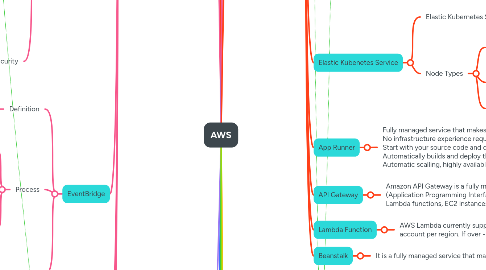
11.8. Elastic Kubenetes Service
11.8.1. Elastic Kubernetes Service (EKS) is a **fully managed** service that makes it easy to **run Kubernetes on AWS** without having to install, operate, or maintain your own Kubernetes control plane or nodes
11.8.2. Node Types
11.8.2.1. Managed Node Groups
11.8.2.1.1. Managed node groups automatically provision and manage EC2 instances as worker nodes. EKS handles tasks like deploying nodes, updating them, and ensuring their lifecycle management. **AWS managed nodes, deployment and maintenance**
11.8.2.2. Self-Managed Nodes
11.8.2.2.1. Manually provision and manage your EC2 instances that serve as worker nodes. You have complete control over how to configure, patch, and scale your nodes. **You are in charge of managing & configure nodes from scratch**
11.8.2.3. AWS Fargate (Serverless Nodes)
11.8.2.3.1. No maintenance required, no nodes managed
11.9. App Runner
11.9.1. Fully managed service that makes it easy to deploy applications and APIs at scale No infrastructure experience required Start with your source code and docker images Automatically builds and deploy the web app Automatic scalling, highly available, load balancer, VPC
11.10. API Gateway
11.10.1. Amazon API Gateway is a fully managed service that allows developers to create, publish, maintain, monitor, and secure APIs (Application Programming Interfaces) at any scale. It serves as a front door for applications to access backend services such as AWS Lambda functions, EC2 instances, or any HTTP-based service.
11.11. Lambda Function
11.11.1. AWS Lambda currently supports 1000 concurrent executions per AWS account per region. If over -> need to contact AWS to increase the limit
11.12. Beanstalk
11.12.1. It is a fully managed service that makes it easier to deploy, manage, and scale applications and services in the cloud.
12. Storages
12.1. EFS
12.1.1. Elastic File System (EFS) is a fully managed, scalable, and elastic file storage service offered by AWS EFS is ideal for applications that require **shared file** access **across multiple instances,** making it suitable for a wide range of use cases. >> **Instances from different AZs to read, and write to the same storage -> Use EFS**
12.1.2. Amazon Elastic File System (Amazon EFS) can be accessed in other AWS regions by using an inter-region VPC peering connection
12.2. EBS
12.2.1. **Definition**
12.2.1.1. Amazon Elastic Block Store (EBS) is a cloud-based block storage service provided by AWS, designed to work with Amazon EC2 instances. EBS offers persistent storage, meaning that the data stored in EBS volumes remains available even after the associated EC2 instance is stopped or terminated.
12.2.2. **Volume Types**
12.2.2.1. - General Purpose (gp2, gp3): balance cost & performance - gp3: 3000 iops - 125MiB/s, up to 16,000 iops - 1000 MiB/s - gp2: 3000 iops , up to 16000 iops - Highest-performance (io1, io2): mission critical, low-latency, high-throughput workloads - io1: 64000 iops - io2: 256000 iops - Low Cost HDD (st1). HDD for frequent access - Lowest Cost HDD(sc1). HDD for infrequent access.
12.2.3. **Multiple Attach**
12.2.3.1. Certain EBS volume types (e.g., io2) support Multi-Attach, allowing you to attach a single volume to multiple EC2 instances concurrently, which is useful for clustered applications. - Single EBS can be attach to multiple EC2. - Only io1 or io2 can be executing multi-attach. - Up to 16 instances at a time. - Must be a file system that clustering awareness (not xfs, ext4, etc, …)
12.2.4. **Encryption**
12.2.4.1. EBS supports encryption of data at rest and in transit, ensuring that sensitive information is protected. Encryption can be enabled on a volume during creation or for existing volumes. Encrypt the EBS by creating Snapshot → Copy Snapshot and active encryption → restore back to the EC2 instance.
12.3. FSx for Windows (File Server)
12.3.1. - Fully managed windows file system - Support SMB & windows NTFS - Microsoft active directory integration, ACLs, - Can be mounted on Linux EC2 instances - Scale up to 10s of GB/s millions IOPs, 100S PB of data - Options: SSD/ HDD - Access: VPN/ Direct connect - Can be configure multi-AZ
12.4. FSx for Lustre
12.4.1. - Machine learning, HPC - Video Processing, Financial Modeling, Electronic - Storage options: SSD/ HDD - Seamless integration with S3 - Can be used from on-premises server (VPN or Direct Connect
12.5. NetApp ONTAP
12.5.1. - Work with: Linux, Window, MacOS, VMWare, Amazon EC2, EC2, EKS
12.6. Storage Gateway
12.6.1. It's a bride between on-premises data and cloud data to perform a backup for disaster recorvery, restore, cache, etc
12.6.2. S3 File Gateway
12.6.2.1. S3 File Gateway - S3 file gateway will translate NFS or SMP from your on-premises server to the S3 storages - The File. Gateway will be installed on the on-premises server. instead of cloud - The File Gateway will cache the most recent files for better user experience.
12.6.3. Volume Gateway
12.6.3.1. - Block storage using ISCSI backed by S3 - Backed by EBS snapshot to restore - Translate iSCSI to HTTP and load to S3
12.7. S3
12.7.1. Definitions
12.7.1.1. S3
12.7.1.1.1. S3 is a combination of Buckets (Directory/Folder) and Object (Files)
12.7.1.2. Bucket
12.7.1.2.1. - The name of the Bucket must be unique on all regions - User define unique bucket name at the region level
12.7.1.3. Object
12.7.1.3.1. - **KEY**: **KEY** is the FULL Path (from the end of Bucket Name to the last character) - KEY = PREFIX + Object Name (Prefix is the path of Object) - **Values**: Maximum 5TB (need to upload multi-part for each max 5GB) - Metadata: - Version → If user enable version control - Tag:
12.7.2. Security
12.7.2.1. User Base
12.7.2.1.1. - Assign IAM Policy to S3 Bucket for EC2 User - Assign IAM Role to S3 Bucket for EC2 Instance - IAM User of other AWS Account → Create Bucket Policies with Cross Account
12.7.2.2. Resource Base
12.7.2.2.1. - Bucket Policies: JSON data file - Resource: Bucket and Object - Effect: Allow / Deny - Actions: Set of API to Allow or Deny - Principle: The account or user to apply policy to. - Object ACL - Bucket ACL
12.7.2.3. Encryption
12.7.2.3.1. Server Side Encryption
12.7.2.3.2. Client-side encryption
12.7.2.3.3. Encryption in flight (SSL, TLS)
12.7.3. S3 Versioning
12.7.3.1. - User will be able to enable Versioning in the properties of bucket - When user upload/delete (delete marker) the same key mutliple times, the S3 will update the version to keep track the history. - Files that have been uploaded before enabling Versioning will have the default value to `null`
12.7.4. S3 Replication
12.7.4.1. Sync S3 bucket from one region to another region and it’s required to enable Versioning for this feature. Able to sync the delete marker (optional) - Cross-Region Replication (CRR) - Same-Region Replication (SRR)
12.7.4.2. Only **new objects** will be async after **enabling** S3 Replication. If user wants to sync **existing S3 objects,** use **S3 Batch Replication**
12.7.4.3. **Encryption:** → For object encrypted with SSE-KMS, yu need to enable the option - Specify which KMS key to encryp the objects - Adapt KMS key policy for the target key - An IAM role. with kms:Decrypt for the source KMS key and KMS:Encrypt for the target KMS key - You might get KMS throttling errors, in which case you can ask for a Service Quotas increase
12.7.5. S3 Storage Class
12.7.5.1. Standard
12.7.5.1.1. For frequently accessed data with low latency and high throughput requirements.
12.7.5.2. Standard IA (Infrequent Access)
12.7.5.2.1. For data that is less frequently accessed but requires rapid access when needed.
12.7.5.3. One-Zone IA
12.7.5.3.1. For infrequently accessed data that does not require the resilience of multiple availability zones but requires rapid access when needed
12.7.5.4. Glacier
12.7.5.4.1. For archival storage where data retrieval times of minutes to hours are acceptable. It is a cost-effective option for long-term storage.
12.7.5.5. Glacier Deep Archive
12.7.5.5.1. The lowest-cost storage class designed for long-term data archiving, with retrieval times ranging from hours to days.
12.7.5.6. Glacier Intelligent-Tiering
12.7.5.6.1. Automatically moves data between two access tiers (frequent and infrequent) based on changing access patterns, optimizing cost without performance impact.
12.7.6. S3 Life cycle
12.7.6.1. Amazon S3 Lifecycle Management is a feature that allows users to automate the process of transitioning objects between different storage classes and deleting objects that are no longer needed. This helps optimize storage costs and manage data efficiently over time. **E.g:** Move objects from Standard IA to Galicer for cost saving
12.7.6.2. The minimum storage duration is 30 days before transition to another class
12.7.7. S3 Requester Pay
12.7.7.1. Enable Requester to Pay so that the requester need to pay for the download. The requester must be authenticated by Amazon. **E.g:** If the owner of the buckets needs to pay for the S3’s storage and the networking fees. However, in some case which some large dataset. The Requester need to pay for that.
12.7.8. S3 Event Notification
12.7.8.1. S3 sends data when some events happening (object_created, object_deleted, etc) to some AWS services such as SQS, SNS, EventBridge. Each of them need to be configure the Resource (Access) Control Policy to access instead of IAM.
12.7.9. S3 Performance:
12.7.9.1. S3 is automatically scales to high request without any configurations. - Minimum per path of bucket: If you want, **you can add 10 / into the prefixes then these number will scale up 10 times** - 3500rps PUT/COPY/POST/DELETE - 5500rps GET/HEAD - No limit to the number of prefixes in buckets How to speed up objects download/upload processes? - Should split the big files into smaller groups and upload in parallel to take the advantages of network (>100MB is recommended, >5GB is required) - Split the big file to smaller to download, sometime we can know the fixes first number of bytes to get the meta data.
12.7.10. S3 Batch Operations
12.7.10.1. Perform bulk operations on existing S3 objects with a single request. - Modify metadata - Copy objects - Encrypt/Decrypt objects - Modify ACLs - Rstore objects - Invoke lamda functions to execute custom functions S3 Batch Operation: - Manage retries, tracks progress, sends completion notification, generate reports Process: - S3 Inventory → S3 Select (filter) → S3 Batch Operation
12.7.11. S3 Storage lens
12.7.11.1. Data visualization for better future plan across organizations in the main AWS account. - AWS has a default dashboard for visualization. - Metrics: - Summary - Cost-Optimiation - Data-protection - Access-management - Performance - Activity - Detailed Status Code
12.7.12. S3 Transfer Acceleration
12.7.12.1. Use to transfer the file from one region to another region via AWS’s private network. The source can be AWS cloud machine or on-premises setup. **Only pay for the file that is accelerated**
12.7.13. S3’s MFA Delete
12.7.13.1. Force user to generate and input code from devices before doing important actions on S3 - To use MFA delete, Versioning must be enabled
12.7.14. S3’s Access Logs
12.7.14.1. All request (success, error) will be logged to the Logging Bucket
12.7.15. S3's Pre-signed URLs
12.7.15.1. Generate a URLs that will be expire in 1 minutes until 720 minutes. The user that using the pre-signed URLs inherit action-to-perform from the user that created the presigned URLs
12.7.16. Glacier Vault Lock & S3 Object Lock
12.7.16.1. To ensure WORM (Write-one read many), lock the policy for future edits. It’s helpful for compliance and data retention. - **`Must enable versioning`** - Block object version deletion - Adopt WORM - Retention Mode - Compliance - Object version can’t be overwriting or deleted - Object retention mode can’t be change - Retention Mode - Governance - Most user can’t overwrite or delete or alter lock settings - some users have special permission to change the retention or delete - Retention Period: - Protect object for a fixe period, can be extended - Legal Hold: - Protect the object indefinitly, independent from retention period - Can be placed and removed using the s3:PutObjectLegalHold IAM permission
12.7.17. Object Lock
12.7.17.1. Retention Periods
12.7.17.1.1. S3 Object Lock allows you to specify retention periods during which objects are protected from deletion or modification. During this time, the object is immutable, ensuring that no one can change or delete it.
12.7.17.2. Retention Mode
12.7.17.2.1. **Governance Mode:** In this mode, users with specific permissions can still delete or modify the object, but most users are prevented from making changes. **Compliance Mode:** In this mode, no user, including the root account, can delete or modify the object during the retention period. This mode offers the highest level of protection.
12.7.17.2.2. Different version can have different modes
12.7.17.3. Legal Holds
12.7.17.3.1. S3 Object Lock also allows you to place legal holds on objects. A legal hold prevents the deletion of an object indefinitely until the legal hold is removed, regardless of the
12.7.17.4. WORM Compliance
13. Access Controls
13.1. IAM
13.1.1. Policies
13.1.1.1. Policies is a JSON Documents to claim the actions providing for
13.1.1.2. **Structure of Policy:** - **Version:** The version of policy, optional - **Statements:** List of multiple statements to claim actions + **Sid:** The statement ID, should unique + **Principle:** The Amazon Resource Name (ARN) representing for people, services, etc. + **Effect:** Allow/Deny + **Action:** Describe the API action in the regex (optional) format + **Condition:** The condition to apply the statement (filter
13.1.2. Users
13.1.2.1. An account for the single physical user to get in to the AWS account with username/password
13.1.3. Groups
13.1.3.1. **Definition**: Group is a combination of similar users in the organization **Features**: Group contains a list of access control policies representing the actions that group can perform
13.1.4. Roles
13.1.4.1. Roles is similar to groups, a combination of multiple policies that claim the access. However, Role is different with Group because the Role often granted to services to access other services. Where group focus on granting access to Users
13.2. MFA
13.2.1. **Multi-factor Authentication:** Used to add one more layer of security on the account
13.3. Organizations
13.3.1. Similar to group but different. - Manage ACL under Organization Unit (OU) - Each OU can be represented for a department and OU can be define in hierarchy. - Can create OU User (similar to IAM User) - Can grants access to OU and Users - Can share EC2 reserved instances or Saving Plans across accounts & OUs **Security**: Control access uder SCP (Service Control Policy) instead of Policy
13.4. IAM Identity Center
13.4.1. Often use together with Organization. Grants access permantly or temporary for the single IAM user to multiple Organization. Each Organization will have separated policies so they can login ot that OUs with configured SCPs
13.5. Permission Boundary
13.5.1. Define IAM permission boundary to grant policies & statements. Prevent mistake when assign people to groups & policies that shouldn't be
13.6. AWS Control Tower
13.6.1. Easy ways to setup and govern a secure and compliant multi-account AWS environment based on the best practices
13.7. Best Practices
13.7.1. **Policy intersection:** Final policy will be the intersection of IAM policy, Organization SCP, and Permission Boundary - Do not use Root account excep setup - One Physical User = One IAm user - Assign users. to groups & permission to groups - Create strong password - Use MFA - Create use Roles for giving AWS Services’s permission - Access Key (via CLI / SDK) must be private. - Audit permission via reports
14. Network & DNS
14.1. Route 53
14.1.1. DNS
14.1.1.1. Domain Name System, which will translate the human friendly domain to the IP address that computer using. - Top Level Domain (.com, .net, etc), managed by ICANN - Second LeveL Domain (example.com, longbui.net, abc.xyz, etc) → Manage by Godaddy, Cloudflare, Route53, etc - Subdomain & Wildcard (odoo.longbui.net) → Manage by user via secondary provider
14.1.1.2. **Process of translating DNS.** 1. Computer will ask for a domain [longbui.net](http://longbui.net) on the local DNS server 2. If we cannot found it on the local DNS server → Find on the root DNS (ICANN) 3. If the ICANN cannot found → Find on the IANA (Branch of ICANN) 4. The IANA will tell computer where is it (Godaddy, Cloudflare, Route53, etc) 5. Ping to specific provider to get the ip, and cache them on the local DNS server
14.1.2. AWS Route 53 (DNS provider)
14.1.2.1. **Definition**: A highly available, scalable, fully managed and authoritative DNS.
14.1.2.2. CNAMES
14.1.2.2.1. Point the domain to another domain, works for NON ROOT DOMAIN
14.1.2.3. ALIAS
14.1.2.3.1. Point the domain to another domain, works for ROOT and NON ROOT DOMAIN - Target: ELB, API Gateway, CloudFront, Elastic Beanstalk, S3 Websites, VPC, GAA, Route 53 in the same hosted zone. - Cannot set ALIAS to EC2’s DNS Name
14.1.3. Hosted Zone
14.1.3.1. - **Public Hosted Zones:** Contains records that specify how to route traffic on the internet
14.1.3.2. - **Private Hosted Zone:** Contains record that specify how to traffic within one or more VPCs
14.1.4. Health Check
14.1.4.1. Send HTTP request to a ALB to ensure the instance are ready to receive the request, the success if the server response 2xx or 3xx code. - Health-check can be setup pass/failed based on the text in the first 5120 bytes - Result of health check can be combine together (AND, OR, NOT) and specify how many percent pass to make the total healthcheck pass - Route 53 cannot access private endpoint, only for public endpoint. - Can config heathcheck based on CloudWatch alarm.
14.1.5. Routing Policies
14.1.5.1. Simple
14.1.5.1.1. If the client access multiple IPv4s via only one DNS records, the Route 53 will reply multiple options and the client will choose only one randomly.
14.1.5.2. Weighted
14.1.5.2.1. The user manually input the weight for each ip address. The AWS will evaluate and send the request to destination IP based on weight by balancing input( the total doesn’t need to be 100) Weight work similar to Load Balancing
14.1.5.3. Latency
14.1.5.3.1. Setup the DNS including the region of the IPv4. Then the Route 53 will take responsible to reroute the request to the nearest IPv4
14.1.5.4. Failover
14.1.5.4.1. Configure secondary (backup) instance, if the primary instance has not passed the health check, then the Route 53 will redirect the request to the secondary instance.
14.1.5.5. Geolocation
14.1.5.5.1. Specify the destination based on the geolocaiton of the client request. **E.g:** If the client from Asia → Go to Asia server, if the client is in Viet Nam → Go to VietNam server
14.1.5.6. Geoproximity
14.1.5.6.1. Route the traffic based on the GEO location and some configured bias value (integer) to shift the traffic to some specific server
14.1.5.7. IP-based routing
14.1.5.7.1. Configure CIDR collection to define the range of IP address. If the client’s IPv4 is belonging to the specific CIDR, their traffic will be reroute to the configured IPv4 by Route53
14.1.5.8. Multi-value
14.1.5.8.1. Associate the DNS record with the heath check record. Then the Route53 only response the record that has passed health check to the client then client will be able to choose the suitable one.
14.1.6. Third-party DNS provider <> Route 53
14.1.6.1. We can buy domain from GoDaddy or CloudFlare and change the nameserver to Route53 to manage them
14.2. CloudFront
14.2.1. **Definition**: CloudFront is a CDN (Content Delivery Network) to improve the read performance, content is cached at the edge to improve user experiences
14.2.2. CloudFront Origin
14.2.2.1. **Source to read the website pages** - S3 Buckets → Distribute files & cache - Custom Origin (HTTP) - Application Load Balancer - EC2 - S3 Website, - Any HTTP
14.2.3. Geo Restriction
14.2.3.1. Restrict who from where can access to your distribution - Allow list - Block list Geographic use 3party services, therefore, some legal problem might be hapenning **E.g: ** Medium block Vietnamese server
14.2.4. Price Classes
14.2.4.1. Because the CloudFront is using the edge location all around the world → the cost of each location is varies. → Can reduce the number of edge locations for cost reduction - Can adjust the price classes - Price Class All → Best performance because it’s using all regions - Price Class 200 → Most 200 edges - Price Class 100 → Most 100 edges
14.2.5. Cache Invalidation
14.2.5.1. The cache will be auto invalidating when TTL is expired. However, Cache invalidation is used to manually invalidate cache before TTL expiration.
14.3. Global Accelerator
14.3.1. Unicast IP
14.3.1.1. One sever holds one IP
14.3.2. Anycast IP
14.3.2.1. All servers hold the same IP address and the client is routed to the nearest one.
14.3.3. Definition
14.3.3.1. - Leverage Anycast concepts and use AWS internal network to route application. - AnycastIP send traffic directly to Edge, Edge send directly to Elastic IP, EC2, ALB, NLB, Public, or private - Health Check is available - Security: Only 2 external ip need to be white-listed
14.3.3.2. Can use GA to reroute the traffic to multiple regions, (this is the key of important)
14.3.4. Comparison with CloudFront
14.3.4.1. - Use the same AWS global network and its edge - Integrated with AWS Shield for DDOs **Cloud Front:** - Cache content to improve performance - Dynamic content - Content is served at the edge **Global Accelerator** - Wide range of applications over TCP - Proxying package at the edge to applications - Got fit for non-HTTP (UDP, MQTT) - Good for HTTP that required static IP - Good for HTTP that required deterministic, fast regional failover