


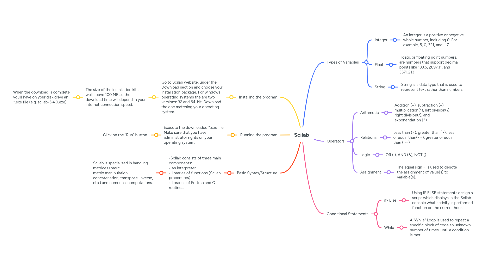
1. Installing the program
1.1. Go to Scilab website, under the Download section and choose your installation package. For windows operating systems the are two versions: 32 and 64-bit. Download the one matching your operating system.
1.1.1. The size of the installation kit is well above 100 MB so the download time will depend in your internet connection speed.
1.1.1.1. When the download is complete you’ll have on your disk drive an *.exe file (e.g. scilab-5.4.0.exe)
2. Running the program
2.1. Execute the downloaded *.exe file. Make sure that you have administrator rights on your operating system.
2.1.1. Click on the “Run” button.
3. Basic Syntax/Structure
3.1. -Scilab consists of three main components: • an interpreter • libraries of functions (Scilab procedures) • libraries of Fortran and C routines.
3.1.1. Scilab is specialized in handling matrices (basic matrix manipulation, concatenation, transpose, inverse, etc.) and numerical computations.
4. Types of Variables
4.1. Integer
4.1.1. An integer is a positive or negative whole number, including 0. For example, 5, 0, 321, and -17.
4.2. Float
4.2.1. Floats, or floating point numbers, are numbers that support decimal points like 133.5, 2897.11, and 3571.213
4.3. String
4.3.1. String is a data type that is used to represent text rather than numbers.
5. Operators
5.1. Arithmetic
5.1.1. Addition (+), subtraction (–), multiplication(*), left division(\), right division(/), and exponentiation (^)
5.2. Relational
5.2.1. Less than (<), greater than (>), less or equal than(<=), greater or equal than (>=)
5.3. Logic
5.3.1. OR (|), AND (&), NOT ()
5.4. Assignment
5.4.1. The equal sign = is used to denote the assignment of value(s) to variable(s).
6. Conditional Statements
6.1. if- Else
6.1.1. Using IF ELSE statements design a script which displays in the Scilab console what activity is performed function on the current hour.
6.2. While
6.2.1. A "While" Loop is used to repeat a specific block of code an unknown number of times, until a condition is met.