


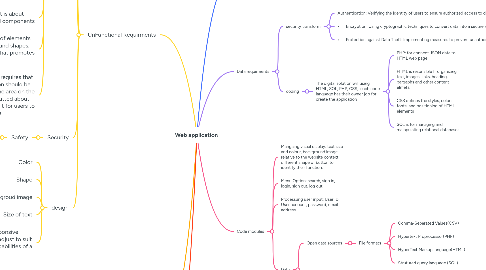
1. Functional Requirments
1.1. The digital solution will using mutiple way of data exchange to change details and function through an API, for example
1.1.1. JSON:(Javascript object notation)
1.1.1.1. It easy to reading coding language for most solucitons in the reality world
1.1.2. XML (extensible Markup Language)
1.1.3. SQL
1.1.3.1. using to connect database to html web page
2. UnFunctional Requirments
2.1. Michelle bridges brand
2.2. CARP
2.2.1. Utility:The utility of an interface is simply how useful it is
2.2.2. Portability: An interface is said to be portable if it is platform-independent.
2.2.3. effectiveness: Effectiveness of a user interface relates to how well it does what it needs to do.
2.2.4. learnability: Learnability includes how quickly and easily users can learn to find information, complete tasks andn navigate the digital soluction
2.2.5. contrast: Contrast insists that any item you would like to stand out and be eye-catching should contrast with its background and use other effects such as bold type, underlining and more.
2.2.6. alignment: Alignment is about positioning graphical components
2.2.7. Repetition: Repetition of elements such as fonts, colours and shapes, creates a uniformaity that promotes design harmony
2.2.8. proximity: Proximity requires that all related information should be organised in the same area on the page, rather than scatted about and making it difficult for users to understand the page
2.3. Security
2.3.1. Safety
2.3.1.1. The interface design must also consider measures that help create a safe environment for the user
2.4. design
2.4.1. Color
2.4.2. Shape
2.4.3. Backgroud image
2.4.4. Size of text
2.4.5. Responsiveness: A responsive design will dynamicall adjust to suit the screen size and capabilities of a wide variety of devices
3. User interface
3.1. Buttons:Buttons are clickable elements that trigger an action when clicked
3.2. Dropdown menus: Dropdown menus present a list of options that user can slect from by clicking on a a downward- facing arrow.
3.3. Text fields: Text fields allow users to input and edit text.
3.4. Checkboxes: Checkboxes are small boxes that users can select or deselect to indicate choices or preferences.
4. Data requirments
4.1. security transform
4.1.1. Authentication: Verifying the identity of users to ensure authorized access to data.
4.1.2. • Encryption: Using cryptographic techniques to convert data into a secure and unreadable form, safeguarding it during transmission and storage.
4.1.3. • Protection against Data Theft: Implementing measures to prevent unauthorized access and protect data from being stolen or compromised by hackers.
4.2. coding
4.2.1. The digital solution will using HTML, SQL, PHP, CSS, each code language has their owner job for create the application
4.2.1.1. PHP: for connect JSON data to HTML web page
4.2.1.2. HTML is respnsible fr organizing text, images, links, heading, pargaphs and other content elmets.
4.2.1.3. CSS defines the styles, colors, fonts, and positioning of HTML elements
4.2.1.4. SQL is for managing and mainpulating relational databases
5. Code modules
5.1. Mangaing visual display: text size and colour, background image relative to the website context, different shape of button to identify their function.
5.2. Menu Option: search, sign in, login, sign out, log out.
5.3. Processung user input: User ID, User account, password, email address.
5.4. Data
5.4.1. Open data sources
5.4.1.1. File formats
5.4.1.1.1. Comma-Separated Values(CSV)
5.4.1.1.2. Hypertext Proprocessor(PHP)
5.4.1.1.3. HyperText MarkupLanguage(HTML)
5.4.1.1.4. Strutured query language (SQL)
5.4.2. Existing originisation data
5.4.2.1. Data struture and formats
5.4.2.1.1. INT
5.4.2.1.2. VARCHAR
5.4.2.1.3. TEXT
5.4.2.1.4. DATE