


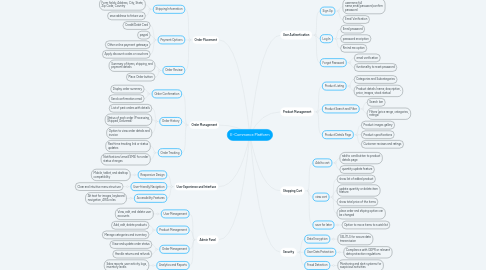
1. Order Placement
1.1. Shipping Information
1.1.1. Form fields: Address, City, State, Zip Code, Country
1.1.2. save address to feture use
1.2. Payment Options
1.2.1. Credit/Debit Card
1.2.2. paypal
1.2.3. Other online payment gateways
1.2.4. Apply discount codes or vouchers
1.3. Order Review
1.3.1. Summary of items, shipping, and payment details
1.3.2. Place Order button
2. Order Management
2.1. Order Confirmation
2.1.1. Display order summary
2.1.2. Send confirmation email
2.2. Order History
2.2.1. List of past orders with details
2.2.2. Status of each order (Processing, Shipped, Delivered)
2.2.3. Option to view order details and invoice
2.3. Order Tracking
2.3.1. Real-time tracking link or status updates
2.3.2. Notifications (email/SMS) for order status changes
3. User Experience and Interface
3.1. Responsive Design
3.1.1. Mobile, tablet, and desktop compatibility
3.2. User-friendly Navigation
3.2.1. Clear and intuitive menu structure
3.3. Accessibility Features
3.3.1. Alt text for images, keyboard navigation, ARIA roles
4. Admin Panel
4.1. User Management
4.1.1. View, edit, and delete user accounts
4.2. Product Management
4.2.1. Add, edit, delete products
4.2.2. Manage categories and inventory
4.3. Order Management
4.3.1. View and update order status
4.3.2. Handle returns and refunds
4.4. Analytics and Reports
4.4.1. Sales reports, user activity logs, inventory levels
5. User Authentication
5.1. Sign Up
5.1.1. username,full name,email,password,confirm password
5.1.2. Email Verification
5.2. Log In
5.2.1. Email,password
5.2.2. password encription
5.2.3. Rmind me option
5.3. Forgot Password
5.3.1. email varification
5.3.2. funtionality to reset password
6. Product Management
6.1. Product Listing
6.1.1. Categories and Subcategories
6.1.2. Product details (name, description, price, images, stock status)
6.2. Product Search and Filter
6.2.1. Search bar
6.2.2. Filters (price range, categories, ratings)
6.3. Product Details Page
6.3.1. Product images gallery
6.3.2. Product specifications
6.3.3. Customer reviews and ratings
7. Shopping Cart
7.1. Add to cart
7.1.1. add to card button to product details page
7.1.2. quantity update feature
7.2. view cart
7.2.1. show list of added product
7.2.2. update quantity or delete item feature
7.2.3. show total price of the items
7.2.4. place order and shiping option can be changed
7.3. save for later
7.3.1. Option to move items to a wishlist
8. Security
8.1. Data Encryption
8.1.1. SSL/TLS for secure data transmission
8.2. User Data Protection
8.2.1. Compliance with GDPR or relevant data protection regulations
8.3. Fraud Detection
8.3.1. Monitoring and alert systems for suspicious activities