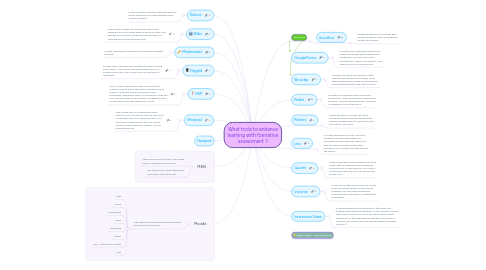
What tools to enhance learning with formative assessment ?

Jetzt loslegen. Gratis!
oder registrieren mit Ihrer E-Mail-Adresse
What tools to enhance learning with formative assessment ? von Mind Map: What tools to enhance learning with formative assessment ?

1. Kahoot

1.1. A game-based classroom response system, where teachers can create quizzes using Internet content.

2. Wikis

2.1. Wikis allow students to collaborate and to give feedback to one another when producing a task. The teacher can also give feedback on production in a synchronous or asynchronous way.

3. Mindmeister

3.1. A mind mapping tool designed to understand student thinking.

4. Flipgrid

4.1. Flipgrid offers teachers and students to interact using small videos. Very much used around the world, it is powerful as it uses very similar tools as Snapchat or Înstagram.

5. H5P

5.1. H5p is a free, web-based open-source tool for creating easy to share interactive content such as quizzes, matching games and online audio recordings, interactive video. Its connection with the LMS Moodle makes it very easy to integrate all sorts of evaluation activities within the course.

6. Etherpad

6.1. This unique tool for collaborative work offers 8 colors to choose from so that each contributor may use a different color. You can easily imagine group work, be it peer review or peer editing for starters, can be made interactive

7. Nearpod

8. M365

8.1. Teams and OneNote offer a very large panel of assessment activities

8.2. See tutorials on M365 (teams and One note ClassNotebook)

9. Moodle

9.1. Very powerful for assessing in synchronous or asychronous sessions.

9.1.1. chat

9.1.2. forum

9.1.3. assignment

9.1.4. wikis

9.1.5. workshop

9.1.6. lesson

9.1.7. H5P - Interactive content

9.1.8. quiz

10. Interactive

10.1. Socrative

10.1.1. Engaging exercises and games that engage students using smartphones, laptops and tablets.

11. GoogleForms

11.1. A Google Drive app that allows you to create documents that students can collaborate on in real time using smartphones, tablets and laptops. Very useful also for self-assessment

12. Wooclap

12.1. Teachers can easily and quickly create quizzes that students can answer using their mobile device. Great for checking for understanding before and after a lesson.

13. Padlet

13.1. Provides an essentially blank canvas for students to create and design collaborative projects. Great for brainstorming. Give likes or feedbacks on posted items.

14. Plickers

14.1. Allows teachers to collect real-time formative assessment data without the need for student devices. Perfect for the one-device classroom.

15. Lino

15.1. A virtual corkboard of sticky-notes so students can provide questions or comments on their learning. These can also be used to create collaborative activities or to comment on the goals of the lesson.

16. Quizlet

16.1. Create flashcards, tests, quizzes and study games that are engaging and accessible online and via a mobile device. For a most collaborative activity, you can also try the quizlet Live.

17. Vocaroo

17.1. A free service that allows users to create audio recordings without the need for software. You can easily embed the recording into slide shows, presentations, or websites.

18. Interactive Video

18.1. In adding questions and activities in the video, the students get additional feedback, more cognitive activity within the visualization. It can be used in every phase depending on the pedagogical intention. Also think of using the interactive video as learning design (students create IV)

19. Aude Vaudan - December 2020