

1. Structure
1.1. Point
1.1.1. Что это?- What
1.1.2. Для чего это нужно / как этим пользоваться? - Why we need?
1.1.3. Пример - usage example
1.1.4. Практическая задача - Practice
2. Salesforce Layers
2.1. Org / Production
2.1.1. Applications
2.1.1.1. Tables
2.1.2. UI
2.1.3. Security
2.1.4. MetaData
2.1.4.1. RecordType
2.1.4.2. Fields
2.1.4.3. Objects
2.1.5. Data
2.1.5.1. Records
2.2. Sandboxes
2.3. Trailhead
2.4. Developer Edition (DE) org
3. Intro
3.1. Salesforce
3.1.1. What is CRM?
3.1.2. What is Salesforce?
3.1.3. Why companies use CRM?
3.1.4. Waht is SaaS?
3.1.5. Lighting Platform
3.1.6. Multitenant cloud
3.1.7. Standard functionality
3.1.8. Customization
3.2. Development
3.2.1. No code (declarative) development:
3.2.2. Programmatic development
3.3. Salesforce Org
3.3.1. Application
3.3.2. Database
3.3.3. Objects
3.3.4. Records
3.3.5. Fields and values
3.3.6. Metadata
3.4. Salesforce Job Roles
3.4.1. Salesforce Developer
3.4.2. Salesforce Admin
3.4.3. Salesforce Architect
3.5. Developer Edition (DE) org
3.6. trust.salesforce.com
3.7. Trailhead Playground
3.8. Production
3.9. Sandboxes
3.10. Appexchange
4. Data Modeling
4.1. Objects
4.1.1. Object Manager
4.1.2. Standard Objects
4.1.3. Custom Objects
4.1.4. Junction Objects
4.1.5. Data model
4.1.6. External objects
4.1.7. BigObjects
4.2. Fields
4.2.1. Fields Types
4.2.1.1. Standard Fields
4.2.1.1.1. System
4.2.1.1.2. Identity
4.2.1.1.3. Name
4.2.1.1.4. Auto Number
4.2.1.2. Fields Group 2
4.2.1.2.1. Number
4.2.1.2.2. Currency
4.2.1.2.3. Checkbox
4.2.1.2.4. Percent
4.2.1.2.5. Date and Date/Time
4.2.1.2.6. Text Area
4.2.1.2.7. Rich Text Area
4.2.1.2.8. Text
4.2.1.3. Fields Group 3
4.2.1.3.1. Picklist
4.2.1.3.2. Formula Fields
4.2.1.3.3. Roll-Up Summary Fields
4.2.1.3.4. Email
4.2.1.3.5. Phone
4.2.1.3.6. Geolocation
4.2.1.3.7. URL
4.3. Records
4.4. Object Relationships
4.4.1. Lookup
4.4.2. Master-Detail
4.4.3. Many-to-Many
4.4.4. Self Relationship
4.4.5. External
4.4.6. Hierarchical
4.5. Fields Dependency
4.6. Schema Builder
4.7. Record Types
4.8. Field History Tracking
4.9. Deliting
4.10. Validation Rules
4.11. Applications
5. UI
5.1. Applications
5.1.1. Tabs
5.1.2. Navigation Bar
5.2. Search Page Layout
5.3. List Views
5.4. Page Layouts
5.5. Lighting Record Pages
5.6. Compact Layouts
5.7. Buttons and Actions
5.8. Themes and Branding
5.9. Lightning Extension for Chrome
5.10. Setup
6. Data Management
6.1. Import Data
6.2. Export Data
6.3. Import Wizard
6.4. Data Loader
6.5. Dataloader.io by mulesodt
6.6. SOQL
6.7. Salesforce Inspector
6.8. Mass transferr functions
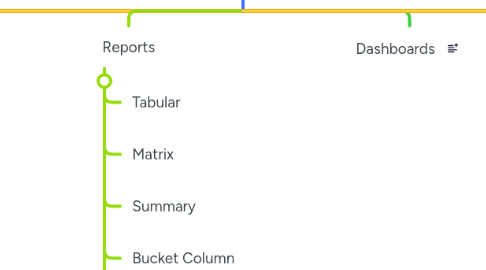
7. Reports
7.1. Tabular
7.2. Matrix
7.3. Summary
7.4. Bucket Column
7.5. Custom Report Types
7.6. Conditional highlihtning
7.7. Bucket Fields
7.8. Repport Summary Formulas
7.9. Report Type Layout
7.10. Custom Report Types
7.11. Joined Reports
7.12. Report Charts
7.13. Subscribe
8. Dashboards
9. Unclassified
9.1. Org
9.2. Applications
9.3. Audit Trail
9.4. Recurring tasks
9.5. Security Token To Profile
9.6. Data Backup
9.7. Salesforce Licenses
9.8. Person Accounts
9.9. Salesforce Duplicate Rules
10. Resources
10.1. Trailhead
10.1.1. Admin Beginner
10.2. Udemy
10.3. Certification
10.4. Admin Questions
10.5. Glossary
11. Org
11.1. Setup Audit trail
11.2. Security Health Check
11.3. Company Profile
12. Security
12.1. Users
12.2. Profiles
12.3. Roles
12.4. Sharing Settings
12.4.1. OWD
12.4.2. Sharing Rules
12.4.3. Manual Sharing
12.5. Permission Sets
12.6. Restriction Rules
12.7. Public Groups
12.8. Queues
12.9. MFA
12.10. User Management
12.10.1. add multiple users
12.10.2. Freeze
12.11. Delegated Adminstration
12.12. Permission Set Group
13. Automations
13.1. Flows
13.1.1. Screen Flow
13.1.2. Record Triggered Flow