

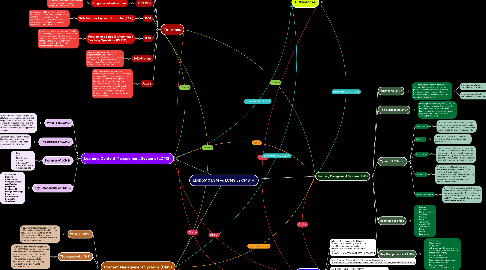
1. Learning Management Systems (LMS)
1.1. What is an LMS?
1.1.1. A learning management system (LMS) is software that allows users to develop, publish, automate, and deliver eLearning material and training courses. These materials can be given in both synchronous and asynchronous modes.
1.1.1.1. Synchronous - allow individuals to communicate in real time.
1.1.1.2. Asynchronous - allow individuals to communicate via email and forum.
1.2. The purpose of LMS?
1.2.1. Learning management systems (LMS) are most frequently used in business and higher education to support online learning initiatives, accomplish training objectives, and create corporate educational materials.
1.3. Types of LMSs
1.3.1. Open-source
1.3.1.1. An open-source LMS is a coding system created and maintained by a community of developers. Organizations can have access to and modify the system's source code.
1.3.2. Enterprise
1.3.2.1. An enterprise LMS, often known as a commercial LMS, is created primarily for large enterprises
1.3.3. Cloud-based
1.3.3.1. A cloud-based LMS is accessed over the internet and is housed on a distant server. This form of LMS eliminates the need for businesses to buy and maintain their own gear and software. Instead, customers can use a web browser to access the system.
1.3.4. On-premise
1.3.4.1. An on-premise LMS is hosted and managed on a company's servers. This form of LMS allows businesses more control over their data and system settings and might be a viable solution for organizations with strong security and compliance standards.
1.3.5. Integration-capable
1.3.5.1. An LMS with integration capabilities can work with other applications that your firm may already be utilizing. This enables the LMS and other systems, such as HR, CRM, and ERP, to communicate data in real time and streamline workflow.
1.4. Examples of LMSs
1.4.1. • Canvas • Moodle • Blackboard Learn • Schoology • Continu • Docebo • TalentLMS • Absorb LMS • 360Learning • Bluevolt • Litmos • LearnUpon
1.5. Key Components of LMSs
1.5.1. • Scalability • Customization • Integration • Advanced reporting and analytics • Communication and collaboration • Mobile compatibility • Compliance tracking • Course management • Learning content management • Platform consolidation • User management • Security and data protection
2. Timelines
2.1. 1924
2.1.1. Teaching Machine
2.1.1.1. Sidney Pressey invented the first 'teaching machine' in 1924, which led to the development of the first LMS. This looked like a typewriter with a window for answering questions. One window displayed the question, while the other was used to enter the response.
2.2. 1929
2.2.1. Problem Cylinder
2.2.1.1. The problem cylinder was created by M.E. Lazerte. It provided an issue to a student and examined if the student's solution steps were correct.
2.3. 1953-1956
2.3.1. Programmed Instructions
2.3.1.1. B.F. Skinner created one of the earliest learning machines that used pre-programmed instructions.
2.4. 1956
2.4.1. Self-Adaptive keyboard instructor (SAKI)
2.4.1.1. Gordon Park and Robin McKinnon-Wood created the first adaptable teaching system in 1956. It automatically modified questions for students based on their performance level. Adaptive learning is becoming increasingly crucial.
2.5. 1960
2.5.1. Programmed Logic for Automated Teaching Operations (PLATO)
2.5.1.1. PLATO became the first computer-assisted instruction system to go live. It was also the first networked computer to host and access online courses, as well as the first to record and save student scores and completion status. The first Learning Management System was PLATO.
2.6. 2012-Present
2.6.1. There has been a desire for more adaptable technology since the establishment of the first LMS. Since the late 1990s, LMS platforms such as Blackboard and Moodle have enabled real-time access to information.
2.7. Future
2.7.1. With the ongoing advancement of technology, the future of LMSs is becoming more adaptable to meet the demands of all learners. Immersive learning offers learners with a "interactive learning environment, either physically or electronically, to imitate hypothetical scenarios or to teach certain skills or approaches. Immersive learning can include simulations, role play, and virtual learning settings.
3. Differences
3.1. LMS
3.1.1. Used to design, distribute, track, and manage online training material and activities. Training materials are created using third-party software. Provides data reports and analytics that give insight on the learners' development.
3.2. LCMS
3.2.1. A content management system (CMS) that is specifically built for developing and distributing learning content. It includes a full-featured content creation and writing tool. The instructor can identify knowledge gaps among students and make educated decisions regarding the content.
3.3. CMS
3.3.1. It's used to create, organize, and distribute photos, slideshows, movies, and other material. There is no eLearning or training management function. It is not possible to track the development of students.
4. References
4.1. Behera, P. C., Mohapatra, S., & Dash, C. (2017). Comparative study on LCMS, LMS and CMS. International Journal of Information Science and Computing, 4(2), 79–87. https://doi.org/10.5958/2454-9533.2017.00008.4
4.2. Rocky Mountain Alchemy. (n.d.). LMS timeline. Retrieved from https://www.rockymountainalchemy.com/cudenver/INTE6750/Emergence/LMS-Timeline.html#
4.3. Log, B. (2021, July 6). LMS vs CMS VS LCMS: How To Choose. HuskyJam. Retrieved from https://huskyjam.com/blog/lms-vs-cms-vs-lcms-the-difference/
4.4. Continu. (2022, October 26). LMS vs CMS VS LCMS: How Are They Different? Continu. Retrieved from https://www.continu.com/blog/lms-vs-cms-vs-lcms
4.5. Zia, Z. (2023, February 8). What is a learning management system & HOW TO CHOOSE THE RIGHT LMS. Visme Blog. Retrieved from https://visme.co/blog/what-is-a-learning-management-system/
5. Content Management Systems (CMS)
5.1. What is a CMS?
5.1.1. A course management system, unlike an LMS or an LCMS, is only utilized by content providers. It is essentially an online platform where people may post and exchange resources as well as collaborate on content management.
5.2. The purpose of a CMS?
5.2.1. The purpose of a content management system (CMS) is to produce, manage, and publish material to an online repository such as a website, help center, or web application. A content management system (CMS) makes it simple for businesses to create content for any occasion, from blog postings to help-center articles.
5.3. Examples of CMSs
5.3.1. • WordPress, • Drupal, • Joomla, • Webflow, • HubSpot
5.4. Key Components of CMSs
5.4.1. • Optimize • Manage • Create • Measure • Develop • Extend • Update • Modify
6. Learning Content Management Systems (LCMS)
6.1. What is an LCMS?
6.1.1. Learning content management systems (LCMS) are online learning platforms that are especially built for the creation and dissemination of teaching materials. The LCMS includes authoring tools to assist instructors in developing training programs for learners.
6.2. The purpose of LCMS?
6.2.1. Learning content management systems (LCMS) are designed to offer instructors with the resources they need to create, track, manage, and author training programs.
6.3. Examples of LCMSs
6.3.1. • EdApp • Itacit • Next Thought • Auzmor • Articulate 360 • Articulate Storyline • Adobe Captivate
6.4. Key Components of LCMSs
6.4.1. • Assessment • Branding • Collaboration • Content Creation • Gamification • Integration • Intelligent AI • Manage Knowledge • Reporting • Responsiveness • Reusability • Workflows