


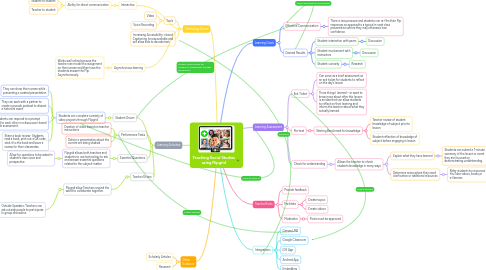
1. Learning Goals
1.1. Effective Communication
1.1.1. There is less pressure and students can re-film their Flip responses as apposed to a typical in-seat class presentation where they may otherwise lose confidence.
1.2. Desired Results
1.2.1. Student interaction with peers
1.2.1.1. Discussion
1.2.2. Student involvement with instructors
1.2.2.1. Discussion
1.2.3. Student curiosity
1.2.3.1. Research
2. Learning Assessment
2.1. Exit Ticket
2.1.1. Can serve as a brief assessment as an exit ticket for students to reflect on the day's lesson
2.1.2. Three things I learned – or want to know more about after this lesson is an idea that can allow students to reflect on their learning and inform the teacher about what they actually learned.
2.2. Pre-test
2.2.1. Starting Benchmark for knowledge
2.2.1.1. Teacher review of student knowledge of subject prior to lesson
2.2.1.2. Student reflection of knowledge of subject before engaging in lesson
2.3. Check for understanding
2.3.1. Allows the teacher to check students knowledge in many ways
2.3.1.1. Explain what they have learned
2.3.1.1.1. Students can submit a 1-minute summary of the lesson or event they are focused on, demonstrating understanding.
2.3.1.2. Determine areas where they need clarification or additional resources
2.3.1.2.1. Refer students to resources like YouTube videos, books,or e-libraries
3. Learning Activities
3.1. Student Driven
3.1.1. Students can complete a variety of video projects through Flipgrid
3.1.1.1. They can show their screen while presenting a curated presentation
3.1.1.2. They can work with a partner to create a pseudo podcast to dissect a historical event
3.1.1.3. Students can respond to a prompt and to each other in a discussion-board style assessment.
3.1.1.4. Share a book review- Students read a book, print out a QR code, stick it to the book and leave a review for their classmates.
3.2. Teacher Driven
3.2.1. Flipgrid allow Teachers around the world to collaborate together.
3.2.1.1. Outside Speakers: Teachers can ask outside people to participate In group discusions.
3.3. Performance Tasks
3.3.1. Creation of video based on teacher instructions
3.3.2. Deliver a presentation about the current era being studied
3.4. Essential Questions
3.4.1. Flipgrid allows both teachers and students to use technology to ask and answer essential questions related to the subject-matter
3.4.1.1. Allow for questions to be asked in student's own voice and perspective
4. Teacher Roles
4.1. Provide feedback
4.2. Facilitate
4.2.1. Create topics
4.2.2. Create videos
4.3. Moderator
4.3.1. Posts must be approved
5. Integrations
5.1. Canvas LMS
5.2. Google Classroom
5.3. iOS App
5.4. Android App
5.5. Embedding
6. Technology Driven
6.1. Asynchronous learning
6.1.1. Works well online because the teacher can model the assignment on their screen and then have the students answer the Flip Asynchronously.
6.2. Interactive
6.2.1. Ability for direct communication
6.2.1.1. Student to student
6.2.1.2. Teacher to student
6.3. Tools
6.3.1. Video
6.3.2. Voice Recording