


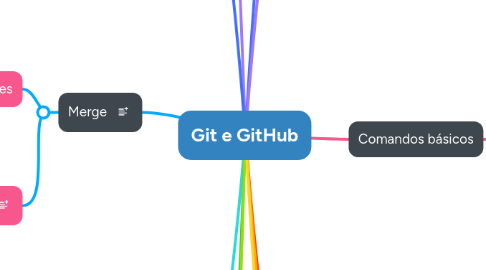
1. GitHub
1.1. Salvando dados no servidor
1.2. Baixando a ultima versão do servidor
1.3. Outras funções
1.3.1. Star
1.3.2. Observe
1.3.3. Fork
1.3.3.1. Pull request
1.3.4. Issue
1.3.4.1. Labels
1.3.4.2. Milestones
1.4. Arquivo README.md
1.5. Chave SSH
2. Branches
2.1. Comandos
2.1.1. git branch
2.1.1.1. git branch --list
2.1.2. git branch *nome da branch*
2.1.3. git checkout *nome da branch*
2.1.3.1. git checkout -b *nome da branch*
2.1.4. git switch *nome da branche* ou *-*
2.1.4.1. git switch -c * nome da branch*
2.2. Mudanças não salvas
2.2.1. git checkout -f *nome da branch*
2.3. Detached HEAD
2.4. Enviando branch para o repositorio remoto
2.4.1. git push --set-upstream origin *nome da branch*
2.5. Remoção de branch
2.5.1. Local
2.5.1.1. git branch -d *nome da branch*
2.5.2. Remoto
2.5.2.1. git push --delete origin *nome da branch*
2.6. Renomear branch
2.6.1. Local
2.6.1.1. git branch -m *novo nome da branch*
2.6.1.2. git branch -m *nome antigo da branch* *novo nome da branch*
2.6.2. Remoto
2.7. Historico de alterações em branches diferentes
2.7.1. git log *nome da branch*
3. Merge
3.1. Mesclando alterações
3.1.1. git merge *nome da branch com alterações*
3.1.2. git branch --no-merge
3.1.3. git branch --merge
3.1.4. git merge --no-ff *nome da branch com alterações*
3.2. Resolvendo conflitos
3.2.1. git merge --abort
4. Tags
4.1. Criando e listando tags
4.1.1. git tag *nome da tag*
4.1.2. git tag -a -m *descrição da tag* *nome da tag*
4.2. Visualizando tags
4.2.1. git show *nome da tag*
4.2.2. Visualizando tags criadas
4.2.2.1. git tag
4.2.2.2. git tag -l
4.2.2.3. git tag --list
4.2.2.4. git tag -n
4.3. Usar uma tag em commits antigos
4.3.1. git tag *nome da tag* *codigo do commit*
4.4. Enviando tag para o repositorio
4.4.1. git push origin *nome da tag*
4.4.2. git push --tags
4.5. Usando tags
4.5.1. git checkout *nome da tag*
4.5.2. git diff *nome da tag* *nome da tag*
4.6. Removendo tags
4.6.1. Local
4.6.1.1. git tag -d *nome da tag*
4.6.2. Remoto
4.6.2.1. git push --delete origin *nome da tag*
5. Stash
5.1. git stash
5.2. git stash list
5.3. git stash apply
5.4. git stash apply *nome do stash*
5.5. git stash pop
5.6. git stash drop
5.7. git stash branch *nome da branch*
6. Ferramentas graficas
6.1. Sourcetree
6.2. GitKraken
6.3. Git GUI
7. Controle de vesão
7.1. Histórico
7.2. Frentes de trabalho
7.3. Ramos (branches)
7.4. Rastreabilidade
8. Tipos de controle de versão
8.1. Centralizado
8.2. Distrubuído
8.2.1. Git
9. Comandos básicos
9.1. Configuração do usuário
9.2. Criando repositorio local
9.3. Adicionando mudanças
9.4. Removendo arquivos adicionados
9.5. Salvando mudanças
9.6. Quatro estados
9.7. Visualizando alterações
9.8. Histórico de commits
9.8.1. Variações
9.9. Alterando um commit
9.9.1. Utilizando ammend
9.10. Editor de texto padrão
9.10.1. Instalação
9.10.1.1. VS Code
9.11. Usando commits anteriores
9.12. Desfazendo mundaças
9.12.1. git rm --cached<file>
9.12.1.1. git reset --hard
9.12.2. git restore --staged <file>
9.12.3. git clean -f
9.12.4. git checkout<file>
9.13. Ignorando arquivos
9.14. Parar de rastrear um arquivo
9.15. Clonando repositório
10. SCM(Source Code Management)
11. Bitbucket
12. Utilizades
12.1. Alias
12.1.1. Adicionar
12.1.1.1. git config --global alias.*novo comando que o git irá reconhecer* * comando que o git deve realizar *
12.1.2. Remover
12.1.2.1. git config --global --unsert alias.*comando que deseja remover*
12.2. Grep
12.2.1. git branch | grep *opção para filtro*