Theme Activate

Theme Activate by Lawrence Romero Vigeowebsite - Manual https://www.vigeowebsite.com

Começar. É Gratuito
ou inscrever-se com seu endereço de e-mail
Theme Activate por Mind Map: Theme Activate

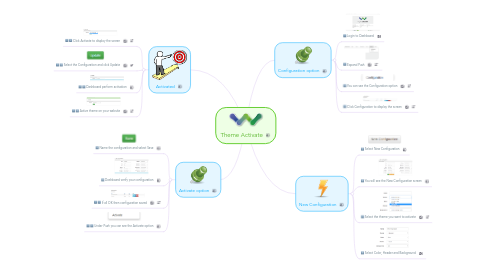
1. Activated

1.1. Click Activate to display the screen

1.2. Select the Configuration and click Update

1.3. Dashboard perform activation

1.4. Active theme on your website

2. Activate option

2.1. Name the configuration and select Save

2.2. Dashboard verify your configuration

2.3. If all OK then configuration saved

2.4. Under Push you can see the Activate option

3. Configuration option

3.1. Login to Dashboard

3.2. Expand Push

3.3. You can see the Configuration option

3.4. Click Configuration to display the screen

4. New Configuration

4.1. Select New Configuration

4.2. You will see the New Configuration screen

4.3. Select the theme you want to activate

4.4. Select Color, Header and Background