Kom i gang. Det er Gratis
eller tilmeld med din email adresse
PROCEDURE TEXT af Mind Map: PROCEDURE TEXT

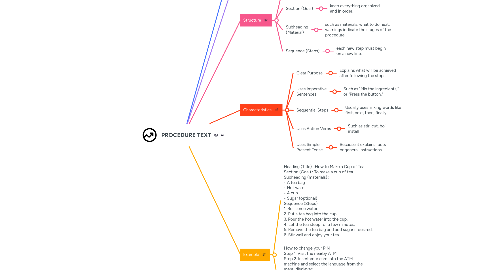
1. Definition

1.1. Procedure Text is a type of text that contains steps or instructions to do something systematically.

2. Purpose

2.1. This text aims to guide the reader in completing a task or achieving a specific result by following clear and structured steps.

3. Structure

3.1. Heading (Title

3.1.1. indicate the goal or aim of your procedure

3.2. Section (Goal)

3.2.1. keep everything organized and in order.

3.3. Subheading (Material)

3.3.1. such as materials, what to do next, warnings indicate the stages of the procedure.

3.4. Sequence (Steps)

3.4.1. each new step must begin on a new line.

4. Characteristics

4.1. Clear Purpose

4.1.1. Explains what will be achieved after following the steps.

4.2. Uses Imperative Sentences

4.2.1. Such as "Mix the ingredients," or "Press the button."

4.3. Sequential Steps

4.3.1. Usually uses linking words like first, next, then, finally.

4.4. Uses Action Verbs

4.4.1. Such as stir, cut, boil, install

4.5. Uses Simple Present Tense

4.5.1. Because it explains facts or general instructions.

5. Example

5.1. Heading (Title) :How to Make a Cup of Tea Section (Goal) : To make a cup of tea. Subheading (materials) : • A tea bag • Hot water • A cup • Sugar (optional) Sequence (Steps): 1. Boil some water. 2. Put a tea bag into the cup. 3. Pour the hot water into the cup. 4. Let the tea steep for a few minutes. 5. Remove the tea bag and add sugar if desired. 6. Stir well and enjoy your tea.

5.2. How to change your PIN Step 1. Visit the nearby ATM. Step 2. Insert your card into the ATM machine and select the language from the menu displayed. Step 3. Now enter your ATM PIN number. Step 4. After that select the PIN change option from the main menu. Step 5. A text will be displayed on the ATM screen, "Please enter your new PIN". Type your new ATM PIN. Step 6. A new screen appears, with a text, "Please re-enter your new PIN". Type your new PIN again. Step 7. Make sure that you type the PIN correctly the second time. A new screen appears "Your PIN has been changed successfully".