

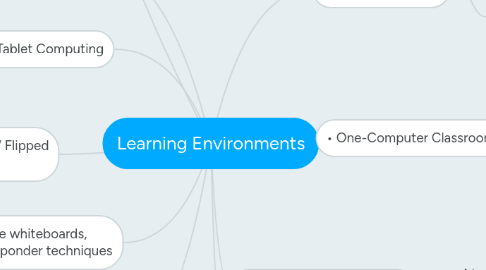
1. • Computer Stations / Stand-Alone Computer Lab
1.1. • Advantages:
1.1.1. Students can work alone independently, can work on multiple subjects, Freedom to work in groups online, or to have online instruction
1.2. Disadvantages:
1.2.1. Students take advantage of freedoms and get sidetracked. Cost to set up and maintain.
2. • Interactive whiteboards, student responder techniques
2.1. • Advantages:
2.1.1. interactive teaching opportunities, great way to check understanding / Great teachers aide
2.2. Disadvantages:
2.2.1. None that I can think of other than expense
3. • Tablet Computing
3.1. • Advantages:
3.1.1. All student can participate / Mobile device / more flexibility
3.2. Disadvantages:
3.2.1. Expense$$$ / not all software is run on apps
4. • Blended Learning / Flipped Classroom
4.1. • Advantages:
4.1.1. Can meet students where they are face to face or outside of school online
4.2. Disadvantages:
4.2.1. None / Can only benefit student
5. • Online Learning
5.1. • Advantages:
5.1.1. Student can access from home / work / anywhere
5.2. Disadvantages:
5.2.1. Some students need classroom structure and fail to focus if given to much freedom
6. • No Computers in the classroom [by design]
6.1. • Advantages:
6.1.1. Face to face instruction
6.1.2. More individualized and personable instruction
6.2. Disadvantages:
6.2.1. Students are not given opportunity to engage in activities to expand their thinking using technology
6.2.2. limited to classroom activities.
7. • One-Computer Classroom
7.1. Disadvantage
7.1.1. No flexibility
7.1.2. more likely default back to traditional instruction if not trained to use resource available
7.1.3. difficulty in administering on-line instruction.
7.2. Advantage
7.2.1. Centralized instruction
7.2.2. Allows for creative instruction
7.2.3. makes the teacher look smart
7.2.4. more control of resource
8. • One-to-One Environment
8.1. • Advantages:
8.1.1. Best scenario for classroom instruction. Students can work at own pace / personalized instruction / each one has one (computer)
8.2. Disadvantages:
8.2.1. Cost constraints / not all teachers can adapt to student use of computers / not all students can effectively use computers
9. • B.Y.O.D. [cell phones, etc]
9.1. • Advantages:
9.1.1. Most students already own a phone, a tablet or another device with Internet access
9.1.2. Many apps available for mobile devices
9.2. Disadvantages:
9.2.1. Students get sidetracked / no controls
10. • Cloud Computing
10.1. Advantage
10.1.1. Can access homework or schoolwork from anywhere / 24 access / students in control of their own learning
10.2. Disadvantage
10.2.1. Some students just don’t plug in
10.2.2. Need Internet access to do work