


1. **Formative** is a valuable online platform designed to enhance classroom assessment and instruction. Here's how it can be used and how it facilitates generating feedback and feedforward:
1.1. **Formative's Features for Classrooms:** **Formative Assessments:** Create quick quizzes, polls, exit tickets, and other interactive activities to gauge student understanding in real-time. **Differentiation:** Adapt questions based on student responses, allowing for personalized learning. **Live Results:** View student responses instantly, enabling immediate intervention or adjustments to the lesson. Collaborative Learning: Encourage peer review and discussion through features like student explanations and shared responses. **Data Analytics:** Gain insights into student progress and identify areas for improvement through comprehensive reports.
1.1.1. **Generating Feedback and Feedforward with Formative:** **Immediate Feedback:** Provide automated feedback on multiple-choice or short answer questions, saving you time. **Customizable Feedback:** Craft targeted feedback messages for specific responses or question types. **Audio & Text Feedback:** Deliver feedback in formats that suit your style (written text or voice recordings). Student Explanations: Encourage students to explain their reasoning, revealing misconceptions and promoting self-reflection. **Formative Assessment Cycle:** Use data from Formative assessments to inform future instruction and provide students with opportunities to apply feedback and improve.
1.1.1.1. **Exit Tickets:** Provide immediate feedback on key concepts covered in a lesson. **Quick Quizzes:** Offer personalized feedback based on correct or incorrect answers. **Peer Review:** Students can offer feedback on each other's work, fostering peer learning and self-reflection. **Open Ended Questions:** Analyze student explanations to identify areas where they need further support or clarification.
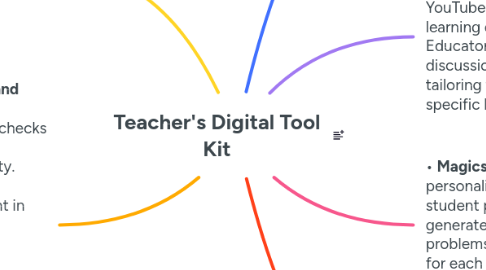
2. **Alternatives for Feedback and Feedforward:** • Turnitin: Offers plagiarism checks and automated feedback on grammar, style, and originality. • • Grammarly: Provides suggestions for improvement in grammar, style, and clarity. • • Notability: Allows for annotating documents and providing written or audio feedback. • • Google Classroom: Offers basic feedback tools and comment sections for collaborative work
3. • **Teachermatic:** aims to streamline lesson planning. It provides teachers with access to a vast library of pre-made lesson plans, customizable templates, and resources, saving them valuable time and effort in lesson preparation.
3.1. **Feedback with Teachermatic:** 1. **Upload Student Work:** Teachermatic supports various file formats, including text documents, images, or audio recordings. 2. **Choose Feedback Type:** Teachermatic offers several options for generating feedback: * Automated Grammar and Punctuation Checks: Identify basic errors in student work. * Rubric-Based Feedback: Create custom rubrics within Teachermatic to assess specific criteria. * Open-Ended Feedback: Provide feedback using text boxes or audio comments. 3. **Utilize AI Suggestions:** Teachermatic can suggest specific improvements based on the content analysis. 4. **Review and Personalize:** Review AI-generated suggestions and personalize the feedback with your own insights and comments. 5. **Deliver Feedback:** Teachermatic offers various ways to deliver feedback to students, such as through the platform itself or integrated learning management systems (LMS).
3.1.1. **Feedforward with Teachermatic:** 1. **Analyze Student Work:** Review student work to identify areas for improvement and future learning goals. 2. **Identify Learning Gaps:** Use Teachermatic's analytics to pinpoint areas where students might require further support. 3. Generate Personalized Suggestions: Teachermatic can suggest relevant learning resources, activities, or differentiated instruction based on individual needs. 4. Create Personalized Action Plans: Develop individual action plans for students with clear steps for improvement. 5. Communicate Feedforward: Clearly communicate feedforward to students, either through written feedback or one-on-one conversations.
4. • **Edpuzzle:** allows teachers to transform existing videos (like YouTube clips) into interactive learning experiences. Educators can add quizzes, discussions, and voiceovers, tailoring the video content to their specific lesson plans.
5. •** Magicschool.ai:** focuses on personalized learning. It analyzes student performance data and generates individualized practice problems and learning pathways for each student, catering to different learning styles and paces.
5.1. **Magicschool AI for Feedback and Feedforward:** Magicschool AI offers various tools that can be used to provide feedback and feedforward on student work. However, it doesn't directly analyze written content itself. Here's how you can utilize its features for this purpose:
5.1.1. **Rubric Generator:** • Create custom rubrics that outline specific criteria and learning objectives for your assignment. This helps you define clear expectations and areas for improvement. • Magicschool AI's rubric generator can help you create a structured framework to evaluate student work.
5.1.2. **Text Rewriter and Grammar Checker (Plus Version):** • These features are part of the paid "Plus" version of Magicschool AI. While they don't directly analyze student work, they can be used by students to revise their own writing and receive suggestions for improvement. • Students can utilize the text rewriter to explore different phrasings or sentence structures, potentially leading to stronger writing. • The grammar checker can help catch errors and ensure proper use of language, facilitating self-assessment and improvement
5.1.3. **Feedback Templates (Limited Functionality):** • The free version of Magicschool AI might offer pre-made feedback templates for specific tasks. However, their usefulness might be limited and require significant customization.
6. • **Eduaide.ai:** AI assistant goes beyond lesson planning. It offers features like automated grading for multiple-choice quizzes, real-time feedback for students on their writing, and plagiarism detection. Eduaide can also analyze student data to identify areas where they might need additional support.
6.1. • Eduaide offers various feedback options, including: o Typographic feedback: Checks for spelling and grammar errors. o Syntactic feedback: Analyzes sentence structure and coherence. o Semantic feedback: Evaluates the logic and reasoning of the content. o Custom feedback: Allows you to input specific feedback criteria.
6.1.1. • Eduaide will process the student's work and generate a detailed feedback report