


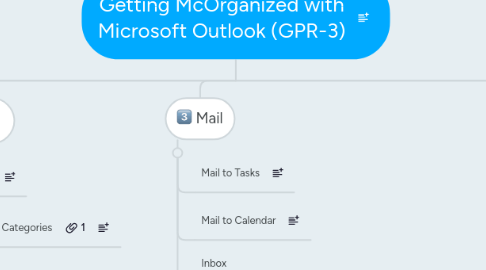
1. Overview
1.1. What is Covered
1.1.1. How I Organize my work with Outlook.
1.1.2. How I report my current work items.
1.2. What is not Covered
1.2.1. Time Management
1.2.2. Outlook
2. Tasks
2.1. Categorizing
2.1.1. Custom Categories
2.1.2. Prioritizing
2.1.2.1. Outlook Defaults
2.1.2.1.1. High
2.1.2.1.2. Normal
2.1.2.1.3. Low
2.1.2.2. Custom Fields
2.2. Listing Sorting
2.2.1. Columns
2.2.2. Attachement
2.2.3. Group By
2.2.3.1. Category (Sort 1)
2.2.4. Sort
2.2.4.1. Due Date (Sort 2)
2.2.4.2. Priority (Sort 3)
2.3. Printing and Emailing
2.3.1. xps and pdf format (print & save to file)
2.3.2. Email [to manager(s)] as attachment
3. Mail
3.1. Mail to Tasks
3.2. Mail to Calendar
3.3. Inbox
3.3.1. Respond
3.3.2. Delete
3.3.3. File
3.3.3.1. Short-Term
3.3.3.1.1. Action (24 hour)
3.3.3.1.2. On Hold (Tasks Assigned)
3.3.3.2. Long-Term (> Day)
3.3.3.2.1. Personal Folders
4. Calendar
4.1. Tasks to Calendar
4.2. Appointments
4.2.1. All Day Event
4.2.2. Standard
4.2.3. Showing As
4.2.3.1. Busy
4.2.3.2. Tenative
4.2.3.3. Out of Office
4.2.3.4. Free
5. Additional Learing
5.1. Internet
5.1.1. Search Engines: Bing, Google
5.1.2. Courses
5.1.2.1. GCF
5.1.2.1.1. Office