


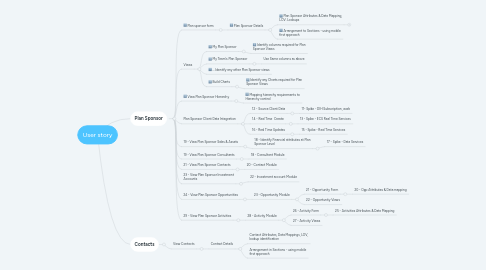
1. Plan Sponsor
1.1. Plan sponsor form
1.1.1. Plan Sponsor Details
1.1.1.1. Plan Sponsor Attributes & Data Mapping, LOV. Lookups
1.1.1.1.1. Get ECS attributes - numeric/text/date etc
1.1.1.1.2. Get additional CRM attributes
1.1.1.1.3. Get LOVs
1.1.1.1.4. Identify if there any lookups
1.1.1.2. Arrangement to Sections - using mobile first approach
1.2. Views
1.2.1. My Plan Sponsor
1.2.1.1. Identify columns required for Plan Sponsor Views
1.2.2. My Team's Plan Sponsor
1.2.2.1. Use Same columns as above
1.2.3. ... Identify any other Plan Sponsor views
1.2.4. Build Charts
1.2.4.1. Identify any Charts required for Plan Sponsor Views
1.3. View Plan Sponsor Hierarchy
1.3.1. Mapping hierarchy requirements to Hierarchy control
1.4. Plan Sponsor Client Data Integration
1.4.1. 12 - Source Client Data
1.4.1.1. 11- Spike - DIH Subscription, work
1.4.2. 14 - Real Time Create
1.4.2.1. 13 - Spike - ECS Real Time Services
1.4.3. 16 - Real Time Updates
1.4.3.1. 15 - Spike - Real Time Services
1.5. 19 - View Plan Sponsor Sales & Assets
1.5.1. 18 - Identify Financial attributes at Plan Sponsor Level
1.5.1.1. 17 - Spike - Data Services
1.6. 19 - View Plan Sponsor Consultants
1.6.1. 18 - Consultant Module
1.7. 21 - View Plan Sponsor Contacts
1.7.1. 20 - Contact Module
1.8. 23 - View Plan Sponsor Investment Accounts
1.8.1. 22 - Investment account Module
1.9. 24 - View Plan Sponsor Opportunities
1.9.1. 23 - Opportunity Module
1.9.1.1. 21 - Opportunity Form
1.9.1.1.1. 20 - Opp Attributes & Data mapping
1.9.1.2. 22 - Opportunity Views
1.10. 29 - View Plan Sponsor Activities
1.10.1. 28 - Activity Module
1.10.1.1. 26 - Activity Form
1.10.1.1.1. 25 - Activities Attributes & Data Mapping
1.10.1.2. 27 - Activity Views
2. Contacts
2.1. View Contacts
2.1.1. Contact Details
2.1.1.1. Contact Attributes, Data Mappings, LOV, lookup identification
2.1.1.2. Arrangement in Sections - using mobile first approach