


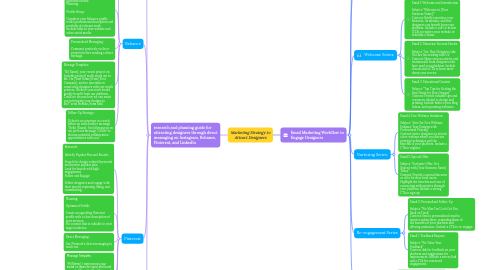
1. research and planning guide for attracting designers through direct messaging on Instagram, Behance, Pinterest, and LinkedIn
1.1. Instagram
1.1.1. Research: Identify Influencers and Design Communities: Search for popular design-related hashtags (#GraphicDesign, #Illustration, #DesignerLife). Follow accounts of design influencers and explore their followers. Look for design communities and groups that share relevant content. Engage with Posts: Like and comment on posts by potential leads. Participate in discussions and offer valuable insights.
1.1.2. Planning: Create a Compelling Profile: Optimize your bio with a clear description of your services. Use a professional profile picture and cohesive feed aesthetic. Prepare Your Message: Personalize each message to show genuine interest. Mention something specific about their work to demonstrate you’ve taken the time to look at their portfolio.
1.1.3. Message Template: “Hi [Name], I came across your amazing work on Instagram and was really impressed by [specific work/piece]. I’m with [Your Company], and we connect talented designers like you with top printers. We’d love to collaborate and help you bring your designs to life. Let’s chat more about how we can work together!”
1.1.4. Follow-Up Strategy: If no response within a week, send a polite follow-up message. “Hi [Name], just checking if you had a chance to see my previous message. We’re really excited about the possibility of working with you!”
1.2. Behance
1.2.1. Research: Browse Design Categories: Explore categories relevant to your target audience (Graphic Design, Illustration, Mockup). Look for projects with high appreciation and comments.
1.2.2. Curate Collections: Create collections of designers whose work aligns with your platform’s needs. Planning: Profile Setup: Complete your Behance profile with a professional description and portfolio of relevant work. Include links to your website and other social media.
1.2.3. Personalized Messaging: Comment positively on their projects before sending a direct message.
1.2.4. Message Template: “Hi [Name], your recent project on [specific project] really stood out to me. I’m [Your Name] from [Your Company], and we specialize in connecting designers with top-notch printers. I believe your work would greatly benefit from our platform. Could we discuss how we can assist you in bringing your designs to life?” send website/form linkl
1.2.5. Follow-Up Strategy: If there’s no response in a week, follow up with another message. “Hello [Name], I’m following up on my previous message. I’d love to discuss potential collaboration opportunities with you.”
1.3. Pinterest
1.3.1. Research: Identify Popular Pins and Boards: Search for design-related keywords and browse popular pins. Look for boards with high engagement. Follow and Engage: Follow designers and engage with their pins by repinning, liking, and commenting.
1.3.2. Planning: Optimized Profile: Create an appealing Pinterest profile with a clear description of your services. Pin content that is valuable to your target audience.
1.3.3. Direct Messaging: Use Pinterest’s direct messaging to reach out.
1.3.4. Message Template: “Hi [Name], I came across your board on [specific topic] and loved your pins! I’m with [Your Company], and we connect talented designers with quality printing services. I think our platform could really enhance your design projects. Let’s chat about how we can work together!”
1.3.5. Follow-Up Strategy: If no response within a week, send a friendly follow-up. “Hi [Name], just wanted to follow up on my previous message. We’re really interested in collaborating with you and helping bring your designs to print.”
1.4. LinkedIn
1.4.1. Research: Search for Designers: Use LinkedIn’s search function to find designers by job title, industry, and location. Join LinkedIn groups related to design and printing.
1.4.2. Engage with Content: Comment on and share relevant posts from potential leads. Participate in group discussions.
1.4.2.1. Planning: Professional Profile: Ensure your LinkedIn profile is complete and professional, highlighting your company’s services and success stories.
1.4.2.2. Connection Request: Send personalized connection requests. “Hi [Name], I came across your profile and was impressed by your work in [specific area]. I’d love to connect and explore potential collaboration opportunities with [Your Company], where we specialize in connecting designers with top printers.”
1.4.2.3. Message Template: After connecting, send a detailed message. “Hi [Name], thank you for connecting! I’m [Your Name] from [Your Company], and we help designers like you connect with high-quality printing services. I believe your design work could greatly benefit from our platform. Can we discuss how we might collaborate?”
1.4.2.4. Follow-Up Strategy: Follow up if there’s no response after a week. “Hi [Name], I wanted to follow up on my previous message. We’re very excited about the possibility of working with you and enhancing your design projects with our printing services.”
2. Email Marketing Workflow to Engage Designers
2.1. Strategy call with Mr Farouq
2.1.1. Generating leads from Linkedln
2.2. Lead Capture
2.2.1. Use sign-up forms on your website and landing pages offering free resources or exclusive content to collect email addresses.
2.3. Welcome Series:
2.3.1. Email 1: Welcome and Introduction Subject: "Welcome to [Your Business Name]!" Content: Briefly introduce your business, its mission, and how designers can benefit from your platform. Include a call-to-action (CTA) to explore your website or schedule a demo.
2.3.2. Email 2: Showcase Success Stories Subject: "See How Designers Like You Are Succeeding with Us" Content: Share success stories and testimonials from designers who have used your platform. Include visuals and a CTA to learn more about your service
2.3.3. Email 3: Educational Content Subject: "Top Tips for Getting the Best Prints for Your Designs" Content: Provide valuable tips and resources related to design and printing. Include links to your blog, videos, and upcoming webinars.
2.4. Nurturing Series:
2.4.1. Email 4: Free Webinar Invitation Subject: "Join Our Free Webinar: Enhance Your Designs with Professional Printing" Content: Invite designers to attend a free webinar where you discuss printing techniques and the benefits of your platform. Include a CTA to register.
2.4.2. Email 5: Special Offer Subject: "Exclusive Offer: Get Started with [Your Business Name] Today" Content: Provide a special discount or offer for first-time users. Highlight the benefits and ease of connecting with printers through your platform. Include a strong CTA to sign up.
2.5. Re-engagement Series
2.5.1. Email 6: Personalized Follow-Up Subject: "We Miss You! Let’s Get You Back on Track" Content: Send a personalized email to inactive subscribers, reminding them of the benefits of your platform and offering assistance. Include a CTA to re-engage.
2.5.2. Email 7: Feedback Request Subject: "We Value Your Feedback" Content: Ask for feedback on your platform and suggestions for improvement. Include a survey link and a CTA for continued engagement.
2.6. Regular Updates
2.6.1. Monthly Newsletter Subject: "[Month] Updates: New Features, Tips, and More!" Content: Send monthly updates featuring new features, tips, success stories, and upcoming events. Keep the content engaging and relevant to designers.