Unlock the full potential of your projects.
Try MeisterTask for free.
アカウント登録をしていませんか?
無料で登録する
ブラウズ
特定マップ
カテゴリー
プロジェクト管理
ビジネスと目標
人事
ブレインストーミングと分析
マーケティングとコンテンツ
教育とノート
エンターテインメント
ライフ
テクノロジー
デザイン
サマリー
その他
言語
English
Deutsch
Français
Español
Português
Nederlands
Dansk
Русский
日本語
Italiano
简体中文
한국어
その他
フルマップを表示
マップをコピーして編集する
コピー
Gathering, Analyzing, and Curating
BL
Bill Lovin
フォローする
Solve your problems or get new ideas with basic brainstorming
登録は簡単!.
無料です
Google で登録
または
登録
あなたのEメールアドレスで登録
類似のマインドマップ
マインドマップの概要
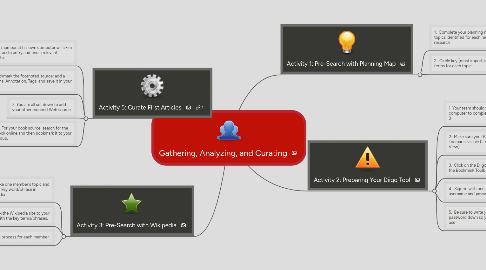
Gathering, Analyzing, and Curating
Bill Lovin
により
1. Activity 5: Curate First Articles
1.1. 1. Each member at his own computer will skim his Wikipedia entry and find a relevant footnote.
1.2. 2. Bookmark the footnoted source; add a Personal Annotation, Tags, and save it in your group.
1.3. 3. You are all set down to add your other required Web source.
1.4. 4. For your book source, search for the book online and then bookmark it to your group.
2. Activity 3: Pre-Search with Wikipedia
2.1. 1. Take one member's topic and look up key word/phrase in Wikipedia
2.2. 2. Bookmark the Wikipedia site to your group. Tag it with the key terms/phrases.
2.3. 3. Complete this process for each member.
3. Activity 1: Pre-Search with Planning Map
3.1. 1. Complete your planning map with topics identified for each member to research
3.2. 2. Circle key (most important) terms for each topic
4. Activity 2: Preparing Your Diigo Tool
4.1. 1. Your team should work on one computer to complete Activities 2 and 3
4.2. 2. Make sure your Bookmark Toolbar is visible (if not add under View)
4.3. 3. Click on the Diigolet button on the Bookmark Toolbar
4.4. 4. Sign-in with one member's username and password
4.5. 5. Be sure to write your username and password down so you can take it home to use
さぁ、無料で始めましょう!
Googleとつなぐ
または
登録