


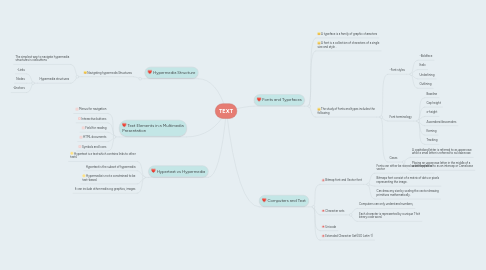
1. Text Elements in a Multimedia Presentation
1.1. Menus for navigation
1.2. Interactive buttons
1.3. Field for reading
1.4. HTML documents
1.5. Symbols and Icons
2. Hypertext vs Hypermedia
2.1. Hypertext is a text which contains links to other texts
2.2. Hypertext is the subset of hypermedia
2.3. Hypermedia is not a constrained to be text-based.
2.4. It can include other media e.g graphics, images
3. Hypermedia Structure
3.1. Navigating hypermedia Structures
3.1.1. The simplest way to navigate hypermedia structures is via buttons
3.1.2. Hypermedia structures
3.1.2.1. -Links
3.1.2.2. Nodes
3.1.2.3. -Anchors
4. Fonts and Typefaces
4.1. A typeface is a family of graphic characters
4.2. A font is a collection of characters of a single size and style .
4.3. The study of fonts and types includes the following
4.3.1. -Font styles
4.3.1.1. -Boldface
4.3.1.2. Italic
4.3.1.3. Underlining
4.3.1.4. Outlining
4.3.2. Font terminology
4.3.2.1. Baseline
4.3.2.2. Cap height
4.3.2.3. x-height
4.3.2.4. Ascenders/descenders
4.3.2.5. Kerning
4.3.2.6. Tracking
4.3.3. Cases
4.3.3.1. A capitalized letter is referred to as uppercase while a small letter is referred to as lowercase
4.3.3.2. Placing an uppercase letter in the middle of a word is referred to as an intercap or Camelcase
5. Computers and Text
5.1. Bitmap font and Vector font
5.1.1. Fonts can either be stored as bitmapped or vector
5.1.2. Bitmaps font consist of a matrix of dots or pixels representing the image.
5.1.3. Can draw any size by scaling the vector drawing primitives mathematically.
5.2. Character sets
5.2.1. Computers can only understand numbers,
5.2.2. Each character is represented by a unique 7-bit binary code word.