


Work Algorithm
af Ayazhan Zhaxykeldiyeva
1. 1) We use the website to manage the greenhouse
1.1. An Apache server is installed on Raspberry to host the website and a bridge is created using php between the mysql database and the website. The website will contain:
1.1.1. 1) Main page. On this page, the user can see the status of devices and various indicators.
1.1.2. 2) On the second page, Commands and Options, the user can easily change the device mode and turn them on or off. You can also change the setpoints and parameters on this page. For the parameters, we check the newly entered value to make sure it is correct.
1.2. The greenhouse has various sensors to measure ambient temperature, outside temperature, soil moisture and light. On the website, we can determine the temperature and humidity setpoints. It is also possible to control each actuator manually and view their status.
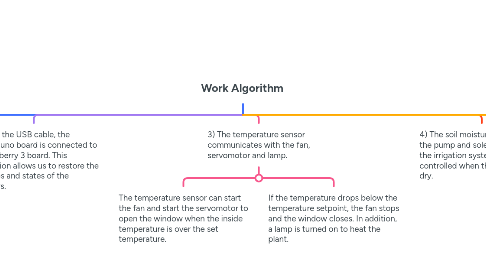
2. 2) Using the USB cable, the Arduino uno board is connected to the raspberry 3 board. This connection allows us to restore the measures and states of the actuators.
3. 3) The temperature sensor communicates with the fan, servomotor and lamp.
3.1. The temperature sensor can start the fan and start the servomotor to open the window when the inside temperature is over the set temperature.
3.2. If the temperature drops below the temperature setpoint, the fan stops and the window closes. In addition, a lamp is turned on to heat the plant.
4. 4) The soil moisture sensor allows the pump and solenoid valve of the irrigation system to be controlled when the ground is too dry.
5. 5) The data is stored in the mysql database. The python script allows us to communicate with the arduino uno and store the data in the database, or read the database and send new values to the arduino.
5.1. The database consists of three tables:
5.1.1. The "Measures" table is designed to store the collected data.
5.1.2. The "Types" table contains the parameters of each dimension.
5.1.3. The "Commands" table allows us to control devices and know their status.