


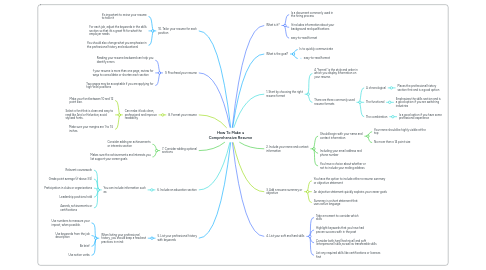
1. 10. Tailor your resume for each position
1.1. It’s important to revise your resume to tailor it
1.2. For each job, adjust the keywords in the skills section so that it’s a great fit for what the employer needs
1.3. You should also change what you emphasize in the professional history and educational
2. 9. Proofread your resume
2.1. Reading your resume backward can help you identify errors
2.2. f your resume is more than one page, review for ways to consolidate or shorten each section
2.3. Two pages may be acceptable if you are applying for high-level positions
3. 8. Format your resume
3.1. Can make it look clean, professional and improve readability
3.1.1. Make your font between 10 and 12 point size.
3.1.2. Select a font that is clean and easy to read like Arial or Helvetica; avoid stylized fonts.
3.1.3. Make sure your margins are 1 to 1.5 inches.
4. 7. Consider adding optional sections
4.1. Consider adding an achievements or interests section
4.2. Makes sure the achievements and interests you list support your career goals
5. 6. Include an education section
5.1. You can include information such as:
5.1.1. Relevant coursework
5.1.2. Grade point average (if above 3.5)
5.1.3. Participation in clubs or organizations
5.1.4. Leadership positions held
5.1.5. Awards, achievements or certifications
6. 5. List your professional history with keywords
6.1. When listing your professional history, you should keep a few best practices in mind:
6.1.1. Use numbers to measure your impact, when possible.
6.1.2. Use keywords from the job description
6.1.3. Be brief
6.1.4. Use action verbs
7. What is it?
7.1. Is a document commonly used in the hiring process
7.2. It includes information about your background and qualifications
7.3. easy-to-read format
8. What is the goal?
8.1. Is to quickly communicate
8.2. easy-to-read format
9. 1. Start by choosing the right resume format
9.1. A “format” is the style and order in which you display information on your resume.
9.2. There are three commonly used resume formats
9.2.1. A chronological
9.2.1.1. Places the professional history section first and is a good option
9.2.2. The functional
9.2.2.1. Emphasizes the skills section and is a good option if you are switching industries
9.2.3. The combination
9.2.3.1. Is a good option if you have some professional experience
10. 2. Include your name and contact information
10.1. Should begin with your name and contact information
10.1.1. Your name should be highly visible at the top
10.1.2. No more than a 14 point size