


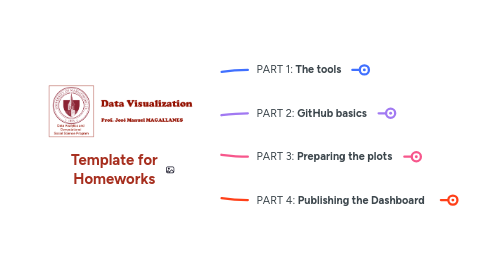
1. PART 1: **The tools**
1.1. Accounts to be created
1.1.1. An account on GitHub
1.1.2. An account in Zotero
1.2. Installations
1.2.1. GitHub Desktop
1.2.2. Zotero Desktop
1.2.3. R
1.2.4. RStudio
1.2.4.1. Install inside RStudio:
1.2.4.1.1. flexdashboard
2. PART 2: **GitHub basics**
2.1. 1. Create an organization for this course
2.1.1. Go to your GitHub account
2.1.2. Then, you will do this ONCE during the course
2.1.2.1. Go to "**Your organizations**"
2.1.2.1.1. Create an **organization**
2.2. 2. Create repo in your Github Organization for this course
2.2.1. You will create ONE repository
2.2.1.1. Then, you will do this ONCE during the course
2.2.1.1.1. The dashboard will live in this repo, and will be modified at each HW
2.2.2. Create a **repository** in your organization
2.2.2.1. set it up
2.2.2.1.1. choose simple name
2.2.2.1.2. make sure it is public
2.2.2.1.3. always add a README
2.2.2.1.4. Do not deal with **gitignore**
2.2.2.1.5. Choose one license
2.3. 3. Clone the repo to your computer (make sure you have GitHub **desktop**)
2.3.1. You will do this **ONCE**
2.3.2. Look for **CODE** in green
2.3.2.1. never clone inside another app's folder
2.3.2.1.1. never inside another repo
2.3.2.2. You can clone anywhere, choose a location easy to find
2.4. 4. Add content to local repo
2.4.1. put this data inside the repo
2.5. 5. Synchronizing *local* and *cloud * **Repo**
2.5.1. commit
2.5.1.1. you may not see this
2.5.1.1.1. you must write a 'Summary' of the commit
2.5.1.1.2. when changes are about ONE file, GitHub desktop offers a 'Summary'
2.5.1.1.3. Description is not a requirement
2.5.1.1.4. Notice the UNDO option
2.5.2. push
2.5.2.1. you may not see this
2.5.2.1.1. This is the actual local-cloud synchronization
2.5.2.1.2. Works seamlessly ...unless there is a conflict!
3. PART 3: **Preparing the plots**
3.1. Prepare a Plot
3.1.1. Save the Plot
3.1.1.1. Code for visualizations inside the repo
3.2. Set up the dashboard
3.2.1. simplest code
3.2.1.1. read in the saved plots
3.2.1.1.1. other options
3.2.2. About citations?
3.2.2.1. prepare citations
3.2.2.1.1. Create Collection in ZOTERO
3.2.2.1.2. Export collection (download into repo)
3.2.3. **Knit** your dashboard
3.2.3.1. rename the _html file_ generated as **index.html** (lowercase only)
3.2.3.1.1. This same file will be updated when you add more visualizations in the coming homeworks
4. PART 4: **Publishing the Dashboard**
4.1. Back to GitHub: check the desktop app
4.1.1. You will do this for every homework
4.1.2. commit & push
4.2. Go to your "Repo" on the GitHub cloud
4.2.1. easy way to find from the desktop app!
4.3. Go to "Settings"
4.3.1. use pages!
4.3.1.1. final steps
4.3.1.1.1. wait for link to appear!
4.3.2. you do **NOT** need to update the link after each homework
4.4. Change the README
4.4.1. paste the URL from PAGES
4.4.2. commit (no push)
4.4.2.1. in local GitHUB: **PULL**