Unlock the full potential of your projects.
Try MeisterTask for free.
Non hai un account?
Iscriviti gratis
Naviga
Mappe in primo piano
Categorie
Gestione del progetto
Affari e obiettivi
Risorse umane
Brainstorming e analisi
Marketing e contenuti
Istruzione e note
Intrattenimento
Vita
ICT
Design
Sintesi
Altro
Lingue
English
Deutsch
Français
Español
Português
Nederlands
Dansk
Русский
日本語
Italiano
简体中文
한국어
Altro
Mostra mappa intera
Theme Activate
Altro
Lawrence Romero
Seguire
Theme Activate by Lawrence Romero Vigeowebsite - Manual https://www.vigeowebsite.com
Iniziamo.
È gratuito!
Iscriviti con Google
o
registrati
con il tuo indirizzo email
Mappe mentali simili
Schema mappa mentale
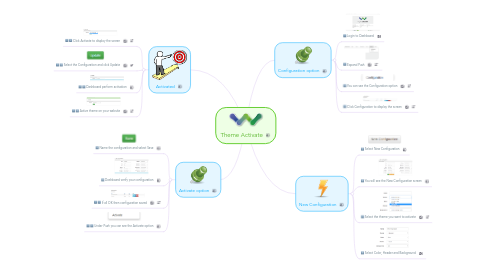
Theme Activate
da
Lawrence Romero
1. Activated
1.1. Click Activate to display the screen
1.2. Select the Configuration and click Update
1.3. Dashboard perform activation
1.4. Active theme on your website
2. Activate option
2.1. Name the configuration and select Save
2.2. Dashboard verify your configuration
2.3. If all OK then configuration saved
2.4. Under Push you can see the Activate option
3. Configuration option
3.1. Login to Dashboard
3.2. Expand Push
3.3. You can see the Configuration option
3.4. Click Configuration to display the screen
4. New Configuration
4.1. Select New Configuration
4.2. You will see the New Configuration screen
4.3. Select the theme you want to activate
4.4. Select Color, Header and Background
Comincia. È gratis!
Connetti con Google
o
Registrati