
What is whiteboarding?
Whiteboarding is a way of thinking out loud on a shared surface. Instead of talking an idea through, you put it where everyone can see it: a sticky note for each thought, a box for each step, a line between the things that belong together. The board becomes the shared memory of the conversation.
The term covers both the old-fashioned version, a pen and a wall in a meeting room, and digital whiteboarding on an online canvas. The method is the same. What changes is who can join and whether the board survives the end of the meeting.
When people ask about the whiteboarding meaning in a work context, they usually mean one of three things:
Brainstorming: collecting as many ideas as possible before judging any of them.
Planning: laying out steps, owners and dependencies so a plan becomes visible.
Problem solving: sketching how something works today to find where it breaks.
Why whiteboarding works
Whiteboarding works because it takes ideas out of people's heads and puts them somewhere neutral. Once an idea is a sticky note on a board, it's easier to question, move or combine it without anyone feeling attacked.
It also keeps the whole picture in view. In a normal meeting, the third idea pushes the first one out of people's minds. On a board, all of them stay in sight, so patterns appear that nobody would have spotted in a list.
There's a second, less obvious benefit: space encourages persistence. Research described in Harvard Business Review found that people tend to underestimate how many good ideas they'll come up with if they keep going after the first obvious ones. A board with plenty of empty space nudges a team to keep adding rather than settling early.
Finally, whiteboarding makes grouping easy. Sorting a pile of notes into clusters is the core of affinity diagramming, a method the Nielsen Norman Group describes for turning scattered research findings into themes. The same move works for ideas in any whiteboarding session.
What is a whiteboarding session?
A whiteboarding session is a short, focused meeting where a small group works through one question on a whiteboard. It usually runs between 30 and 90 minutes and ends with something concrete: a shortlist of ideas, a rough plan or a clear picture of a problem.
What separates a whiteboarding session from an ordinary meeting is the output. A normal meeting produces notes that one person writes. A whiteboarding session produces a board that everyone built together, and that board is often more useful than any summary.
Typical reasons to call one:
Kicking off a project and agreeing what's in scope.
Generating ideas for a campaign, a product feature or an event.
Mapping out a process that keeps causing delays.
Preparing a decision by laying out the options side by side.
Who should join? Keep it small. Three to six people is the sweet spot: enough perspectives to spark new ideas, few enough that everyone gets to add notes and speak. Invite the people who own the problem, plus one or two who see it from the outside, such as a colleague from support or sales. Outside eyes often ask the question everyone inside has stopped asking.
One person should act as facilitator. They don't need special training, but they do need to keep time, read the question back when the group drifts and make sure the next steps get written down before people leave.
How to run a whiteboarding session
A good whiteboard session needs three things: a clear question, a bit of structure and someone who keeps time. Here's how to put them together.
Write one question at the top of the board. "How might we halve onboarding time for new hires?" works better than "Onboarding." A specific question tells people what kind of idea to bring.
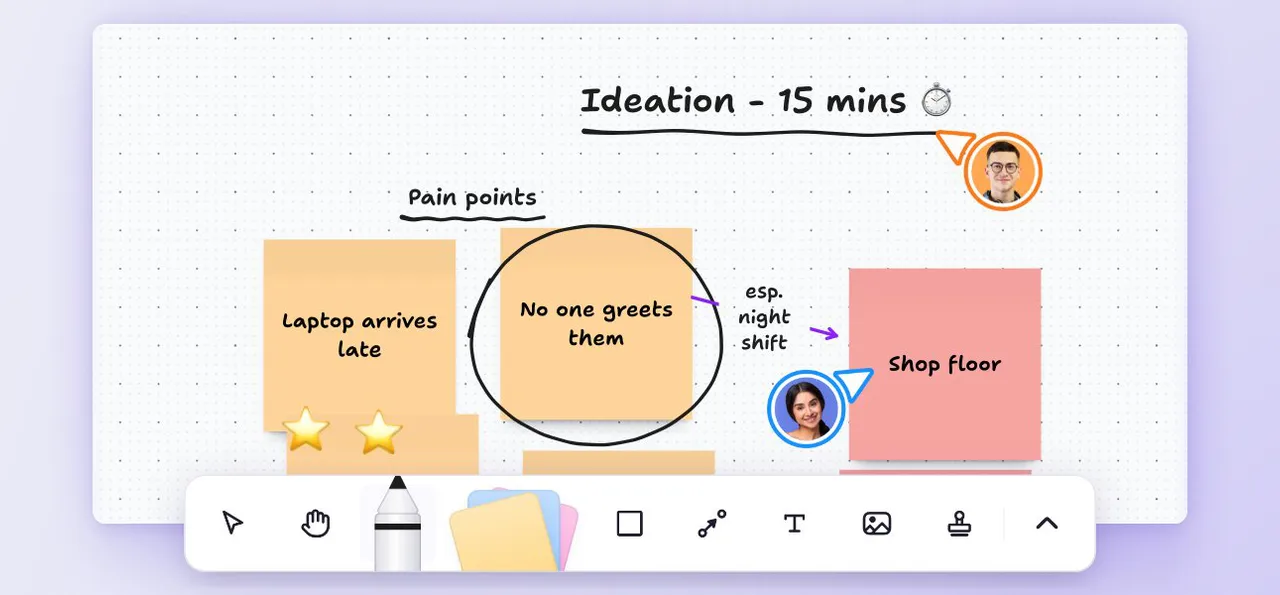
Start with five minutes of silent writing. Everyone adds their own sticky notes before anyone talks. This stops the loudest person from setting the direction and gives quieter colleagues equal room.
Share and cluster the notes. Take turns reading notes out, then move similar ones next to each other. Give each cluster a short label once its theme is clear.
Sketch the shape of the answer. Pick the strongest cluster and turn it into something more structured: a few boxes connected by arrows, a rough timeline or a before-and-after picture.
Agree next steps before you close. Write down who does what by when, directly on the board, so the decisions stay next to the thinking that led to them.
Remote whiteboarding: what changes
Remote whiteboarding follows the same steps, but a few details matter more when people aren't in the same room.
Pick a digital whiteboard everyone can open
The tool should work in a browser, without installs or long setup. If people spend the first ten minutes logging in, the energy is gone before the first sticky note.
Keep the board readable
On a screen, a crowded board turns into noise fast. Use short notes, one idea each, and leave space between clusters. Zoom out every so often so the group sees the whole picture again.
Make silent writing explicit
On a call, silence feels awkward, so people fill it with talk. Say out loud that the next five minutes are for writing, and stay quiet yourself.
Save the board afterward
A physical whiteboard gets wiped. A digital one doesn't, which is one of the biggest advantages of remote whiteboarding. Keep the board, give it a clear name and link it in the follow-up message so nobody has to rebuild the session from memory.
Whiteboarding techniques to try
A whiteboard is flexible enough to host almost any workshop method. These six work well for small teams and don't need special templates.
Brainwriting
Everyone writes ideas on sticky notes in silence, then passes or reads them so others can build on them. It produces more ideas than open discussion and spreads the floor more evenly.
Affinity mapping
Collect all notes first, then sort them into groups by theme. Name each group once it's settled. This turns a wall of ideas into a handful of clear directions.
How might we questions
Reframe a problem as a series of "How might we…?" questions on separate notes. Each question becomes a smaller, more inviting starting point for ideas.
Process sketching
Draw the current process as a row of boxes connected by arrows. Mark the steps where things slow down or go wrong. Seeing the process laid out often makes the fix obvious.
Start, stop, continue
Split the board into three columns and ask what the team should start doing, stop doing and keep doing. It's a quick format for project reviews and retrospectives.
Dot voting
When the board is full, give everyone three dots to draw next to the ideas they back most. The clusters with the most dots go into the next round of discussion. On a MindMeister whiteboard, stamps do the same job.
Common whiteboarding mistakes
Most whiteboarding sessions that fall flat fail for the same handful of reasons. They're all easy to avoid once you know them.
No clear question. "Let's brainstorm about marketing" leads everywhere and nowhere. Narrow the question until people know what a good answer looks like.
Discussing too early. If the group debates the first idea before the others are on the board, the session shrinks to that one idea. Collect first, discuss second.
Writing paragraphs on sticky notes. A note should hold one idea in a few words. Long notes are hard to read, hard to move and hard to group.
Too many people. Beyond six or seven participants, most people stop contributing. Split a large group into smaller teams and compare boards at the end.
Ending without owners. A full board with no next steps feels productive but changes nothing. Leave the last ten minutes for decisions and names.
Losing the board. Photos of a physical board are hard to read a week later. If the outcome matters, move it somewhere the whole team can find and edit it.
Whiteboard or mind map: when to use which
Whiteboards and mind maps both make thinking visible, but they suit different moments.
A whiteboard is freeform. You can put anything anywhere, which is exactly what you want at the start, when ideas are messy and you don't know yet how they relate. Sticky notes, rough sketches and arrows all live side by side.
A mind map is structured. Every idea branches out from central topics, so the relationships are clear at a glance. That makes a mind map the better format once the ideas start to settle and you want to organize, prioritize or present them. If you'd like to see how teams use that structure, read about brainstorming with mind maps.
In practice, many sessions use both: a whiteboard to open up the thinking, then a mind map to bring it into shape. Our article on proven brainstorming techniques covers more methods that work in either format, and the basics of mind mapping explain how to structure ideas once they're on the table.
Whiteboarding in MindMeister
MindMeister has whiteboards right next to your mind maps, so you can run the open, messy part of a session and the structured part in one place.
A MindMeister whiteboard gives you an infinite canvas with sticky notes, text boxes, shapes and your own images. Link shapes with connections, draw freehand or highlight what matters, and share the board so your team can work on it together in real time. When it's time to talk the result through, presentation mode shows the whole board full screen, without the toolbar.
Open the MindMeister online whiteboard, press N for your first sticky note and run your next whiteboarding session there.
Put your next session on a whiteboard