Unlock the full potential of your projects.
Try MeisterTask for free.
Heb je nog geen account?
Meld je Gratis aan
Browse
Aanbevolen kaarten
Rubrieken
Project management
Zakelijke doelen
Personeelszaken
Brainstormen en analyseren
Marketing & Inhoud
Onderwijs en notities
Entertainment
Leven
Technologie
Ontwerp
Samenvattingen
Andere
Talen
English
Deutsch
Français
Español
Português
Nederlands
Dansk
Русский
日本語
Italiano
简体中文
한국어
Andere
Toon volledige map
Kopieer en bewerk map
Kopieer
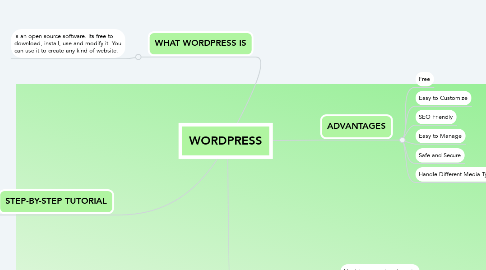
WORDPRESS
Andere
RJ
Ryxzl Jàne Càgàs
Volg
Laten we beginnen.
Het is Gratis
Login met Google
of
registreren
met je e-mailadres
Vergelijkbare mind mappen
Overzicht van map
WORDPRESS
Door
Ryxzl Jàne Càgàs
1. STEP-BY-STEP TUTORIAL
1.1. Step 1: Choose a Domain
1.2. Step 2: Purchase Web Hosting and Domain
1.3. Step 3: Install WordPress
1.4. Step 4: Find a WordPress Theme
1.5. Step 5: Install Your WordPress Theme
1.6. Step 6: Configure Your WordPress Theme
1.7. Step 7: Publish Your First Pages
1.8. Step 8: Create a Menu
1.9. Step 9: Configure Your WordPress Settings
1.10. Step 10: Install Essential WordPress Plugins
2. WHAT WORDPRESS IS
2.1. is an open source software. Its free to download, install, use and modify it. You can use it to create any kind of website.
3. ADVANTAGES
3.1. Free
3.2. Easy to Customize
3.3. SEO Friendly
3.4. Easy to Manage
3.5. Safe and Secure
3.6. Handle Different Media Types
4. DISADVANTAGES
4.1. Hard to use custom layouts
4.2. Lots of Updates
4.3. Learning Curve
4.4. Site Hacks
5. GROUP 9
5.1. MEG QUIDLAT
5.2. RYXZL CAGAS
5.3. GODPRAY FLORES
5.4. CYRIL SALE
5.5. LEONARDO TAYONG
Begin. Het is gratis!
Verbind met Google
of
Registreren