Unlock the full potential of your projects.
Try MeisterTask for free.
Heb je nog geen account?
Meld je Gratis aan
Browse
Aanbevolen kaarten
Rubrieken
Project management
Zakelijke doelen
Personeelszaken
Brainstormen en analyseren
Marketing & Inhoud
Onderwijs en notities
Entertainment
Leven
Technologie
Ontwerp
Samenvattingen
Andere
Talen
English
Deutsch
Français
Español
Português
Nederlands
Dansk
Русский
日本語
Italiano
简体中文
한국어
Andere
Toon volledige map
Kopieer en bewerk map
Kopieer
Animation Formats
Andere
HL
Hannah Luna
Volg
Laten we beginnen.
Het is Gratis
Login met Google
of
registreren
met je e-mailadres
Vergelijkbare mind mappen
Overzicht van map
Animation Formats
Door
Hannah Luna
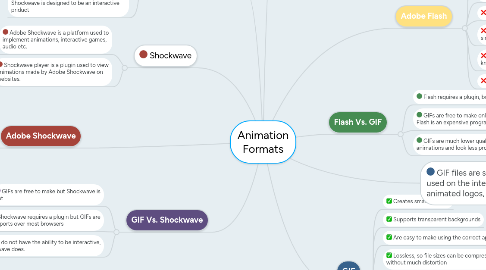
1. Shockwave
1.1. Adobe Shockwave is a platform used to implement animations, interactive games, audio etc.
1.2. Shockwave player is a plugin used to view animations made by Adobe Shockwave on websites.
2. Adobe Shockwave
2.1. Supported by most devices and browsers
2.2. Allows users to create interactive games, videos and audio
2.3. Requires a plugin to be installed
2.4. Large file sizes which can take time to load
2.5. Is expensive to buy
3. Flash Vs. Shockwave
3.1. Both require plugins to be installed before they can be played in devices or browsers
3.2. Shockwave can be used on Apple products but Flash is not supported
3.3. Flash is designed for online advertising and Shockwave is designed to be an interactive priduct
4. GIF Vs. Shockwave
4.1. GIFs are free to make but Shockwave is not
4.2. Shockwave requires a plugin but GIFs are supports over most browsers
4.3. GIFs do not have the ability to be interactive, Shockwave does.
5. Flash is a professional animation software that is used for creating animations, vector graphics, games etc.
6. Adobe Flash
6.1. Has the ability to create high quality animations
6.2. Includes cross browser compatibility
6.3. Animations look much more professional
6.4. Takes time to make short animations
6.5. Is very expensive compared to alternatives with similar features
6.6. Can be very difficult to learn without prior knowledge of animation
6.7. Requires a plugin to work in browsers
7. GIF
7.1. Creates small file sizes
7.2. Supports transparent backgrounds
7.3. Are easy to make using the correct application
7.4. Lossless, so file sizes can be compressed without much distortion
7.5. Is supported by all browsers
7.6. Too many on one page can cause it to slow down
7.7. Can look pixelated and low quality
7.8. Has a limited colour depth of 256 bits
8. Flash Vs. GIF
8.1. Flash requires a plugin, but GIFs do not
8.2. GIFs are free to make online for free, but Flash is an expensive program
8.3. GIFs are much lower quality than Flash animations and look less professional
9. GIF files are simple animated images used on the internet as web adverts, animated logos, budget adverts etc.
Begin. Het is gratis!
Verbind met Google
of
Registreren