


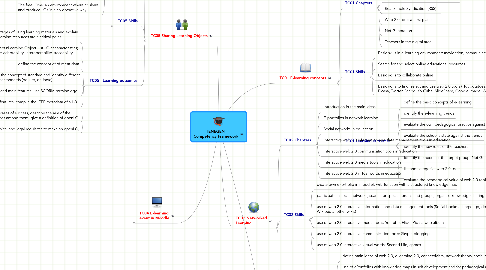
1. TC03 Educational ICT tools
1.1. TC03 Skills
1.1.1. Basic skills to use applications for pedagogical aims (Word Excel, Audacity, Windows Movie Maker, Adobe Premiere, Paint, Gimp)
1.1.2. Basic skills to integrate elements and publish e-learning material (PowerPoint, FKC editor)
1.1.3. Basic skills to select tools for publishing educational content online
1.2. TC03 Learning outcomes
1.2.1. identify the basic features of digital media elements
1.2.2. evaluate the pedagogical value of digital media objects
1.2.3. select ICT tools to create and edit educational media elements
1.2.4. select the ICT tool to integrate and publish e-learning material
1.3. TC03 Chapters
1.3.1. Basic concepts (hypertext, multimedia, hypermedia)
1.3.2. Media elements: features, specification
1.3.3. Aspects of ergonomy (Text, Image, Audio, Video, Animation)
1.3.4. Create and edit media elements using applications
1.3.5. E-learning material: integration
1.3.6. Publishing online
2. TC05 Sharing Learning Objects
2.1. TC05 Chapters
2.1.1. Using eLearning to enhance teaching and learning in schools: a critical point, the learning materials.
2.1.2. Reusability, adaptability, interoperability: the Learning Object model and the SCORM and LOM standards.
2.1.3. The “open” model: free/opensource software and open content. The copyleft licences.
2.1.4. The openLO model: technical, pedagogical and legal aspects.
2.1.5. Learning Object Repositories: features and characteristics of the principal digital repositories.
2.1.6. The freeLOms: an environment where to share and produce LOs in a co-operative way.
2.2. TC05 Skills
2.2.1. insert into a blog or an on-line course the embedded code of a digital resource;
2.2.2. search a learning resource in FreeLOms and dowload it,
2.2.3. upload a digital resource into Learning Object repositories filling in metadata
2.2.4. upload a learning resource into FreeLOms filling in the metadata
2.2.5. use FreeLOms to transform a PPT presentation into a SCORM LO
2.2.6. use FreeLOms to transform web pages into a SCORM LO
2.2.7. modificate a LO in FreeLOms
2.2.8. build up a new LO in FreeLOms using existing resources
2.2.9. insert a SCORM LO in a Moodle directly from FreeLOMs
2.2.10. save the backup of a Moodle course (whithout students data) into FreeLOms
2.2.11. upload into a Moodle environment a new course from FreeLOms
2.3. TC05 - Learning outcomes
2.3.1. list the advantages of using learning materials and explain why digital learning resources are a critical point
2.3.2. define the concepts:Learning Object, list LO caharacteristics; define the terms: adaptability, interoperability, traceability
2.3.3. define the concept of of meta-data
2.3.4. define the concept of standard and identify different types of standards (de iure, de facto)
2.3.5. illustrate SCORM aims and main features, use SCORM terminology
2.3.6. identify LOM IEEE aims and main features, compile the IEEE metadata of a LO
2.3.7. describe open content principles and some cases of success, describe the aim of the CreativeCommons licences and the differences among them; give a definition of openLO;
2.3.8. illustrate the pedagogical, technical and legal requisites to make an openLO;
3. TC04 E-learning event in Moodle
3.1. TC04 Chapters
3.1.1. Design e-learning event
3.1.2. Create Moodle courses
3.1.3. Adding resources (Text, Web page, Link, etc.)
3.1.4. Adding activities (Task, Chat, Blog, Forum, etc.)
3.1.5. Roles in Moodle
3.1.6. Management of users' account
3.1.7. Assessment tools
3.1.8. Learners' records
3.1.9. Evaluation tools
3.2. TC04 Skills
3.2.1. Basic skills in administering Moodle
3.2.2. Basic skills to establish learning environment in Moodle
3.2.3. Basic skill to design the learning event, to create a synopsis
3.2.4. Basic skills to maintenance Moodle as a teacher
3.2.5. Basic skills to carry on and evaluate learning event in Moodle
3.3. TC04 Learning outcomes
3.3.1. design e-learning event
3.3.2. establish e-learning environement
3.3.3. use Web 2.0 tools in Moodle
3.3.4. generate and moderate debates
3.3.5. track on and assess students' activities
3.3.6. evaluate e-learning event
4. TC01 E-learning concepts
4.1. TC01 Chapters
4.1.1. Concepts and history
4.1.2. E-learning trends
4.1.3. Learning Management Systems
4.1.4. Technological changes emerging Web 2.0
4.1.5. Real Simple Syndication (RSS)
4.1.6. Web 2.0 tools at first glance
4.1.7. Net Generation
4.1.8. Teachers in the digital area
4.2. TC01 Skills
4.2.1. Basic skills in e-learning environment: (navigation, communication, authoring in Moodle)
4.2.2. Search for and select online educational resources
4.2.3. Basic skills to collaborate online
4.2.4. Basic skills to find, select and use web 2.0 tools (Hot potatoes, Mahara, WordPress, FaceBook, Del.icio.us, Picasa, Twitter, Scribd, YouTube, SlideShare, Google Image, Wikipedia, GoogleDocs, YahooGroup)
4.3. TC01 Learning outcomes
4.3.1. define the basic concepts of e-learning
4.3.2. identify the e-learning trends
4.3.3. evaluate the own pedagogical practice against the trends
4.3.4. evaluate the school's state against the trends
4.3.5. identify the new roles of the teachers
4.3.6. Identify the needs of the target group: Net Generation
4.3.7. list and categorize web 2.0 tools
4.3.8. evaluate the peadgogical value of web 2.0 tools
5. TC02 Networked Learning
5.1. TC02 Chapters
5.1.1. Introduction in the main ideas
5.1.2. E-portfolios in network learning
5.1.3. Social networks in education
5.1.4. Interactive web 2.0 information and data management tools in education
5.1.5. Interactive web 2.0 communication tools in education
5.1.6. Interactive web 2.0 media tools in education
5.1.7. Interactive web 2.0 virtual words in education
5.2. TC02 Skills
5.2.1. create own ePortfolio in moodle’s wiki-function with a structured knowledge map
5.2.2. participate in social networks, search for special forums and groups, organise knowledge sharing in a network
5.2.3. use of web 2.0 interactive information and data management tools (Social bookmarking:diigo, delicious, Wikipedia, other wikis)
5.2.4. use of web 2.0 interactive media tools: Youtube, Flickr, Picasa web album
5.2.5. use of web 2.0 interactive communication tools: Skype, blogging
5.2.6. use of web 2.0 interactive virtual words: Second Life, games
5.3. TC02 Learning outcomes
5.3.1. define main ideas of web 2.0, eLearning 2.0, connectivism, network theory, social networking
5.3.2. use of ePortfolios with knowledge maps in self development and for pedagogical aims
5.3.3. participate in social networks
5.3.4. pedagogical use of Social bookmarking (diigo, delicious), Wikipedia, other wikis
5.3.5. pedagogical use of Skype, blogging
5.3.6. pedagogical use of Youtube, Flickr, Picasa web album
5.3.7. pedagogical Second Life, games