
What is a mind map template for project planning
A mind map template is a visual diagram that starts with your project name in the center. From there, branches spread outward, each one representing a different part of your project — things like budget, timeline, team members and tasks. Think of it as a bird's-eye view of everything you're working on, all in one place.
For project planning specifically, these templates follow a hub-and-spoke pattern. Your main project goal sits at the central node, with primary branches extending to major categories like resources, milestones and risks. Each of these main branches can then split into smaller sub-branches with more specific details. You might have "Budget" as a main branch, then break it down into "Personnel costs," "Software licenses" and "Equipment."
Mind map templates come in two flavors. Blank mind maps give you a clean slate — just the center circle and you build everything from there. Pre-structured templates already include common project branches, saving you time on setup. Both types are available as free Mindmap templates on various platforms, with many offering mind map for free options to help teams get started without any upfront investment.
Why mind maps streamline project management
Mind maps give you something spreadsheets and documents can't — the ability to see your entire project at once. This visual overview reveals connections you might miss in a traditional project plan. You can spot where Task A affects Task B, identify resource conflicts before they happen and see gaps in your planning that would otherwise stay hidden until it's too late.
When teams work from the same mind map diagram, collaboration speeds up dramatically. Instead of reading through lengthy project documents or sitting through hour-long status meetings, team members can glance at the mind map and immediately understand where things stand. They can add their updates in real time, ask questions right on the relevant branch and stay aligned without constant check-ins.
As your project evolves — and it will — mind maps adapt right along with it.
Just create a new branch. Priorities shifted? Drag branches to reorganize them. Not working on phase two yet? Collapse that section to focus on what matters now. This adaptable format beats static project documents that become outdated the moment you hit "save."
Before diving into formal project plans, many teams use mind maps as canvas for brainstorming or idea mapping. This visual exploration helps you:
See the full picture: understand how different project elements connect and impact each other
Share understanding faster: new team members grasp the project structure in minutes, not hours
Make changes easily: reorganize priorities without rebuilding your entire plan from scratch
Capture ideas freely: add thoughts as they come without worrying about perfect formatting
5 free mind map templates for every project phase
Different stages of your project require different organizational approaches. These five templates cover everything from that first kickoff meeting through ongoing project maintenance, giving you the right visual framework exactly when you need it.
1. Project kickoff
The project kickoff template works best during those critical first meetings when everyone's still figuring out what you're planning and why. Before anyone starts on a single task or creates the first product prototype, this template helps establish a shared understanding of the project's purpose and boundaries.
Your project planning mind map template for kickoffs includes these core branches:
Goals: what success looks like
Scope: what's included (and what's not)
Stakeholders: who's involved and what they care about
Timeline: major dates and deadlines
Risks: what could go wrong
Next Steps: immediate actions to take
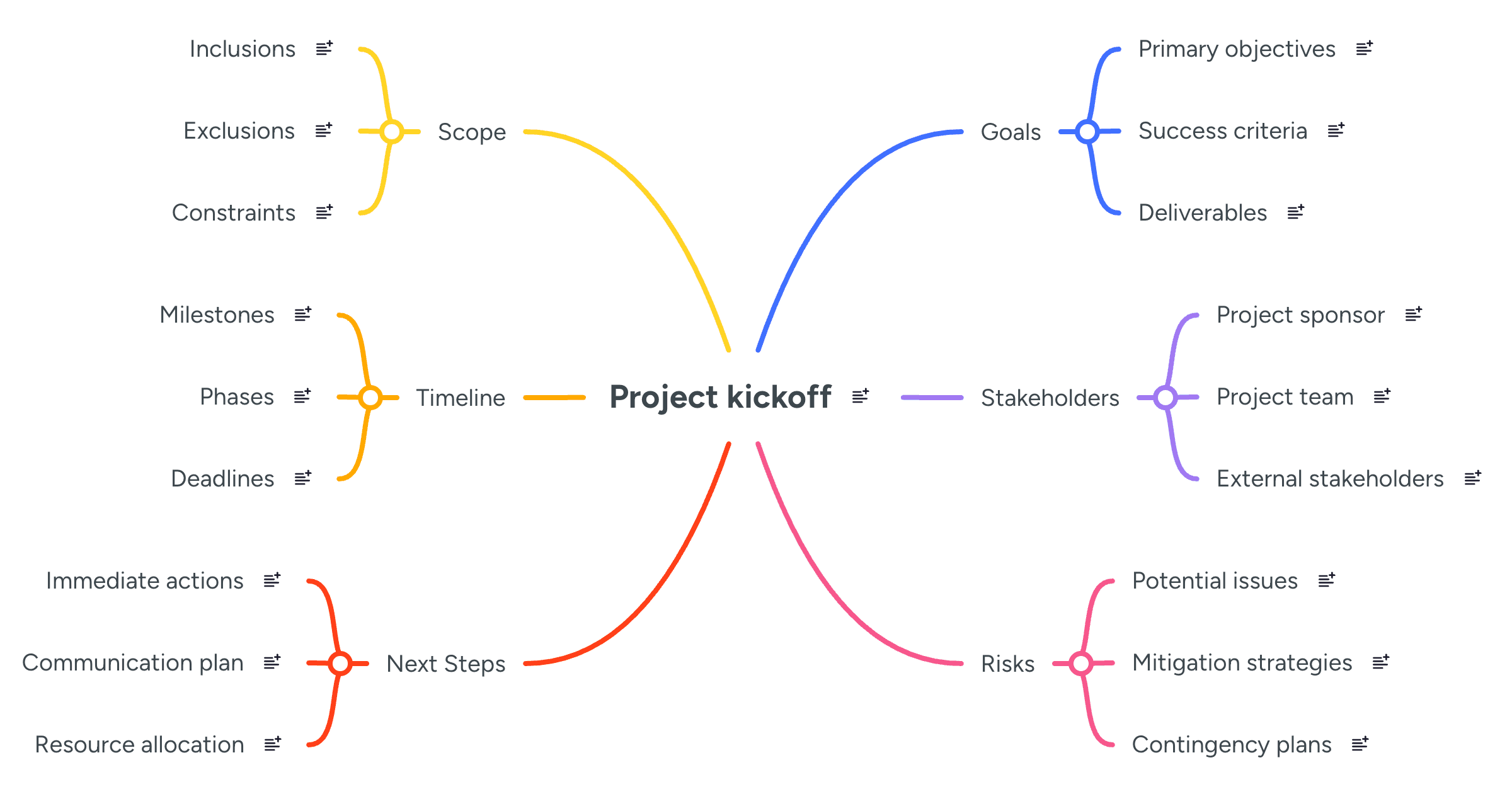
Pull up this template during your kickoff meeting and fill it in together. As team members share their perspectives, add their input directly to the map. Everyone sees their contributions instantly, which builds buy-in and surfaces concerns early.
Need a quick first draft? Try this AI prompt in MindMeister: “Create a project kickoff mind map for [project name], including goals, scope, stakeholders, timeline, risks and next steps.”
2. Project roadmap
Once you know what you're building, the roadmap template helps you plan how to get there. This template breaks your project into phases and milestones, showing the path from today to launch day. Teams can see not just what happens when, but also how each phase builds on the previous one.
Structure your roadmap with these branches:
Phase 1, 2 and 3: or however many stages your project needs
Milestones: key achievements in each phase
Deliverables: what you'll produce
Dependencies: what must happen first
Owners: who's responsible for each piece
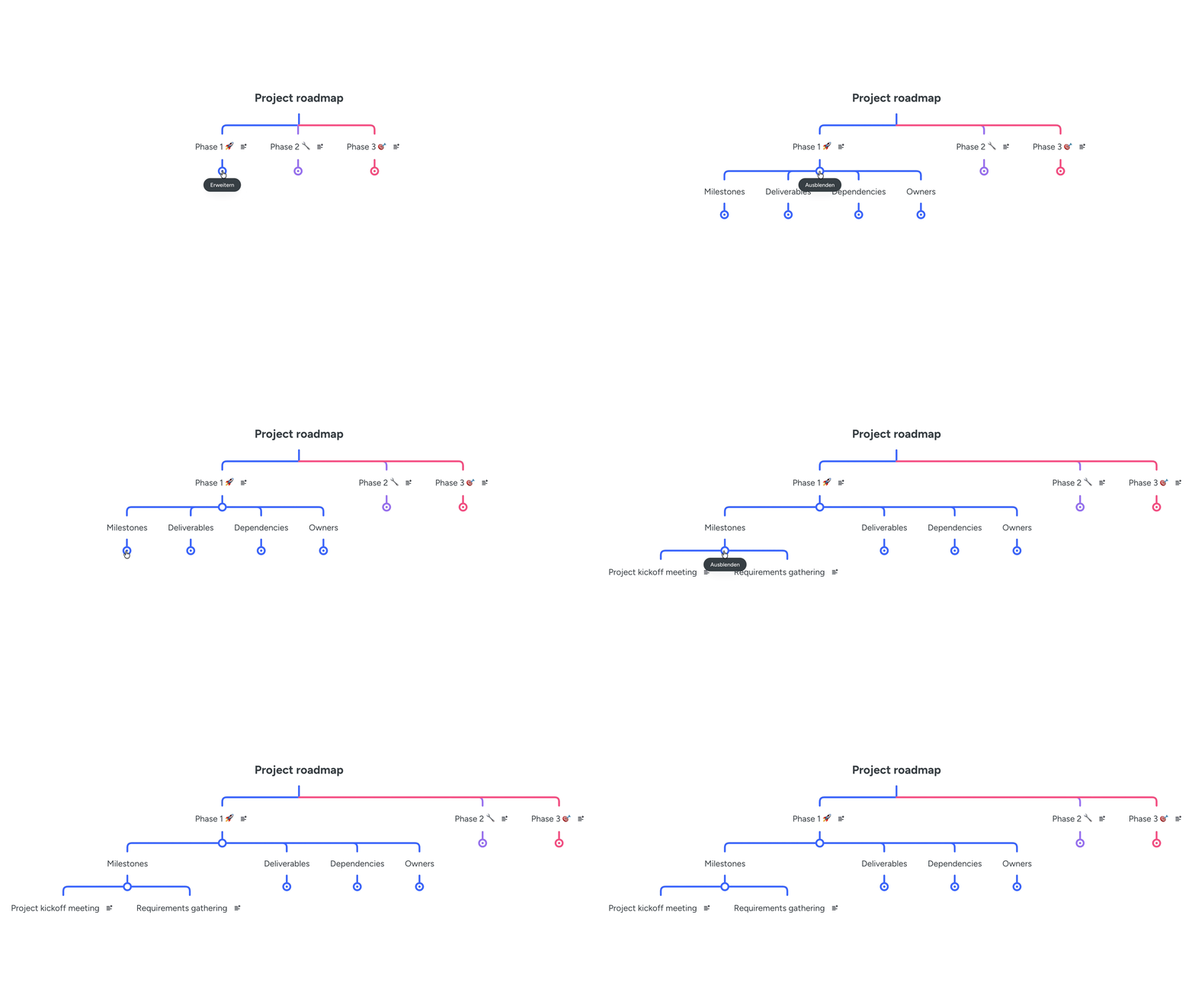
Color-code each phase — maybe green for current work, yellow for next quarter and blue for future phases. This visual distinction helps during meetings when someone asks "What are we working on now?" versus "What's coming later?"
Need a quick first draft? Try this AI prompt in MindMeister: "Build a project roadmap mind map with three phases, including milestones, deliverables, dependencies and owners for each phase."
3. Task planning
High-level strategy means nothing without concrete actions. The task planning template bridges that gap, turning your roadmap into specific to-dos with clear owners and deadlines. This mind map template helps you move from "We need a new website" to "Sarah designs the homepage mockup by Friday."
Build your task plan around these elements:
Workstreams: major areas of work
Tasks: specific actions to complete
Assignees: who's doing what
Deadlines: when each task is due
Blockers: what might slow progress
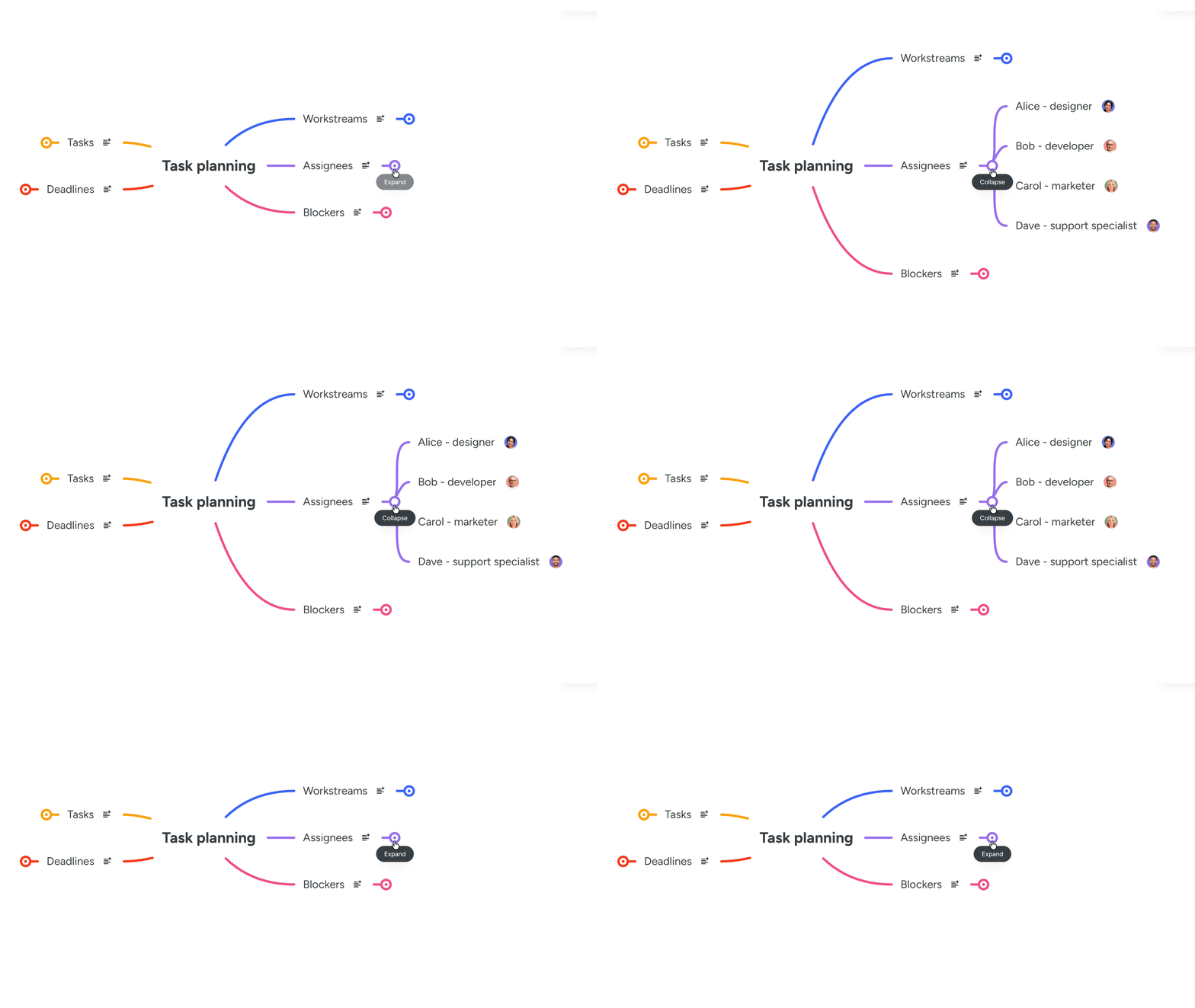
Many teams display this map alongside their project management software during planning sessions. The visual format makes it easy to spot overloaded team members — if one branch has way more assignee tags than others, you know to redistribute work.
Need a quick first draft? Try this AI prompt in MindMeister: "Generate a task planning mind map for [project name] with workstreams, specific tasks, assignees, deadlines and potential blockers."
4. Risks and dependencies
Complex projects rarely run in isolation. The risks and dependencies template helps you map what could go wrong and what relies on what. This visibility lets you plan workarounds before problems arise, rather than scrambling when they do.
Organize your risk planning with these branches:
Known risks: problems you can already see coming
Assumptions: things you're counting on to be true
Dependencies: what relies on other tasks or teams
Bottlenecks: where work might get stuck
Mitigation actions: how to prevent or handle issues
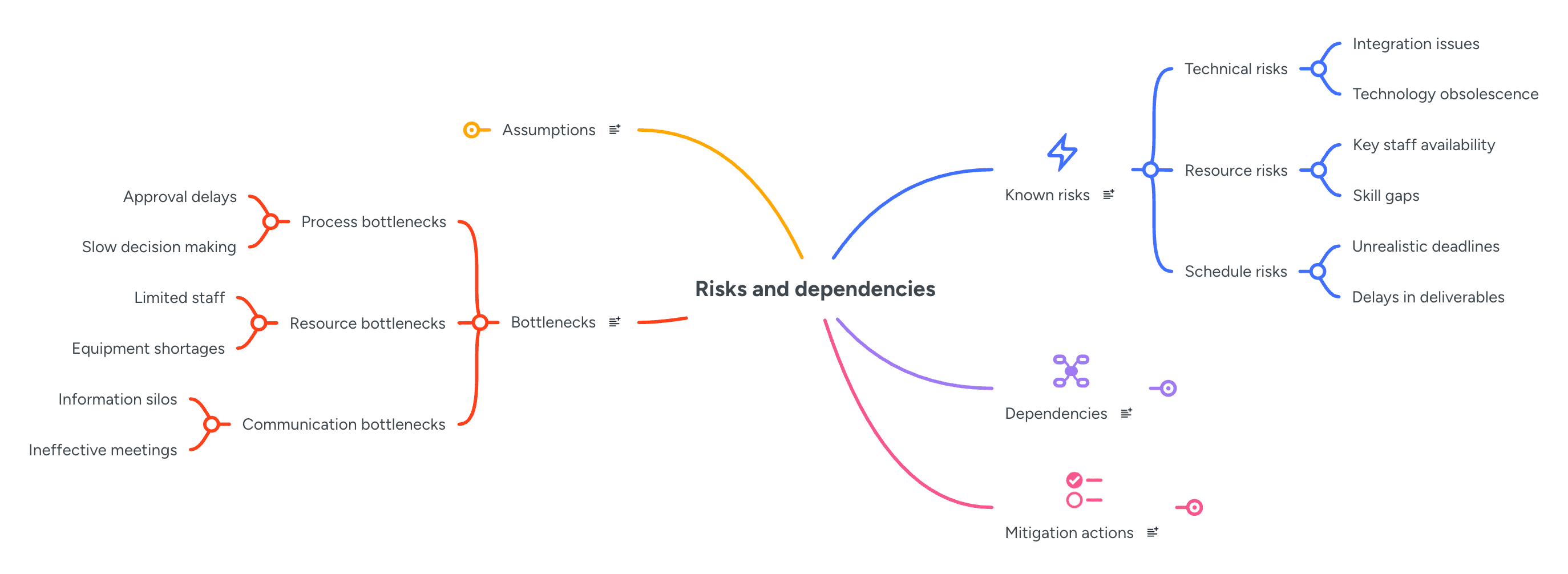
Review this map every week or two. New risks pop up as projects progress, and dependencies shift as scope changes. Regular updates keep your risk management proactive rather than reactive.
Need a quick first draft? Try this AI prompt in MindMeister: "Create a risks and dependencies mind map including known risks, key assumptions, project dependencies, potential bottlenecks and mitigation strategies."
5. Meeting decisions and next steps
Projects live and die by their regular check-ins. The meeting decisions template captures what you discussed, what you decided, and what happens next. Unlike traditional meeting minutes that disappear into email archives, these visual records stay accessible and actionable.
Structure each meeting map with:
Meeting date: when you met
Discussion points: what you talked about
Decisions made: what you agreed on
Open questions: what still needs answers
Follow-up actions: who does what by when
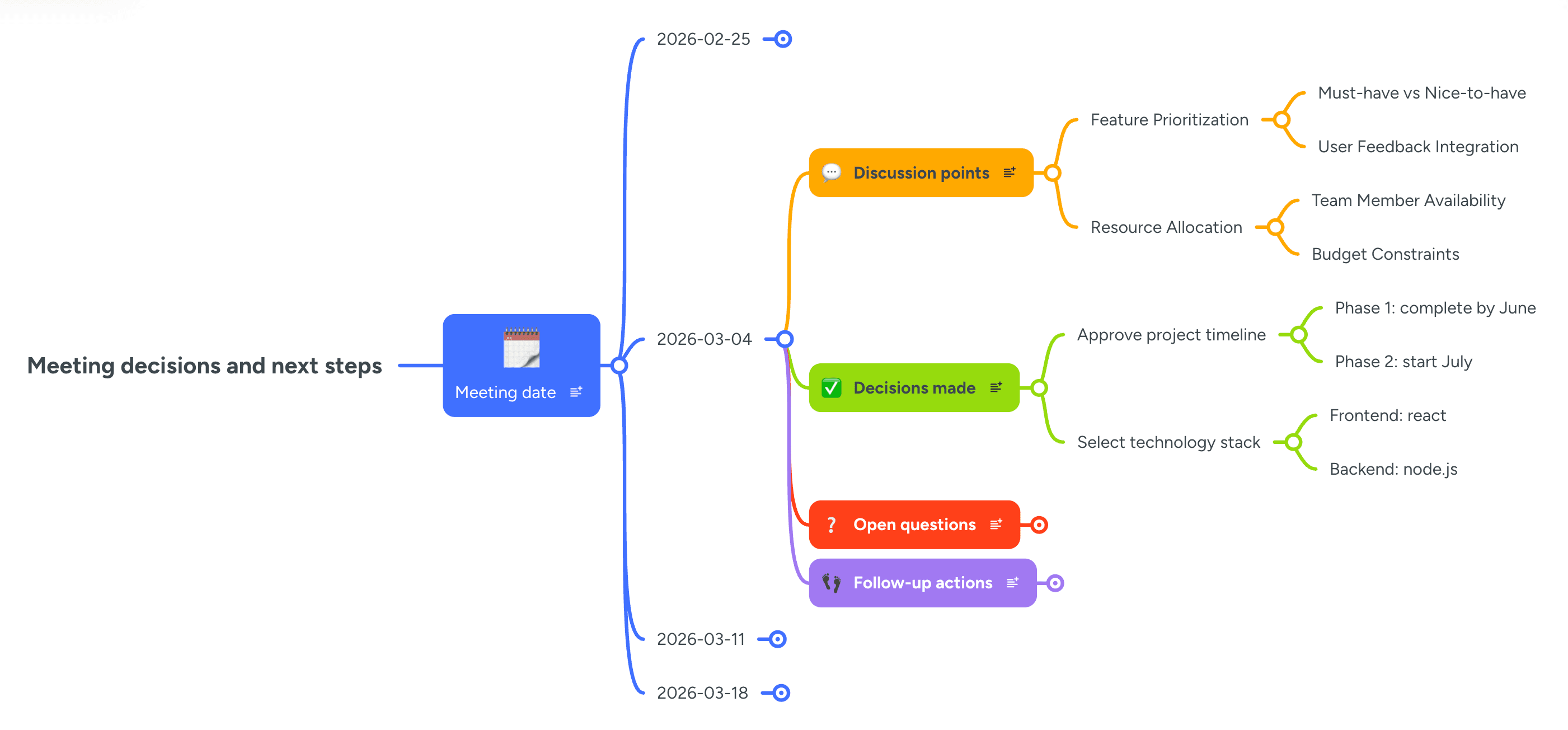
Keep one map per meeting, creating a visual history of your project's evolution. When someone asks "Why did we decide to go with option B?" you can pull up the relevant map in seconds.
Need a quick first draft? Try this AI prompt in MindMeister: "Build a meeting mind map template with sections for date, discussion points, decisions made, open questions and follow-up actions with owners."
Quick Tip: Drop any of the above AI prompts into Meister AI to generate a working draft in seconds. Then customize the map to match your specific project needs.
How to customize and use these mind map templates
You'll find free mind map templates through various mind map generators and mind map maker platforms. Some offer blank mind maps where you build everything from scratch. Others provide pre-filled examples with common project elements already mapped out. Options range from basic canva mind map template collections to specialized project-focused mind map software.
Start customizing by adding branches that match your specific project. Working on a marketing campaign? Add branches for "Creative assets" and "Campaign metrics." Building software? Include "Technical architecture" and "Testing phases." Remove any template sections that don't apply — not every project needs a "Compliance" branch. Think of templates as starting points, not rigid rules.
Different teams prefer different formats:
Digital mind maps: real-time updates, easy sharing and automatic saving
PDF downloads: print for whiteboard sessions and annotate during meetings
Hand-drawn versions: quick sketches during brainstorming and personal planning
Digital tools win for evolving projects since updates sync instantly across your team. But even the with the best mind map template a free downloadable pdf has its place — some people think better with pen and paper.
Keep your templates working hard by:
Regular reviews: update your maps weekly so they reflect current reality, not last month's plan
Smart collapsing: hide completed phases or paused workstreams to reduce visual noise
Consistent colors: use the same color scheme across projects (maybe red always means "blocked")
Template library: Save successful project maps as templates for similar future work
Whether you start with an empty mind map template or dive into pre-built options, the key is making them yours. Explore different free mind map templates until you find what clicks. Many teams begin with a basic template for mind map creation, then develop their own variations. With so many free mind map template options available, experiment until you discover your ideal setup.
Start mapping your next project
Mind map templates transform the chaos of project planning into clear, visual roadmaps everyone can follow. These five templates — from initial kickoff through ongoing meetings — give you a complete toolkit for every project phase. Instead of scattered notes and confusing spreadsheets, you get one visual source of truth that evolves with your work.
Pick the template that matches where you are right now. Starting something new? Grab the kickoff template. Deep in execution? The task planning or meeting decisions templates might serve you better.
MindMeister makes it simple to put these templates into action. As a purpose-built mind map generator for teams, it can easily recreate all five templates discussed here with a simple prompt to Meister AI, plus real-time collaboration and the ability to turn any branch into an actionable task.
Turn your project plan into a clear mind map