


What a goal-setting template needs to include
Every effective goal-setting template captures 5 elements. Start with the goal itself, written so it is specific and measurable rather than aspirational. Add the milestones that mark real progress along the way. Under each milestone, capture the actions required to reach it, because a milestone without actions is just a wish. Name the obstacles that could block you in advance so they do not ambush you later. Finally, set a review schedule that tells you when to check progress and adjust course.
It helps to define the goal clearly before you map anything. The SMART framework gives you a quick test: a goal should be Specific, Measurable, Achievable, Relevant and Time-bound. Run your headline goal through those 5 checks and you turn "grow in my career" into "get promoted to senior manager by Q4." SMART is background scaffolding here, not the whole method. Once the goal passes the test, the real work is mapping how you will actually reach it.
A list or spreadsheet can hold all 5 elements, yet it still fails the reader. Rows sit in isolation, so you never see how a milestone depends on an earlier action or how 1 obstacle threatens several branches at once. You scroll, you lose the thread and the connections that decide success stay invisible. You might even run a SWOT analysis before setting goals and still lose those insights in a static grid. A mind map shows all 5 elements together and exposes the dependencies between them. When you can see that a delayed action stalls 3 downstream milestones, you plan differently and you protect the work that matters most. That visibility is the whole point of mapping a goal rather than listing it.
How to build a goal-setting mind map from a blank map in MindMeister
The fastest way to understand the method is to build 1 map from scratch. We will follow a single worked example throughout: a knowledge worker with the career goal "get promoted to senior manager by Q4." Open a blank map and build it, branch by branch, adding structure as your thinking sharpens. You are not filling in a form. You are laying out the real relationships between your goal, the work it takes and the things that could get in the way. Each step below adds 1 layer, and the layers stack into a plan you can act on and revisit.
1. Start with the goal in the central node
Open a blank map and place your goal in the central node. State it specifically. Write "get promoted to senior manager by Q4," not "advance my career." A vague center produces vague branches, so the precision you set here becomes the standard for everything that follows. The central node is your reference point, and every other branch has to earn its place by serving it. If you cannot state the goal in a single measurable sentence, you are not ready to branch out yet.
2. Add main branches for your milestones
Add 3 to 5 main branches, 1 for each milestone that marks progress toward the promotion. Make each milestone a measurable checkpoint, not a vague intention. Strong branches for this example might read "lead 2 cross-team projects," "hit the revenue target for my accounts" and "complete management training." Each one is something you can mark as done at a specific point. If a branch could never be checked off, rewrite it until it can. Milestones give the goal its skeleton, so keep them concrete.
3. Add sub-branches for actions and resources
Under each milestone, add sub-branches for the specific actions the milestone requires and the resources or support you need. Beneath "complete management training," you might add "enroll in the Q1 leadership course," "shadow a senior manager" and "book monthly time with a mentor." List the support you depend on too, such as budget approval, a sponsor or access to a high-visibility project. This is also where you map your stakeholders as part of goal planning, since most professional goals move only when the right people back them. Keep each action small enough to finish in a week or 2, because a branch you can complete quickly is a branch you will actually start.
4. Add an obstacles branch
Add a dedicated obstacles branch and give it sub-branches for the risks and blockers most likely to derail your progress. For the promotion goal, those might include "a hiring freeze delays the new role," "current workload leaves no time for training" and "no clear sponsor in the leadership team." Naming a blocker is not pessimism. When an obstacle sits on the map, you plan around it in advance instead of meeting it by surprise halfway through the quarter. For each one, add a short sub-branch with your response, so the map holds both the risk and your plan for it.
5. Add a review branch
Add a review branch with dated sub-branches for weekly or monthly check-ins. Each check-in is a fixed moment to assess progress, mark what you finished and update the map to match reality. In MindMeister you can convert action sub-branches directly into MeisterTask tasks with owners and due dates, so a step you mapped becomes a tracked task without leaving your map. That link keeps the plan and the daily work in sync instead of letting them drift apart over the quarter. Set the first few review dates now, while the map is fresh, so the check-ins are already on your calendar when the work gets busy.
Goal-setting template examples: individual and team
Individual example: career development goal
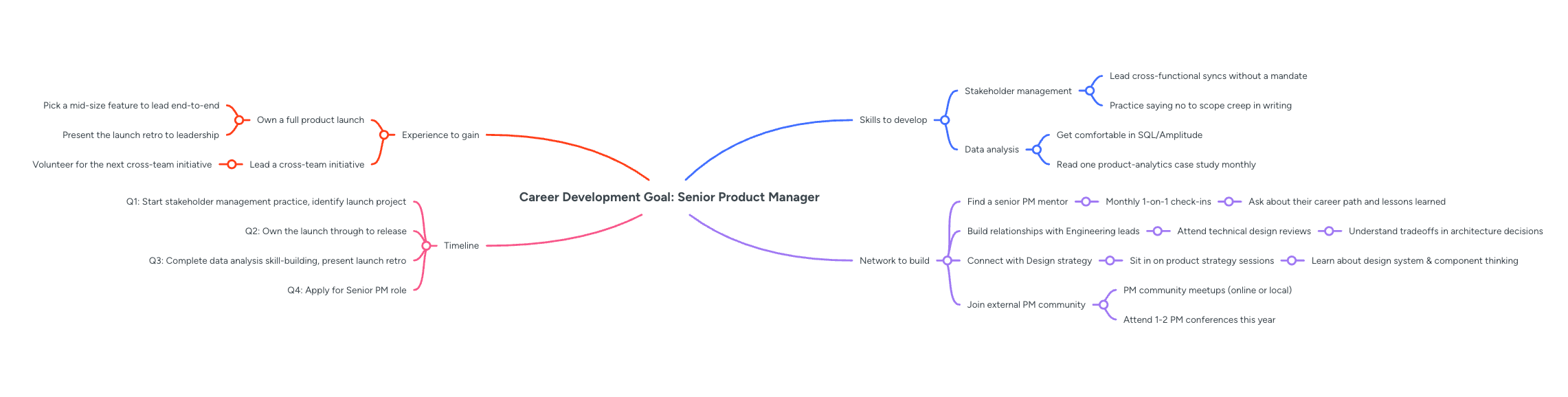 Center this map on the target role, such as "senior product manager." Branch out into the skills to develop, the experience to gain, the network to build and your timeline. Under skills, you might add "stakeholder management" and "data analysis," while under experience, you add "own a full product launch." The network branch can name the specific mentors and cross-team contacts who make the move possible. The timeline branch ties each milestone to a specific quarter so the goal stays time-bound and honest.
Individual example: learning goal
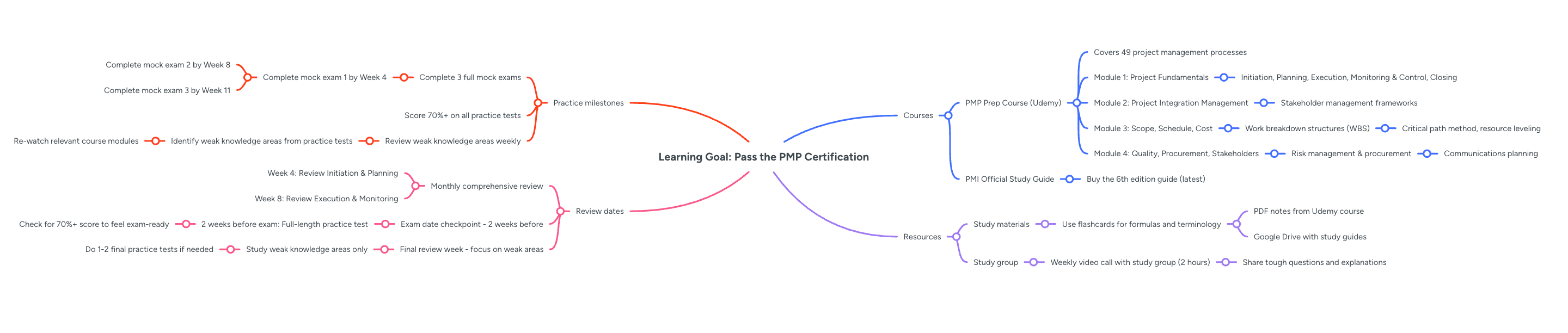 Put the skill or qualification you want at the center, for example, "pass the PMP certification." Add branches for courses, practice milestones, resources and review dates. A practice milestone might read "complete 3 full mock exams," while the resources branch lists your study materials and a study group. Break the courses into modules so you can see how much of the material you have covered. Review dates keep you honest about whether your current pace matches the exam date you booked.
Team example: quarterly OKR
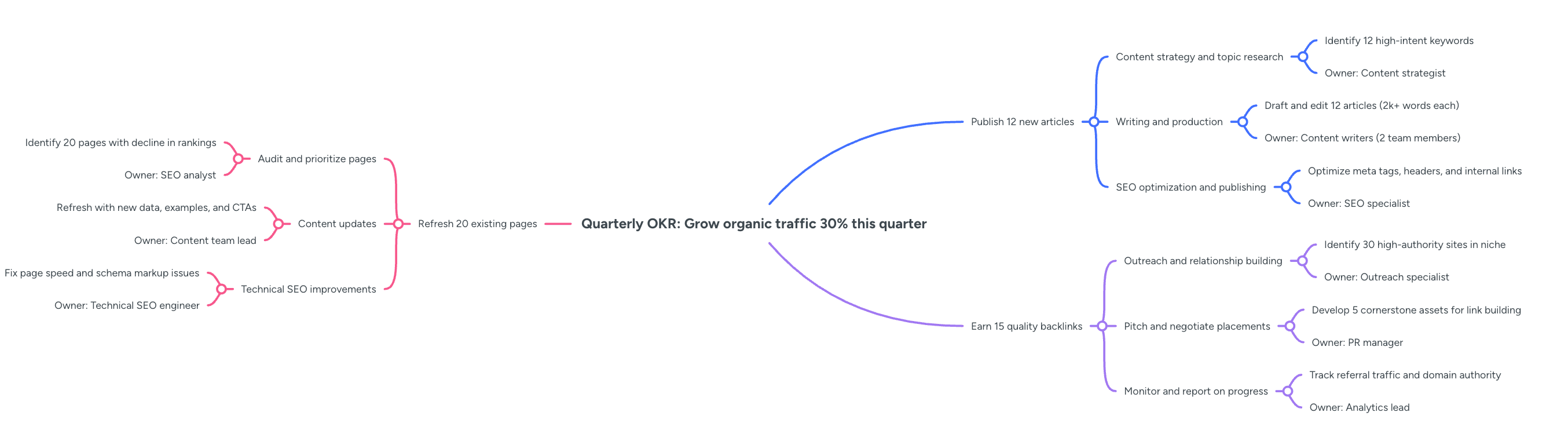 Place the objective in the central node, then add 1 branch for each key result. Imagine a hypothetical objective of "grow organic traffic by 30% this quarter." Key result branches might include "publish 12 new articles," "refresh 20 existing pages" and "earn 15 quality backlinks." Under each key result, add sub-branches for the actions and the owners, so everyone can see who drives what. This is a natural point for brainstorming your goal strategy with your team before the work locks in.
Team example: annual department target
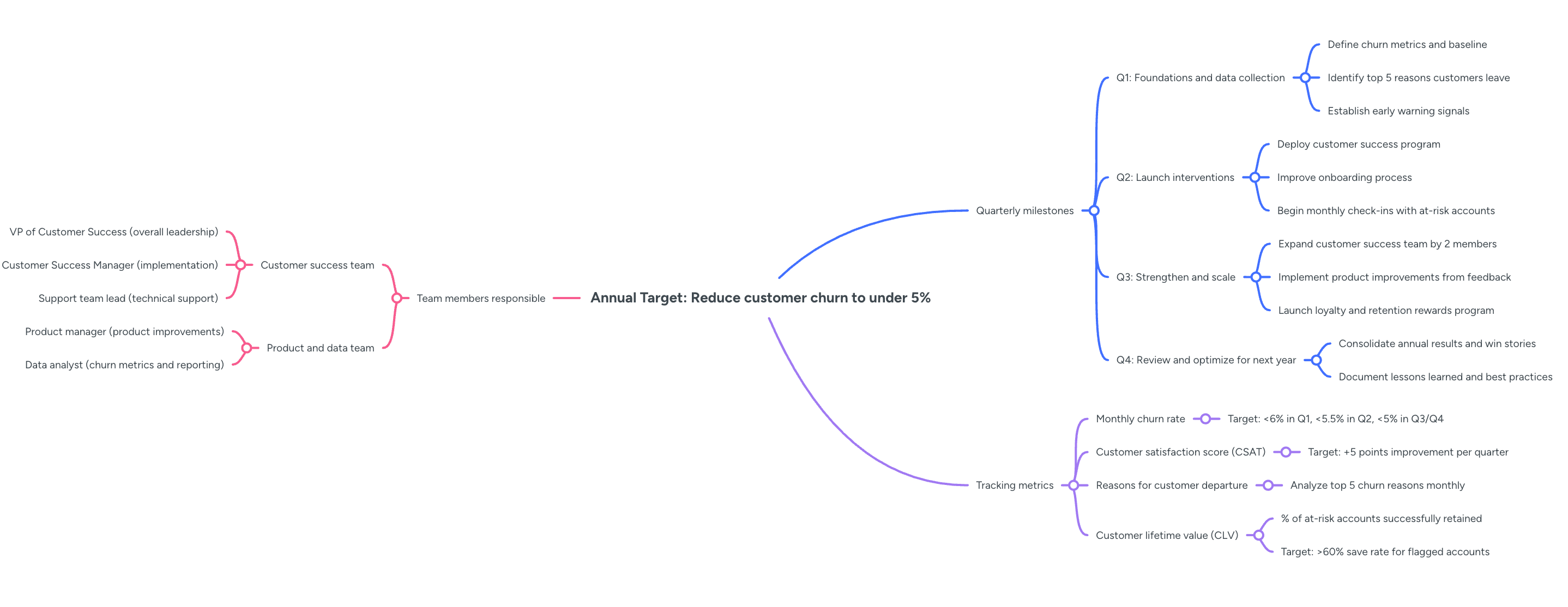 Center this map on the annual target, such as "cut customer churn to under 5%." Branch into quarterly milestones, the team members responsible and the tracking metrics that show real movement. Each quarter becomes 1 main branch with its own owners and measures, so responsibility never blurs across the year. Teams that already lean on project planning templates will find this structure familiar, since it turns a yearlong target into quarterly work you can actually manage and review.
Reviewing and updating your goal map
The map only works if you return to it. Open it at the start of each week or month and check which action sub-branches you finished. Update the milestone branches to reflect actual progress, not the plan you made weeks ago, and adjust the timeline as circumstances change. In MindMeister you can mark completed branches with a checkmark icon and color-code the map, using green for complete, amber for in progress and red for blocked. Review the obstacles branch at every check-in too, because new blockers appear as the work moves. This review habit shows the benefits of mind mapping for planning, since the format keeps progress and problems visible at a glance.
A goal map that reflects the current state is a navigation tool. A map you have not touched since you set the goal is just a record of good intentions. Be honest about what this method does and does not do. A mind map organizes and visualizes your goals and cuts the structural complexity of demanding, multi-step work, but it does not do the work for you and it does not guarantee the outcome. Structured, specific goal setting is well supported by research, yet the results still come from what you do between check-ins. Open a blank MindMeister map, place your first goal in the central node and start building the branches that will get you there.
Turn your goals into a live mind map


